

Vulnerability management
An rConfig server runs rConfig’s own code on top of PHP, a web server, a database, Redis, Composer packages and the operating system. A vulnerability in any of them is a vulnerability in your rConfig install. This page explains how rConfig tracks and publishes them, how Security Center tells you which ones apply to your server, and what your own patch process needs to cover.
To report a vulnerability, see vulnerability disclosure.
Two kinds of vulnerability
| Kind | Example | Who fixes it | What you do |
|---|---|---|---|
| In rConfig’s own code | rCFG-SA-2026-15, the Apache default HTTPS site exposing rConfig files on RHEL-family installs |
rConfig, in a security release (Pro V8.4.3 for that one) | Upgrade rConfig, then follow any extra steps in the advisory |
| In software rConfig depends on | rCFG-SA-2026-16, 14 CVEs fixed in PHP 8.4.28 |
The upstream project (PHP, the OS vendor, the database) | Update that package through your normal OS updates. No rConfig release is needed |
Both get an rConfig advisory. A PHP flaw is not a flaw in rConfig’s code, but it is a flaw in your rConfig server, and the advisory says whether rConfig is exposed, which versions are affected and how to tell when you’re safe.
What an advisory contains
Every confirmed vulnerability gets an advisory at rconfig.com/security-advisories, with an ID of the form rCFG-SA-YYYY-NN. Each one carries:
- Severity, and a CVSS score where one exists.
- What it affects: rConfig Pro, rConfig Core or PHP, as a version range for each.
- The fixed version for each product, where the fix is an rConfig release.
- CVEs, or “Not assigned” where none was issued.
- The check IDs that verify the fix on a running install, such as
web.env_exposedorphp.version_min. - A link to the patch procedure in these docs where one is needed, under Security notices.
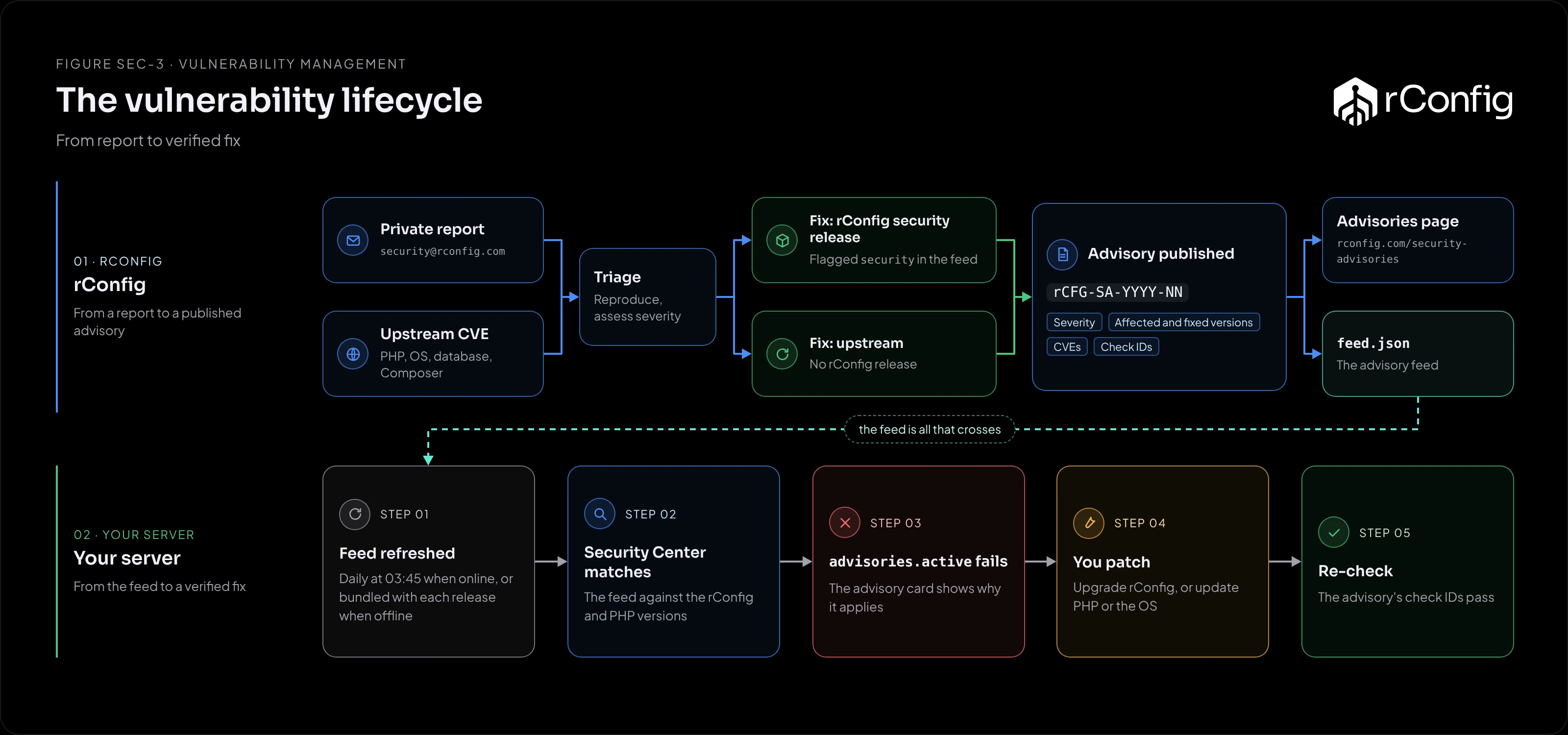
The check IDs are what turn an advisory from something to read into something to verify. After you patch, a fresh Security Center run tells you whether the condition the advisory describes is gone.
The lifecycle
How Security Center matches advisories
Security Center reads the advisory feed and matches each advisory against two facts about the server: the rConfig product and version, and the running PHP version. A match fails advisories.active (Critical) and appears on the advisories card with the reason, for example that PHP 8.4.27 is inside the affected range.
Around that, several checks cover what an advisory alone can’t:
| Check | Catches |
|---|---|
versions.rconfig_latest |
rConfig is behind a release the feed flags as a security release |
php.version_min, php.version_eol |
PHP below rConfig’s security minimum, or on a branch past end of life |
db.version_eol |
A database server past end of support |
versions.os_eol |
An operating system that no longer gets security updates |
supply_chain.composer |
A known advisory against an installed PHP package |
os.auto_updates, os.reboot_required |
OS updates not applied or reported, or waiting for a reboot |
advisories.feed_fresh |
The advisory data itself has stopped refreshing |
The end-of-life dates come from the same feed, so an install learns about an end-of-support date without a code change.
 rConfig docsSecurity advisory feedHow rConfig checks the security advisory feed from rconfig.com each day, uses the copy bundled with every release as a fallback, and how to see which copy is in use.Read the docs
Online and offline installs
An online install downloads the feed over HTTPS every day at 03:45. The download sends nothing about your install. Every release also bundles the feed as it was at release time, and rConfig uses whichever copy is newer.
An offline or air-gapped install uses the bundled copy, and each upgrade brings a newer one. advisories.feed_fresh shows its age for information and doesn’t fail just because the server is offline. That makes the gap between upgrades your responsibility: check rconfig.com/security-advisories from a connected machine between upgrades. The Composer check works offline too, from the composer audit results bundled with the release. See air-gapped and offline.
Your patch process
rConfig publishes, flags and verifies. Applying the fix is yours. A process that covers both kinds of vulnerability:
- Hear about it. Route Security Center alerts to people who act on them.
advisories.activefails the day an online server’s feed brings in an advisory that applies, and the alert says so. Watching the advisories page as well covers offline servers and the gap before your next check run. - Decide how fast. Use the advisory’s severity, whether it says the issue is exploited, and your exposure. An rConfig server reachable only from a management network is less exposed to a web flaw than one reachable from user networks, but credentials and configs on it make it a high-value target either way (see the threat model).
- Patch the right layer. An rConfig advisory with a fixed version means an upgrade. A PHP, OS or database advisory means a package update through your OS. Some advisories need both, or an extra step listed in the matching security notice.
- Verify. Run checks after patching. The advisory’s check IDs should pass and
advisories.activeshould clear. If you run HA, patch and verify both nodes. - Record it. Export the report after the fix. It shows what was affected, what changed and when, which is the evidence an audit asks for (see audit trail and evidence).
Keep the platform under rConfig in support too. A PHP branch or OS release past end of life gets no fixes at all, so every future advisory for it stays open.