

How Security Center works
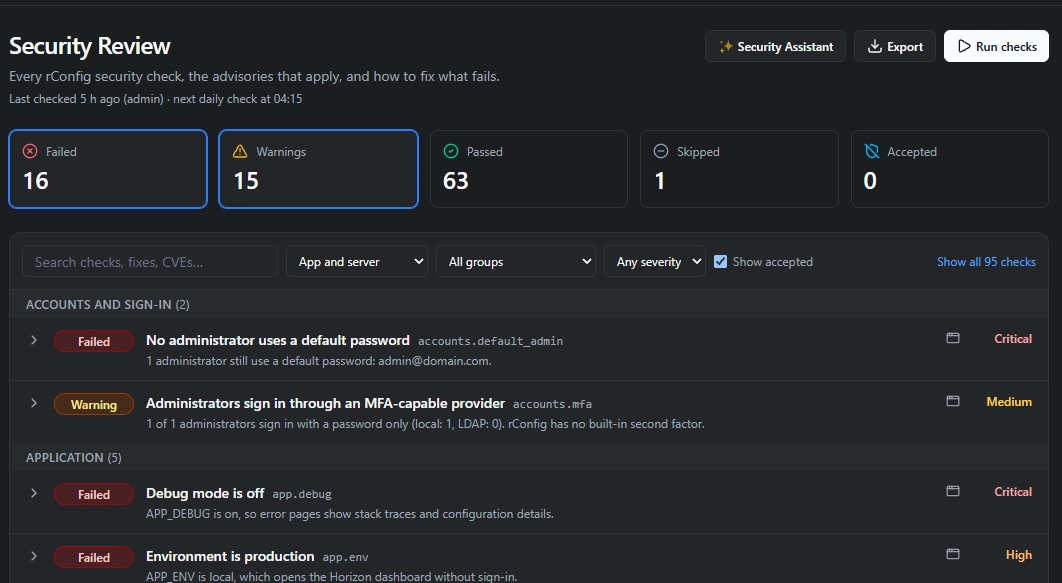
From V8.5.0, rConfig checks its own security. About 100 read-only checks look at the application settings, the web server, TLS, PHP, the database, Redis, accounts, API tokens, stored credentials, the operating system and the security advisories that apply to your version. Security Center is where the results land, and the rest of this library uses it as the way to confirm that each layer is set up the way the guides describe.
This page explains the model behind it and how to fit it into a team’s routine. Running checks, applying fixes and accepting risks step by step are in the main docs, starting at Security Center.
The loop
Security Center is a loop, not a one-off scan. The checks run every day, each finding is either fixed or accepted with a reason, and the next run confirms the outcome. Anything that newly fails sends an alert, so you hear about a regression without opening the page.

What a result means
Every check has a stable ID (such as redis.auth or web.env_exposed), a severity from Critical to Info, and one of five results.
| Result | What to do with it |
|---|---|
| Failed | An open door. Fix it. A failure sends an alert the first time it fails, not every day. |
| Warning | Worth fixing, but not exploitable on its own. Plan it. |
| Passed | Nothing to do. The evidence shows why it passed. |
| Skipped | The check doesn’t apply (a Vector check without Vector, for example) or couldn’t run. Read the message: a check that couldn’t run is a gap in what you know. |
| Accepted | Someone decided this finding is expected, with a reason and a review date. It counts again when the date passes. |
Severity tells you how much a failure matters. Result tells you whether it is happening. A failed Critical (an active advisory, an administrator still on the default password) comes before a failed Low (PHP announcing its version).
Each finding also shows the evidence the check collected, never a secret: checks report whether a value is set and safe, not the value. They never change anything. That is what makes it safe to run them daily on a production server.
Two layers: the web user and root
rConfig runs as the web user (apache or www-data), and since V8.4.1 nothing in rConfig runs as root. That is good for security, and it means the app can’t read root-only files: sshd_config, sudo rules, Apache vhosts, redis.conf, pg_hba.conf or PHP-FPM pools.
So there are two layers of checks:
| Layer | Runs as | Sees | Fixes |
|---|---|---|---|
| App checks | The web user, daily and on demand | rConfig’s settings, .env, what the web server serves, PHP, the database and Redis from rConfig’s side, accounts, tokens, stored data, versions and advisories |
A handful of safe fixes from the page; everything else shows the command |
| Root server check | root, when you run rconfig-server-check.sh |
sshd, sudo rules, Apache, redis.conf, pg_hba.conf, PHP-FPM pools, world-writable files |
With --fix, a small set of safe changes; for the rest it prints what to change |
The root script writes its results to a file the app reads, so both layers appear on one page, with the root findings marked by a server icon and IDs starting server.. Run it after installing, after changing the server, and at least weekly: os.server_check_script warns when its results are more than 7 days old. See hardening the server for how the two layers divide the work.
Fix or accept
A failing finding ends in one of two places.
Fix it when the finding is a real gap. A few app-level findings can be fixed from the page (file modes, .env permissions, stray files in public/, expired or unused API tokens). rConfig shows exactly what will change before it runs anything, does the work in the background, records it in the activity log and runs the checks again. Everything else shows the command for your server, and anything that needs root points to the root server check.

Accept the risk when the finding is expected and you have decided to live with it. The classic case is a local break-glass administrator, which will always show in accounts.mfa because local accounts can’t use SSO MFA. Accepting needs a reason of at least 10 characters and a review date no more than a year away. An accepted finding stays in every report and export, marked Accepted, but stops counting as a failure, stops alerting and stops affecting the command’s exit code. When the date passes it counts again.

Acceptance is a decision with an owner and an expiry, not a way to make the page green. Two habits keep it honest:
- Write the reason for the next reviewer. “Break-glass admin, password in the safe, reviewed quarterly” can be checked. “Known issue” cannot.
- Pick a review date you will actually review on. A year is the maximum, not a default. A quarter suits most accepted risks.
Both actions are recorded in the activity log, so an audit can see who accepted what and why.
Advisories
The advisories card answers a different question from the checks: not “is this setting safe?” but “is there a published vulnerability that affects the versions this server runs?”. rConfig publishes an advisory for every confirmed vulnerability in rConfig or the software it depends on, and Security Center matches each one against this install’s rConfig product and version and its PHP version. A match shows with the reason, for example that the PHP version is inside the affected range, and advisories.active fails.
Online servers fetch the advisory feed from rconfig.com every day; every release also bundles a copy for offline servers. See vulnerability management for how advisories are made and how to act on them.
Getting the results out
The results are useful outside the page too.
| Route | Who uses it | Needs |
|---|---|---|
| Export, JSON or CSV | Audit packs, change records, a support ticket | security.view |
GET /api/v2/security/review |
SIEM, compliance and monitoring tools | A REST API token with the security.read ability |
get_security_posture (MCP) |
AI assistants connected over MCP, read-only | The token owner holds security.view |
| Security Assistant | People who want a finding explained, a fix plan or an audit summary | AI Center on, Security Assistant turned on |
php artisan rconfig:security-check |
CI, deploy scripts, the shell | Exits 0, 1 on warnings, 2 on failures |
The Security Assistant sees the latest stored run (IDs, results, severities, fixes, references and active advisories), never configs or credentials, and it can’t run checks or apply fixes. Finding messages can name hosts and accounts, so they are sent to your AI provider unless you turn details off. See Security Assistant and API tokens and AI access.
Running it as a routine
Security Center does the checking. People still have to look, decide and follow through. A routine that works for most teams:
| When | Who | What |
|---|---|---|
| On alert | Whoever receives Security Check Failed | Open the finding, fix it or raise it with the owner. Alerts fire once per new failure, so an ignored alert does not repeat. |
| Weekly | The rConfig administrator | Run the root server check. Read new warnings. Check the advisories card. |
| After every upgrade or server change | The person who made the change | Run checks and the root server check, and compare with the last run. |
| Quarterly | The administrator and whoever owns security risk | Review every Accepted finding: renew it with a fresh reason, or fix it. Export the report for the audit trail. |
Two settings make the routine reliable:
- Send alerts somewhere people read. Set recipients in Settings > Notifications.
integrations.alert_channelswarns when alerts would only reach the in-app bell. To be told about new warnings too, setSECURITY_CHECK_NOTIFY_ON_WARN=true. - Watch the watcher. If the scheduler stops, the daily run stops with it.
runtime.security_check_stalewarns after 48 hours without a run, andadvisories.feed_freshwarns when an online server’s advisory data stops refreshing.