

All policy methods
A policy method tells rConfig how to check a config. rConfig has 17 of them. This page lists every one.
For each method you get:
- what it does, in plain words,
- a rule you can copy,
- a config that passes (green) and a config that fails (red).
Every pass and fail on this page is checked by a test in rConfig’s own code. Under each example, Source names that test.
Checked against the rConfig policy engine Covers all 17 methods in the rConfig policy engine on this date. If you are on an older version, check the version tag on each method.
All of these are in the app too
Every method on this page is listed in rConfig, on the policy definition page. Go to Compliance → Definitions, open a definition or click New Policy Definition, then click View Policy definition help documentation in the editor. The help shows each method with its syntax and an example, so you can keep it open while you write.
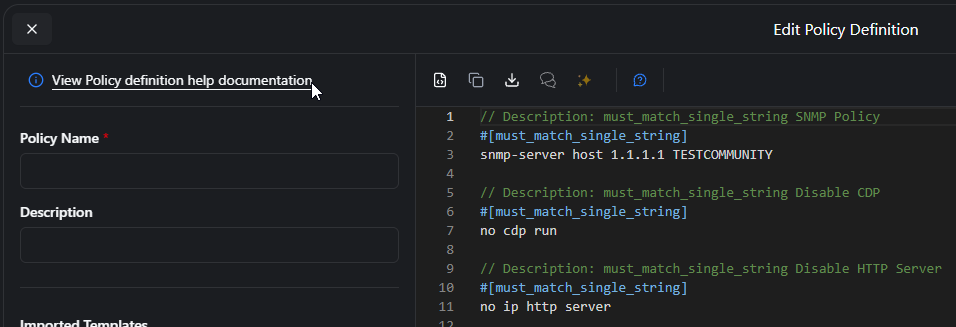
New to policies? Start with Your first policy. For the full file format, see the Policy Definitions reference.
Jump to a method
Pick a card to jump to that method. The colour shows its family. The tag in the corner is the first rConfig version that has it.
How a rule is built
Every rule has three parts, always in this order:
// No telnet on the VTY lines#[must_not_match_single_string]transport input telnet- The note. A line that starts with
//. Write what the rule checks. You will see this note in the results. - The method. The method name inside
#[ ], on the very next line. - The body. The config text to check, on the lines after that.
A definition is just rules, one after another. Put a blank line between rules to make them easy to read.
// No telnet on the VTY lines#[must_not_match_single_string]transport input telnet
// SSH is turned on#[must_match_single_string]ip ssh version 2
Rules rConfig will not save
When you click Save, rConfig checks the layout. If something is wrong, it tells you the line number and will not save. These are the common mistakes:
| Mistake | What rConfig says |
|---|---|
| A blank line between the note and the method | remove the blank line between the description and the #[method] line |
| A blank line between the method and the body | remove the blank line between the #[method] line and the first config line |
| A note that runs onto a second line | the #[method] line must come directly after the one-line description |
| Two methods under one note | has more than one #[method] line |
| A spelling mistake in the method name | unknown policy method |
A space in the method name, such as #[bad method] |
the #[method] line is malformed |
| A method with nothing under it | has no config lines |
| A list method with only one line in the body | needs at least two config lines. Use a single-string method for one line. |
| A config line before the first note | this line is outside any policy block |
Source: PolicyDefinitionValidityTest.
How rConfig scores a device
Each rule gets its own result: pass or fail. Then rConfig adds them up:
- Every rule passes: the device gets
PASS. - Any rule fails: the device gets
FAIL. - A definition with no rules never passes. It gets
FAIL, with the reason “Policy definition contains no valid rules”. - A regex that cannot run (bad syntax, or too slow) makes that rule
fail, with the error as the reason. It never counts as a pass by mistake.
Source: PolicyDefinitionZeroRulesTest and PolicyRegexErrorTest.
Pick the right method
Not sure which one you need? Find your question.
| I want to check that… | Use |
|---|---|
| one exact line is there | must_match_single_string |
| one exact line is not there | must_not_match_single_string |
| a line is there, but part of it changes (an IP, a name) | wildcard_match_single_string |
| no line like this is there | wildcard_must_not_match_single_string |
| all of these lines are there | must_match_all_from_array or wildcard_match_all_from_array |
| at least one of these lines is there | can_match_any_from_array or wildcard_match_any_from_array |
| the text follows a pattern I can write as a regex | must_match_regex / must_not_match_regex |
| these lines are inside one interface or block | match_code_block_strict |
| every interface (or block) has these lines | match_code_block_strict with *, or evaluate_block with scope: |
| “if this is there, then that must be there too” | evaluate_block |
| “this, or that, but not the other” | evaluate_block |
| the whole output has not changed at all | must_match_checksum |
One exact line
These two methods look at whole lines. A part of a line does not count.
Most examples in this section and the next two use this sample router config (sanitised from tests/storage/test_router_showrun.txt):
hostname router1!aaa new-modelaaa authentication login default localaaa session-id common!ip domain name example.com!no ip subnet-zero!interface GigabitEthernet1 ip address dhcp negotiation auto!snmp-server host 192.0.2.1 EXAMPLECOMMsnmp-server host 192.0.2.2 EXAMPLECOMM10snmp-server host 192.0.2.2 EXAMPLECOMM12xxxxxxxsnmp-server host 192.0.2.3 EXAMPLECOMM20snmp-server host 192.0.2.4 EXAMPLECOMM30!line con 0 logging synchronous stopbits 1line vty 0 4 transport input telnet ssh!endmust_match_single_string
The config must have this exact line. Spaces at the start and end of the line do not matter. Everything else must be the same, including capital letters.
- Looks at
- each whole line
- Rule lines
- one
- Capitals
- must match
- Wildcards
- no
- Since
- rConfig 8.0.0
// Trap host 192.0.2.2 uses community EXAMPLECOMM10#[must_match_single_string]snmp-server host 192.0.2.2 EXAMPLECOMM10Why: The line snmp-server host 192.0.2.2 EXAMPLECOMM10 is in the config, letter for letter.
// Trap host 192.0.2.2 uses community EXAMPLECOMM12#[must_match_single_string]snmp-server host 192.0.2.2 EXAMPLECOMM12Why: The config line ends in EXAMPLECOMM12xxxxxxx. The start of a line is not enough.
// Partial line#[must_match_single_string]interface GWhy: interface G is only part of a line. This method needs the whole line.
Source: PolicyMethodsTest::test_must_match_single_string_tests1 and test_must_match_single_string_tests2_with_partial_string_fails.
must_not_match_single_string
The config must not have this line. This one is more relaxed than its twin. It ignores capital letters, extra spaces and indents.
- Looks at
- each whole line
- Rule lines
- one
- Capitals
- ignored
- Wildcards
- no
- Since
- rConfig 8.0.0
feature bgprouter bgp 65000 neighbor 198.51.100.1 remote-as 65001// BGP feature is not enabled#[must_not_match_single_string]FEATURE BGPWhy: FEATURE BGP becomes feature bgp once capitals and extra spaces are ignored. That line is in the config.
// OSPF feature is not enabled#[must_not_match_single_string]feature ospfWhy: There is no feature ospf line.
Indented lines count too:
hsrp 14 preempt delay minimum 100 priority 120 ip 192.0.2.1 ip dhcp relay address 198.51.100.31 ip dhcp relay address 203.0.113.64// No DHCP relay to 198.51.100.31#[must_not_match_single_string]ip dhcp relay address 198.51.100.31Why: The indented line matches once the spaces in front are ignored.
Source: CustomerUseCases/MustNotMatchSingleStringCustomerTest.
Wildcards
Wildcards let one rule match many lines. Use them for the parts that change, like an IP address or a name.
| Symbol | Means | Example | Matches |
|---|---|---|---|
* |
any number of characters (even none) | interface *test* |
interface test-lab-connection |
? |
exactly one character | 192.0.?.? |
192.0.2.1 |
Wildcards stay inside one line. Capital letters must match. The pattern can match part of a line.
wildcard_match_single_string
The pattern must be found somewhere in the config.
- Looks at
- the whole config, line by line
- Rule lines
- one
- Capitals
- must match
- Wildcards
- * and ?
- Since
- rConfig 8.0.0
// A trap host in 192.0.x.x uses community EXAMPLECOMM10#[wildcard_match_single_string]snmp-server host *.0.?.? EXAMPLECOMM10Why: It matches snmp-server host 192.0.2.2 EXAMPLECOMM10.
// A trap host matching *.2.1.? uses community EXAMPLECOMM10#[wildcard_match_single_string]snmp-server host *.2.1.? EXAMPLECOMM10Why: No trap host address has .2.1. in it.
Source: PolicyMethodsTest::test_wildcard_match_single_string_tests.
wildcard_must_not_match_single_string
The pattern must not be found anywhere. Good for “no test or temporary interfaces”.
- Looks at
- the whole config, line by line
- Rule lines
- one
- Capitals
- must match
- Wildcards
- * and ?
- Since
- rConfig 8.0.2
// No lab or test interfaces in the running configuration#[wildcard_must_not_match_single_string]interface *test*interface GigabitEthernet0/0/1 description Production-Server-Link ip address 192.0.2.1 255.255.255.0 no shutdowninterface GigabitEthernet0/0/2 description Production-Client-Link ip address 198.51.100.1 255.255.255.0 no shutdowninterface Loopback0 description Management-Interface ip address 203.0.113.1 255.255.255.255Why: No interface line has test in it.
interface GigabitEthernet0/0/1 description Production-Server-Link ip address 192.0.2.1 255.255.255.0 no shutdowninterface test-lab-connection description Temporary-Test-Interface ip address 203.0.113.100 255.255.255.0 shutdownWhy: interface test-lab-connection matches interface *test*.
Source: PolicyMethodsTest::test_wildcard_must_not_match_single_string_pattern_not_found and test_wildcard_must_not_match_single_string_pattern_found. This is the rule from Your first policy.
wildcard_match_all_from_array
Write one pattern per line. Every pattern must be found.
- Looks at
- the whole config, line by line
- Rule lines
- two or more
- Capitals
- must match
- Wildcards
- * and ?
- Since
- rConfig 8.0.0
// All three wildcard lines are present#[wildcard_match_all_from_array]snmp-server host 192.0.2.1 EXAMPLECOMM*snmp-server host 192.0.?.? EXAMPLECOMM30aaa session*Why: All three patterns are found.
// All three wildcard lines are present#[wildcard_match_all_from_array]snmp-server host 192.0.2.1 EXAMPLECOMM*snmp-server host *.2.1.? EXAMPLECOMM10aaa session*Why: The middle pattern, *.2.1.?, is not found. One miss fails the whole rule.
Source: PolicyMethodsTest::test_wildcard_match_all_from_array_tests.
wildcard_match_any_from_array
Write one pattern per line. At least one pattern must be found.
- Looks at
- the whole config, line by line
- Rule lines
- two or more
- Capitals
- must match
- Wildcards
- * and ?
- Since
- rConfig 8.0.0
// At least one of these is present#[wildcard_match_any_from_array]snmp-server host 192.0.2.1 EXAMPLECOMM*snmp-server host 192.0.?.? EXAMPLECOMM310aaa session*Why: The first pattern is found. That is enough.
// At least one of these is present (none are)#[wildcard_match_any_from_array]snmp-server host 198.51.100.2s EXAMPLECOMM*snmp-server host *.2.1.? EXAMPLECOMM110aaa sessissson*Why: None of the three patterns is found.
Source: PolicyMethodsTest::test_wildcard_match_any_from_array_match.
Lists of text
These methods take a list, one item per line. They search the whole config as one big block of text. An item can match part of a longer line. Capital letters must match. No wildcards.
can_match_any_from_array
At least one item must be found.
- Looks at
- the whole config as one text
- Rule lines
- two or more
- Capitals
- must match
- Wildcards
- no
- Since
- rConfig 8.0.0
// At least one of these lines is present#[can_match_any_from_array]snmp-server host 192.0.2.2 EXAMPLECOMM10snmp-server host 192.0.2.1 EXAMPLECOMM310aaa session-id1Why: The first item is found. The other two are not, and that is fine.
// At least one of these lines is present (none are)#[can_match_any_from_array]snmp-server host 192.0.2.1 EXAMPLECOMM110snmp-server host 192.0.2.1 EXAMPLECOMM310aaa session-id1Why: Not one of the three items is found.
Source: PolicyMethodsTest::test_can_match_any_from_array_tests.
must_match_all_from_array
Every item must be found.
- Looks at
- the whole config as one text
- Rule lines
- two or more
- Capitals
- must match
- Wildcards
- no
- Since
- rConfig 8.0.0
// Every one of these lines is present#[must_match_all_from_array]snmp-server host 192.0.2.2 EXAMPLECOMM10snmp-server host 192.0.2.4 EXAMPLECOMM30aaa session-idno ip subnet-zeroip domain name example.comline vty 0 4Why: All six items are found. aaa session-id is found inside aaa session-id common.
// Every one of these lines is present (one is not)#[must_match_all_from_array]snmp-server host 192.0.2.2 EXAMPLECOMM10snmp-server host 192.0.2.4 EXAMPLECOMM30aaa session-idno ip subnet-zeroip domain name example.comline vty 0 5Why: line vty 0 5 is not in the config. One missing item fails the rule.
Source: PolicyMethodsTest::test_must_match_all_from_array_tests.
must_not_match_all_from_array
The rule fails only if every item is found. If even one item is missing, it passes.
- Looks at
- the whole config as one text
- Rule lines
- two or more
- Capitals
- must match
- Wildcards
- no
- Since
- rConfig 8.0.0
// Not all of these lines are present (none are)#[must_not_match_all_from_array]snmp-server host 192.0.2.2 EXAMPLECOMM100snmp-server host 192.0.2.4 EXAMPLECOMM300aaa session-id0no ip subnet-zero0ip domain name example.com0line vty 0 40Why: None of the items is found, so not all of them are found.
// Not all of these lines are present (all are)#[must_not_match_all_from_array]snmp-server host 192.0.2.2 EXAMPLECOMM10snmp-server host 192.0.2.4 EXAMPLECOMM30aaa session-idno ip subnet-zeroip domain name example.comline vty 0 4Why: Every item is found.
Source: PolicyMethodsTest::test_must_not_match_all_from_array_tests.
Regular expressions
A regular expression (regex) is a small pattern language. Use it when wildcards are not enough.
Write the regex between slashes, with flags after: /pattern/flags. The regex runs on the whole config at once, so the flags matter:
| Flag | What it does |
|---|---|
m |
^ and $ mean the start and end of each line. Without it, they mean the start and end of the whole config. |
i |
Capital letters do not matter. |
s |
. can cross from one line to the next. |
g |
Allowed, but changes nothing. |
For many more regex examples, see regex patterns.
must_match_regex
The regex must find a match.
- Looks at
- the whole config as one text
- Rule lines
- one
- Capitals
- must match, unless you add i
- Wildcards
- regex
- Since
- rConfig 8.0.0
set protocols rstp interface ge-0/0/1.0 edgeset protocols rstp interface ge-0/0/2.0 edgeset protocols rstp interface ge-0/0/3.0 edgeset protocols rstp interface xe-0/0/3.0 edgeset protocols rstp interface xe-0/0/2.0 edgeset protocols rstp interface xe-0/0/1.0 edgeset protocols ospf area 0.0.0.0 interface ge-0/0/1.0set protocols rstp interface xe-0/0/2.0 edgesome other configuration lineset system services sshset protocols rstp interface et-0/0/3.0 edgeanother non-matching lineset protocols bgp group EXTERNAL-PEERS type externalset protocols rstp interface et-0/0/4.10 edgeset protocols rstp interface et-0/0/1.0 edgeset protocols rstp interface et-0/0/2.0 edgeset protocols rstp interface et-0/0/3.0 edge// RSTP edge ports are configured#[must_match_regex]/^set protocols rstp interface (ge|xe|et)-\d+\/\d+\/\d+\.\d+ edge$/gmWhy: Lines like set protocols rstp interface ge-0/0/1.0 edge match.
// RSTP edge ports are disabled#[must_match_regex]/^set protocols rstp interface (ge|xe|et)-\d+\/\d+\/\d+\.\d+ disabled$/gmWhy: No RSTP line ends in disabled.
The / inside the pattern is written \/, because / also marks the start and end of the regex.
Source: PolicyMethodsTest::test_must_match_regex_with_gm_flags.
must_not_match_regex
The regex must not find a match.
- Looks at
- the whole config as one text
- Rule lines
- one
- Capitals
- must match, unless you add i
- Wildcards
- regex
- Since
- rConfig 8.0.2
// No bridge has fast-forward turned on#[must_not_match_regex]/interface bridge add .* fast-forward=yes/m/interface ethernetset [find default-name=ether1] name=ether1-gatewayset [find default-name=ether2] name=ether2-local/ip dhcp-clientadd disabled=no interface=ether1-gateway/ip serviceset telnet disabled=yesset ftp disabled=yes/system ntp clientset enabled=yes primary-ntp=ntp.example.comWhy: There are no bridge lines, so the pattern is not found.
// bridge1 does not have fast-forward turned on#[must_not_match_regex]/add name=bridge1 fast-forward=yes/m/interface bridgeadd name=bridge1 fast-forward=yesadd name=bridge2 fast-forward=no/interface ethernetset [find default-name=ether1] name=ether1-gatewayset [find default-name=ether2] name=ether2-local/ip dhcp-clientadd disabled=no interface=ether1-gatewayWhy: add name=bridge1 fast-forward=yes is in the config.
Source: PolicyMethodsTest::test_must_not_match_regex_pattern_not_found and test_must_not_match_regex_pattern_found.
Config sections
Many checks are about one section of the config, such as one interface. These methods look inside a section, not the whole file.
The first line of the body picks the section. It is called the anchor. The other lines must be inside that section.
| Method | Which sections | Line order | Best for |
|---|---|---|---|
match_code_block_strict |
every section the anchor matches | any order | IOS, IOS-XE, NX-OS, simple Junos |
match_code_block_flexible |
only the first match | any order | brace configs like Junos |
match_code_block_from_array |
only the first match | exact order, line after line | short blocks you know by heart |
evaluate_block with scope: |
every section the scope matches | any order | anything, including deep F5 braces |
In all three code block methods, a body line can use * and ?, or start with re: to be a regex. Capital letters do not matter, unless you write a re:/.../ regex without the i flag.
The match_code_block_strict and match_code_block_flexible examples use this two-port config (sanitised from tests/storage/policydata/match_code_block_flexible_interfaces.txt):
interface GigabitEthernet5/0/48 description ACCESS-PORT switchport access vlan 206 switchport mode access switchport voice vlan 3755 switchport port-security maximum 100 switchport port-security violation restrict switchport port-security aging time 5 switchport port-security aging type inactivity switchport port-security ip access-group ACL-USER-OUT out no logging event link-status ipv6 traffic-filter port_client in no snmp trap link-status spanning-tree portfast!interface GigabitEthernet6/0/48 description ACCESS-PORT switchport access vlan 145 switchport mode access switchport voice vlan 3788 switchport port-security maximum 100 switchport port-security violation restrict switchport port-security aging time 5 switchport port-security aging type inactivity switchport port-security ip access-group ACL-USER-OUT out no logging event link-status ipv6 traffic-filter port_client in no snmp trap link-status spanning-tree portfastThe two ports are the same except for their VLANs (highlighted: voice VLAN 3755 on one, 3788 on the other).
match_code_block_strict
The anchor must match. If it has a *, every section it matches must have every line. A section ends at the next line that is not indented further than the anchor, or at a ! or } line.
- Looks at
- each matching section
- Rule lines
- anchor, then lines to find
- Capitals
- ignored
- Wildcards
- *, ? and re:
- Since
- rConfig 8.2.2
// Port 6/0/48 has an access VLAN, a voice VLAN and port security#[match_code_block_strict]interface GigabitEthernet6/0/48switchport access vlan *switchport voice vlan *switchport port-security maximum 100Why: Port 6/0/48 has every line. The * values match any VLAN number.
// Port 5/0/48 is in access VLAN 145#[match_code_block_strict]interface GigabitEthernet5/0/48switchport access vlan 145Why: vlan 145 is on port 6/0/48, not 5/0/48. Lines from another section do not count.
// Every GigabitEthernet port follows the access port standard#[match_code_block_strict]interface GigabitEthernet*description ACCESS-PORTswitchport mode accessswitchport port-security maximum 100switchport port-security violation restrictswitchport port-security aging time 5switchport port-security aging type inactivityswitchport port-securityip access-group ACL-USER-OUT outno logging event link-statusipv6 traffic-filter port_client inno snmp trap link-statusspanning-tree portfastWhy: Both ports have all of these lines.
// Every GigabitEthernet port uses voice VLAN 3755#[match_code_block_strict]interface GigabitEthernet*switchport voice vlan 3755Why: Port 6/0/48 has voice VLAN 3788. With a * anchor, one bad port fails the rule.
// Every TenGigabitEthernet port is an access port#[match_code_block_strict]interface TenGigabitEthernet*switchport mode accessWhy: There are no TenGigabitEthernet ports. An anchor that matches nothing fails. It never passes by default.
The anchor can be a regex too. This one matches any port in slot 5:
// Slot 5 ports are in VLAN 206#[match_code_block_strict]re:^interface\s+GigabitEthernet5/0/\d+$switchport access vlan 206Why: interface GigabitEthernet5/0/48 matches the regex, and that port has vlan 206.
Source: CustomerUseCases/MatchCodeBlockStrictTest.
match_code_block_flexible
Finds the first section that matches the anchor. Then every other line must be in that section, in any order. The section ends where its { } braces close, so this method is built for brace configs like Junos.
- Looks at
- the first matching section
- Rule lines
- anchor, then lines to find
- Capitals
- ignored
- Wildcards
- * and ?
- Since
- rConfig 8.0.0
// LLDP is on with a management address#[match_code_block_flexible]lldp {management-address *;interface all;lldp { management-address 192.0.2.1; interface all;}Why: The lldp block has a management address and interface all.
// LLDP is on with a management address#[match_code_block_flexible]protocols {lldp {management-address *;interface * {enable;protocols { lldp { port-id-subtype interface-name; # Missing management-address interface ge-0/0/0 { enable; } }}Why: The lldp block has no management-address line.
Source: CustomerUseCases/LldpCodeBlockPolicyMethodsTest::test_simple_lldp_configuration and test_lldp_incomplete_configuration. Lines that start with # are comments, and this method skips them.
match_code_block_from_array
The lines must appear together and in order, one after the other, starting at the first line that matches the anchor. It checks only that first match.
- Looks at
- lines in a row
- Rule lines
- anchor, then the next lines in order
- Capitals
- ignored
- Wildcards
- *, ? and re:
- Since
- rConfig 8.0.0
interface GigabitEthernet1 ip address dhcp negotiation auto!// GigabitEthernet1 uses DHCP and auto negotiation#[match_code_block_from_array]interface GigabitEthernet1ip address dhcpnegotiation autoWhy: The three lines appear in this order, one after the other.
// GigabitEthernet1 has an address and auto negotiation#[match_code_block_from_array]* GigabitEthernet1ip address *negotiation autoWhy: * matches the start of the first line and any address.
// GigabitEthernet1 uses DHCP and auto negotiation#[match_code_block_from_array]interface GigabitEthernet1ip address dhcp11negotiation autoWhy: The second line in the config is ip address dhcp, not ip address dhcp11.
Lines that start with re: are a regex. Add /.../ around the regex if you want to set your own flags:
interface Loopback0 description LOOP:null:Loopback0:lab01.ltrk21-ar:null:[]// Loopback0 description follows the naming standard#[match_code_block_from_array]re:^interface Loopback0$re:^\s*description LOOP:null:Loopback0:[a-z]{3}[0-9]{2}\.[a-z]{4}[0-9]{2}-[a-z]{2}:null:\[\]$Why: Both regex lines match, in order. Without slashes, capitals are ignored.
Source: PolicyMethodsTest code block tests, including test_match_code_block_passes_on_all_matched, test_match_code_block_fails_on_secondline_not_matched and test_match_code_block_from_array_raw_regex_match.
Logic rules: evaluate_block
Every method above does one check. evaluate_block lets you mix checks with AND, OR and NOT. It can also run the same check on every section of a config, such as every interface or every F5 virtual server.
- Looks at
- the whole config, or each section
- Rule lines
- a small YAML tree
- Capitals
- ignored for plain lines
- Wildcards
- *, ? and re:
- Since
- rConfig 8.3.0
The building blocks
The body is written in YAML. Indents matter: use spaces, not tabs.
| Word | Means | Passes when |
|---|---|---|
all: |
AND | every item under it passes |
any: |
OR | at least one item under it passes |
not: |
NOT | the item under it does not pass |
scope: |
for each section | every section that starts with a matching line passes (optional, top only) |
Each item in a list is a leaf. The easiest leaf is just a config line:
// No telnet on any line#[evaluate_block]not: transport input telnetA plain line matches if it is part of any line. Capital letters do not matter. You can use *, ? and re:, just like the code block methods.
When you need to be more exact, use a typed leaf:
| Leaf | Passes when | Capitals |
|---|---|---|
just a line |
the text is part of any line (*, ?, re: allowed) |
ignored |
equals: x |
a whole line is exactly x (spaces at the ends are ignored) |
must match |
contains: x |
x is anywhere in the text |
must match |
regex: x |
the regex x matches the text (same rules as must_match_regex) |
must match, unless you add i |
wildcard: x |
the * / ? pattern is found |
must match |
Without scope:, “the text” is the whole config. With scope:, it is one section at a time.
Read it like a sentence
Draw the tree and read it out loud. This F5 rule says: a virtual server is fine if it is disabled, or it has no WAF policy, or it has all the log profiles.
flowchart LR
    S["For each<br/>ltm virtual"] --> A{"any:<br/>one is enough"}
    A --> D["equals: disabled"]
    A --> N["not: ASM_WAF_"]
    A --> L{"all:<br/>every one"}
    L --> L1["siem_log_collector"]
    L --> L2["netlog_tcp"]
    L --> L3["Log illegal requests"]
    L --> L4["telemetry_asm_security_log_profile"]
You will see this rule in example 2.
How sections are found
With scope:, rConfig finds every line that matches the scope regex. Each one starts a section.
- If the first line has a
{, the section runs until all its braces close, however deep they go. This works for F5 and Junos. - If not, the section runs until a line that is not indented further, or a
!line. This works for Cisco IOS.
With scope: ^interface , this IOS config splits into two sections (highlighted lines start each one). The first ends at the ! line, so it does not include GigabitEthernet2:
interface GigabitEthernet1 ip address 192.0.2.1 255.255.255.0 no shutdown!interface GigabitEthernet2 shutdown!With scope: ^ltm virtual , this F5 config also splits into two sections. The first one keeps every nested brace, right down to telemetry_asm_security_log_profile, and stops before vs_bad:
ltm virtual /Common/vs_good { destination /Common/192.0.2.10:443 profiles { /Common/ASM_WAF_policy { } /Common/netlog_tcp { } } security-log-profiles { /Common/telemetry_asm_security_log_profile }}ltm virtual /Common/vs_bad { destination /Common/192.0.2.20:443 profiles { /Common/ASM_WAF_policy { } }}Source: Engine/BlockSplitterTest.
Example 1: AND, OR and NOT on the whole config
No scope:, so the rule runs once on the whole config. It says: there is an NTP server, and one of two syslog hosts, and not telnet.
// NTP set, a syslog target, and no telnet#[evaluate_block]all: - regex: "^ntp server " - any: - logging host 192.0.2.1 - logging host 192.0.2.2 - not: transport input telnetntp server 192.0.2.1logging host 192.0.2.2Why: There is an ntp server line, logging host 192.0.2.2 is there, and there is no telnet.
Here is the not: part on its own, against a config with telnet:
// No telnet#[evaluate_block]all: - not: transport input telnetntp server 192.0.2.1transport input telnetWhy: transport input telnet is in the config. The reason in the result starts with: unexpectedly matched.
Source: Engine/PolicyExpressionEngineTest::test_whole_file_boolean_without_scope and test_whole_file_boolean_reports_failure_reason.
Example 2: check every section with scope:
This rule runs on every F5 virtual server. Each one must have the WAF log profiles, unless it is disabled or has no WAF policy.
// F5 WAF logging: every WAF-enabled virtual server carries the required log profiles (disabled servers are skipped)#[evaluate_block]scope: ^ltm virtualany: - equals: disabled - not: ASM_WAF_ - all: - siem_log_collector - netlog_tcp - Log illegal requests - telemetry_asm_security_log_profileltm virtual /Common/vs_ok { destination /Common/192.0.2.10:443 profiles { /Common/ASM_WAF_policy_prod { } /Common/siem_log_collector { } /Common/netlog_tcp { } /Common/Log illegal requests { } /Common/telemetry_asm_security_log_profile { } } source 0.0.0.0/0}Why: The all: branch passes. Every profile is there.
ltm virtual /Common/vs_disabled { destination /Common/192.0.2.10:443 disabled profiles { /Common/ASM_WAF_policy_prod { } } source 0.0.0.0/0}Why: The line disabled matches equals: disabled. The server is skipped.
ltm virtual /Common/vs_no_waf { destination /Common/192.0.2.10:443 profiles { } source 0.0.0.0/0}Why: There is no ASM_WAF_ line, so not: ASM_WAF_ passes. The log rule does not apply.
ltm virtual /Common/vs_missing { destination /Common/192.0.2.10:443 profiles { /Common/ASM_WAF_policy_prod { } /Common/siem_log_collector { } /Common/netlog_tcp { } /Common/Log illegal requests { } } source 0.0.0.0/0}Why: telemetry_asm_security_log_profile is missing. All three branches of any: fail. The result names this section: ltm virtual /Common/vs_missing {
ltm virtual /Common/vs_tricky { destination /Common/192.0.2.10:443 profiles { /Common/ASM_WAF_policy_prod { } /Common/waf_disabled_logging { } } source 0.0.0.0/0}Why: equals: needs the whole line to be disabled. A profile called waf_disabled_logging does not count, so this server is still checked, and it fails.
That last one is why the rule uses equals: disabled and not a plain disabled line. A plain line matches part of any line.
When a config has many servers and only one is bad, the rule fails and names only that one. Source: CustomerUseCases/F5WafBlockComplianceCustomerTest (WAF logging tests).
hostname router1Why: The config has no ltm virtual line, so there are no sections. The reason says: no config block matched scope.
A scope: that matches no section fails. It never passes by default. Source: Engine/PolicyExpressionEngineTest::test_zero_match_scope_fails.
Example 3: if this, then that
“If interface Vlan4 exists, it must have an IP address, and OSPF must not make it passive.”
scope: cannot do this. It looks at one kind of section, and it fails when there are none. Instead, use the if-then trick:
if A then B is the same as any: [ not A, B ]
If A is missing, not A passes, so the rule passes. If A is there, B must pass.
// Vlan4: if present, must have an IP and be non-passive under router ospf#[evaluate_block]any: - not: "re:^interface Vlan4$" - all: - regex: '/^interface Vlan4\s*\n(?:[ \t]+[^\n]*\n)*?[ \t]+ip address \d+\.\d+\.\d+\.\d+/m' - regex: '/^router ospf\b[^\n]*\n(?:[ \t]+[^\n]*\n)*?[ \t]+no passive-interface Vlan4\s*$/m'In plain words:
not: "re:^interface Vlan4$": there is no line that is exactlyinterface Vlan4. The$stopsVlan40from counting.- First
regex:: findinterface Vlan4, then look down its indented lines for anip address. - Second
regex:: findrouter ospf, then look down its indented lines forno passive-interface Vlan4.
hostname sw01!interface Vlan1 ip address 192.0.2.1 255.255.255.0!endWhy: interface Vlan4 is not there, so the rule does not apply.
hostname sw01!interface Vlan40 ip address 192.0.2.40 255.255.255.0!endWhy: The $ in the first leaf means Vlan40 is not Vlan4.
hostname sw01!interface Vlan4 description mgmt ip address 192.0.2.4 255.255.255.0!router ospf 1 passive-interface default no passive-interface Vlan4 network 192.0.2.0 0.0.0.255 area 0!endWhy: Vlan4 has an IP address, and router ospf has no passive-interface Vlan4.
hostname sw01!interface Vlan4 description mgmt ip address 192.0.2.4 255.255.255.0!router ospf 1 passive-interface default no passive-interface Vlan1 network 192.0.2.0 0.0.0.255 area 0!endWhy: router ospf has no passive-interface Vlan1, not Vlan4.
hostname sw01!interface Vlan4 description mgmt no ip address!router ospf 1 passive-interface default no passive-interface Vlan4 network 192.0.2.0 0.0.0.255 area 0!endWhy: Vlan4 is there, but its section has no ip address with a number.
hostname sw01!interface Vlan4 description mgmt ip address 192.0.2.4 255.255.255.0!router bgp 65000 no passive-interface Vlan4!endWhy: no passive-interface Vlan4 is under router bgp, not router ospf.
The rule also fails when there is no router ospf at all, and works the same with Windows (CRLF) line endings. Source: CustomerUseCases/CiscoIosConditionalAndCountCustomerTest (Vlan4 tests).
Example 4: count lines
There is no “count” method. But a regex can say “this line, and later the same kind of line again”. That means “at least two”.
// NTP: at least two NTP servers configured#[evaluate_block]regex: '/^ntp server \d+\.\d+\.\d+\.\d+[^\n]*\n[\s\S]*^ntp server \d+\.\d+\.\d+\.\d+/m'
// NTP: exactly two NTP servers configured#[evaluate_block]all:  - regex: '/^ntp server \d+\.\d+\.\d+\.\d+[^\n]*\n[\s\S]*^ntp server \d+\.\d+\.\d+\.\d+/m'  - not:      regex: '/^ntp server \d+\.\d+\.\d+\.\d+[^\n]*\n[\s\S]*^ntp server \d+\.\d+\.\d+\.\d+[^\n]*\n[\s\S]*^ntp server \d+\.\d+\.\d+\.\d+/m'
“Exactly two” is “at least two, and not at least three”. [\s\S]* means “anything, across any number of lines”, so the servers do not need to be next to each other. Only ntp server lines with an IPv4 address count.
| NTP lines in the config | At least two | Exactly two |
|---|---|---|
| none | fail | fail |
ntp server 192.0.2.1 | fail | fail |
ntp server 192.0.2.1, a logging host line, then ntp server 192.0.2.2 prefer | pass | pass |
ntp server 192.0.2.1, ntp server 192.0.2.2, ntp server 192.0.2.3 | pass | fail |
ntp source Vlan4, ntp server 192.0.2.1, ntp server ntp.example.com | fail | fail |
The last row fails because a host name is not an IPv4 address, and ntp source is not a server. Source: CustomerUseCases/CiscoIosConditionalAndCountCustomerTest (NTP tests).
Example 5: build in an exception
Put the exceptions first under any:. A section passes if it is an exception or it follows the rule. This rule needs a WAF policy on every F5 server that anyone on the internet can reach.
// F5 WAF for external servers: every externally reachable virtual server has a WAF policy (disabled servers are skipped)#[evaluate_block]scope: ^ltm virtualany: - equals: disabled - not: source 0.0.0.0/0 - ASM_WAF_| Virtual server | Result | Why |
|---|---|---|
| reachable from anywhere, has a WAF policy | pass | ASM_WAF_ is found |
| reachable from anywhere, no WAF policy | fail | no branch passes, and the result names this server |
reachable from anywhere, no WAF policy, disabled | pass | exception: disabled |
internal only (source 198.51.100.0/24), no WAF policy | pass | exception: not source 0.0.0.0/0 |
Source: CustomerUseCases/F5WafBlockComplianceCustomerTest (external servers tests). Per-device values and exceptions shows each config in full.
YAML traps
A line with a colon and a space. YAML reads description: uplink to core as a key and a value. rConfig spots this and turns it back into the config line description: uplink to core, so you can write it as is. Source: Engine/PolicyAstBuilderTest.
Bodies rConfig will not save. Each of these is refused, and a stored one is skipped and logged:
| Body | Problem |
|---|---|
scope: ^x and nothing else |
there is no rule under the scope |
any: and all: both at the top |
only one top item is allowed. Wrap them in another all: or any:. |
any: [] |
the list is empty |
- a and - b at the top |
a list on its own is not a rule. Put all: or any: above it. |
scope: "" |
the scope is empty |
any: [unclosed |
broken YAML |
Source: Engine/PolicyAstBuilderTest::test_invalid_bodies_return_null, EvaluateBlockParserTest and PolicyDefinitionValidityTest.
Checksums
A checksum is a fingerprint of the whole config. If one character changes, the fingerprint changes. Use these for output that should never change, like an approved banner.
Write the checksum as algorithm:hash. The algorithms are md5, sha1, sha256 and sha512. Capitals and spaces at the ends do not matter. Line breaks at the very end of the config are ignored. Nothing else is.
You do not need to work the checksum out yourself. rConfig shows it for you. See getting the right checksum.
The examples use this config:
hostname Router1banner motd ^Authorised access only^line vty 0 4 transport input sshmust_match_checksum
The config’s checksum must be this one. One checksum only.
- Looks at
- the whole config, every character
- Rule lines
- one checksum
- Since
- rConfig 8.4.2
// Config is the approved version#[must_match_checksum]sha256:482de71a7fd537ed94658b358aa849e59746774041e6ac4052563a125fdec7e8hostname Router1banner motd ^Authorised access only^line vty 0 4 transport input sshWhy: The config is exactly the approved version.
hostname Router1banner motd ^Authorised access only^line vty 0 4 transport input sship http serverWhy: One new line changes the checksum. The result shows the real checksum as Actual Checksum, so you can see what changed.
A single extra space at the start or end of the config also fails. Source: ChecksumPolicyMethodTest.
must_match_any_checksum
The config’s checksum must be one of these. Write one per line. You can mix algorithms. Use it while you roll out a change and two versions are both OK.
- Looks at
- the whole config, every character
- Rule lines
- two or more checksums
- Since
- rConfig 8.4.2
// Approved config, old or new version#[must_match_any_checksum]sha256:810e0a408c7146f0af24c1a05aa7fc9a34bb16fcda2b0566ff2bba739f28e58emd5:8b39cf3c4af25ad525e6e7525193b757Why: The second checksum, the md5 one, matches.
// Approved config, two older versions#[must_match_any_checksum]sha256:810e0a408c7146f0af24c1a05aa7fc9a34bb16fcda2b0566ff2bba739f28e58emd5:e16dc21aa6d299d7ba040b98a42e0533Why: Neither checksum matches this config.
// Banner#[must_match_checksum]sha384:abcWhy: sha384 is not one of the four supported algorithms. rConfig names the bad value when you click Save.
rConfig also refuses a hash of the wrong length (such as md5:abc), and two checksums under #[must_match_checksum]. For more than one, use #[must_match_any_checksum].
Source: ChecksumPolicyMethodTest::test_any_checksum_passes_when_one_listed_value_matches and test_validation_rejects_bad_checksum_values.
Where to next
- Must contain and must not contain: the line and list methods side by side.
- Section-scoped checks: more on checking inside interfaces and blocks.
- Regex patterns: allow-lists, lookaheads and more.
- Per-device values and exceptions: one rule for many devices.
- Avoiding false positives: the traps, and how to test for them.
Related reference
- Policy Definitions: the file format and every method.
- Policy definition development and testing: test a definition before you assign it.
- Policy Compliance Results: where the pass and fail results show up.