


Multi-country data sovereignty
At a glance
| Components | Vector Central Manager, RabbitMQ message broker, one rConfig V8 Vector Server per country, Vector Agents |
| Connectivity | Agents to their regional server, secure unidirectional or bidirectional. Central Manager to servers over RabbitMQ, AMQP over TLS |
| Where data lives | On each country’s Vector Server. Only metadata and jobs cross regions |
| Vector Access | Over bidirectional links to the regional server, as in Figure 2 |
| Typical customer | Global enterprises and MSPs with data residency obligations |
What it is
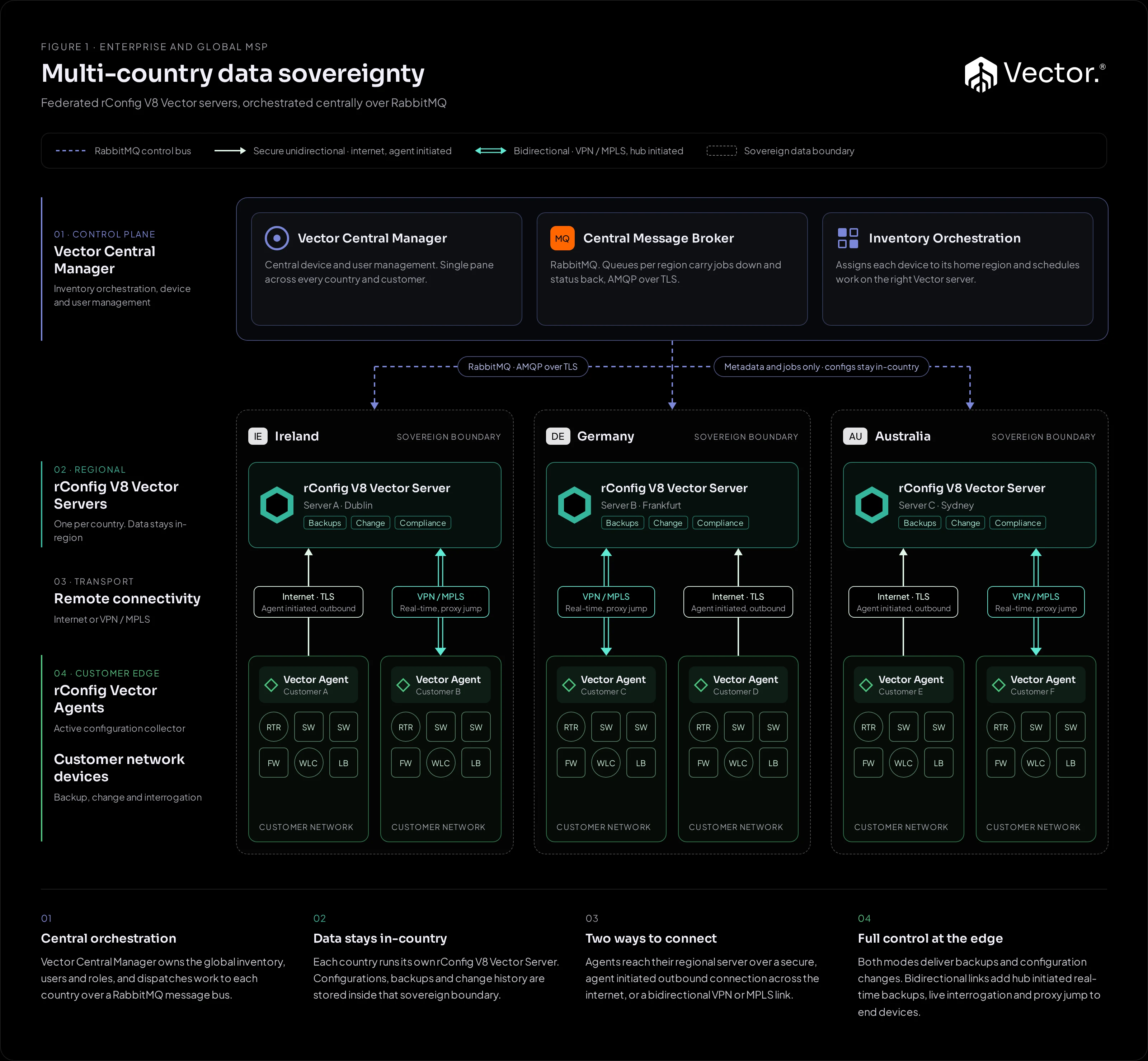
A federated deployment: each country runs its own rConfig V8 Vector Server, and the Vector Central Manager sits above them. Configurations, backups and change history are stored inside that country’s boundary, while the Central Manager gives you one view across every country and customer.
What it implements
| Component | Runs where | Role |
|---|---|---|
| Vector Central Manager | Central control plane | Owns the global inventory, users and roles. Assigns each device to its home region and schedules work on the right Vector Server. |
| RabbitMQ message broker | Alongside the Central Manager | Queues per region carry jobs down to the regional servers and status back up, over AMQP with TLS. |
| rConfig V8 Vector Server | One per country, inside that country’s boundary | Stores configurations, backups and change history. Runs backups, changes and compliance for its region. |
| Vector Agent | Inside each customer network | Collects configurations from devices and applies changes, reporting to its regional Vector Server. |
How traffic flows
- Jobs down: the Central Manager places work on that region’s RabbitMQ queue. The regional Vector Server picks it up and schedules it on the right agent.
- Collection: the agent connects to the devices, collects configurations or applies the change, and sends the results to its regional Vector Server.
- Results up: configuration data stays on the regional server. Only status and metadata go back to the Central Manager over RabbitMQ.
- Vector Access: where a customer is connected over a bidirectional link, the regional server can proxy jump through the agent to end devices, as in Figure 2.
Agents reach their regional server in either connectivity mode. See Connectivity.
Benefits
- Configuration data, backups and change history stay inside each country’s boundary.
- One pane across every country and customer, with central users and roles.
- Each region runs and scales on its own.
Pros
- Data residency per country.
- A single pane across every country and customer.
- Regions scale independently.
Cons and trade-offs
- The most components to run: a Central Manager, RabbitMQ and a Vector Server per country.
- More operational effort than a single-server design.
- For larger deployments, particularly those leveraging Vector Central Manager (CM), professional services are required for deployment, setup, and integration with existing systems.
When to use it
- You have data residency obligations, or customers in more than one country.
- You need one view of inventory, users and roles across several Vector Servers.
When not to use it
- All of your customers sit in one jurisdiction. A single Vector Server (Figure 2) or access nodes (Figure 3) is simpler.
- No metadata at all may leave a region. Run fully separate deployments per jurisdiction instead, each its own Figure 2 or Figure 3 design.
Growth path
- Add a Vector Server for each new country, inside that country’s boundary, and register it with the Central Manager.
- Where a jurisdiction does not allow metadata or jobs to cross its border, run a fully separate deployment for it.