


Single Vector server with customer access nodes
At a glance
| Components | One rConfig V8 Vector Server, shared customer access nodes, one Vector Agent per customer on each node |
| Connectivity | Bidirectional: agent to server over the MSP backbone, and access node to each customer over a VRF or tunnel |
| Where data lives | On the single Vector Server, as in Figure 2 |
| Vector Access | For every customer, scoped by role |
| Typical customer | MSPs with routed connectivity into each customer network, whose engineers need operational access to customer devices |
What it is
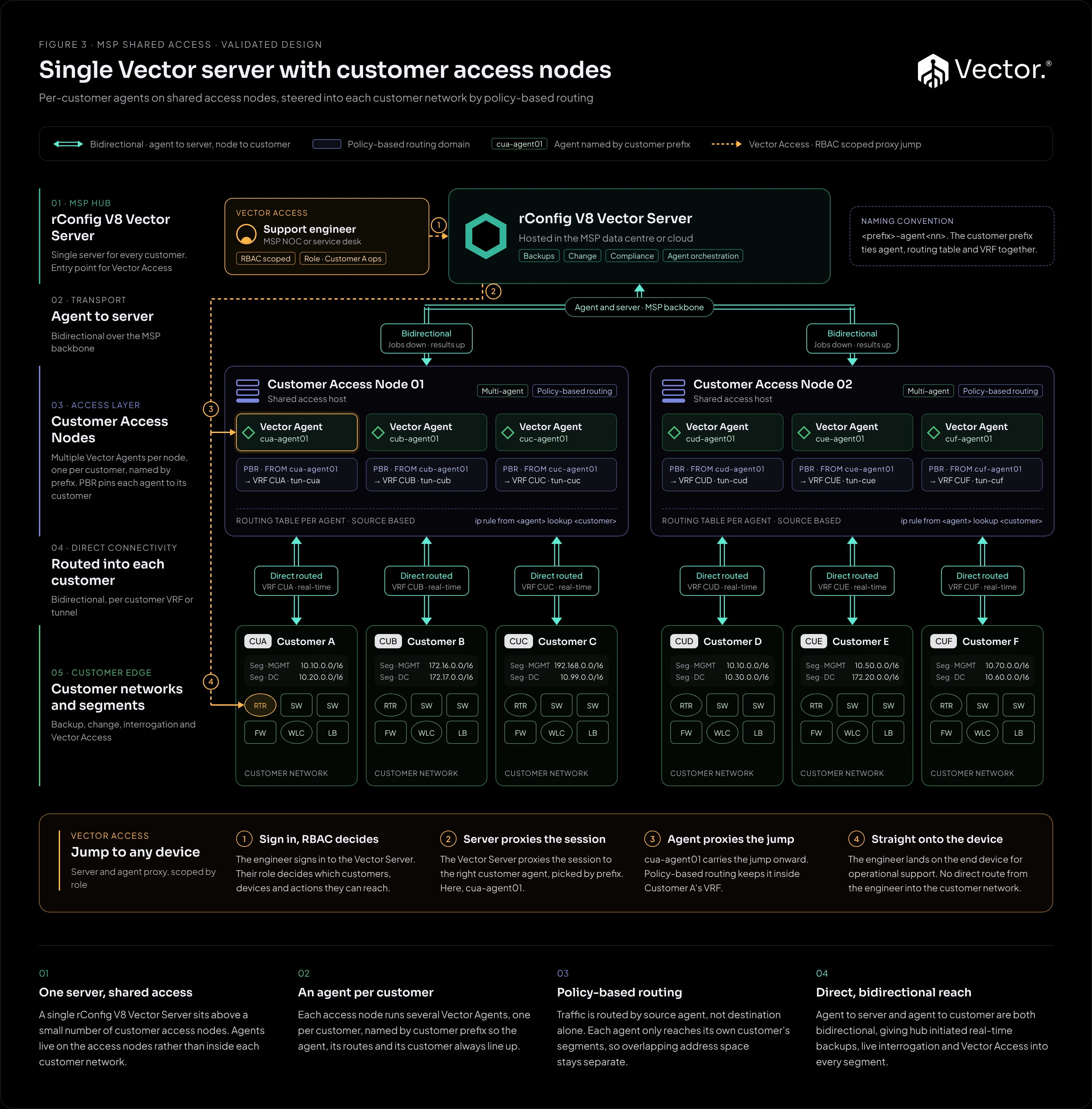
A single rConfig V8 Vector Server sits above a small number of shared customer access nodes. The agents live on the access nodes rather than inside each customer network. Each node runs several Vector Agents, one per customer, and policy-based routing pins each agent to its own customer’s segments.
What it implements
| Component | Runs where | Role |
|---|---|---|
| rConfig V8 Vector Server | MSP data centre or cloud | Backups, changes, compliance and agent orchestration for every customer. The entry point for Vector Access. |
| Customer access node | MSP infrastructure, with routed reach into customer networks | A shared host running several Vector Agents, one per customer. Policy-based routing by source agent keeps each agent inside its customer’s network. |
| Vector Agent | On an access node, one per customer | Collects configurations and applies changes for its customer only. Carries Vector Access sessions onward into the customer’s VRF. |
Naming by customer prefix
Each agent is named by customer prefix, in the form <prefix>-agent<nn>, for example cua-agent01 for Customer A. The prefix ties the agent, its routing table and the customer’s VRF or tunnel together, so the agent, its routes and its customer always line up.
Policy-based routing
Traffic on the access node is routed by source agent, not by destination alone. Each agent reaches only its own customer’s segments, so overlapping address space between customers stays separate.
Running several agents on one host needs rConfig V8.4.1 and Vector agent 2.0.1 or later. Each agent connects to its devices from its own outbound source address, which is what the access node’s routing keys on. See Running multiple agents on one host.
How traffic flows
- Jobs down: the Vector Server sends jobs to the right customer’s agent over the bidirectional link across the MSP backbone.
- Into the customer: the agent connects from its own source address. Policy-based routing on the access node sends the connection into that customer’s VRF or tunnel, and nowhere else.
- Results up: the agent returns configurations and job results to the Vector Server.
Because both legs are bidirectional, the server can also start real-time backups and live interrogation for every customer.
Vector Access
See the Vector Access guide for the concepts, and Vector Access in the docs for the procedure.
Benefits
- Customers do not host anything: the agents run on MSP infrastructure.
- Every customer gets hub-initiated operations, not only those on a VPN.
- Support engineers reach customer devices through one controlled path, scoped by role.
Pros
- Nothing installed inside customer networks.
- Real-time, hub-initiated operations for every customer.
- Vector Access for operational support, scoped by role.
- Per-customer isolation through naming and policy-based routing.
- Agents are added by adding a prefix, not a new site deployment.
Cons and trade-offs
- Needs routed, bidirectional connectivity (VRF, VPN or tunnel) into every customer network.
- Policy-based routing and naming discipline have to be designed and maintained.
- An access node is shared, so an outage affects every customer on that node.
- All customer data sits on one Vector Server, as in Figure 2.
When to use it
- You already have, or can build, routed reach into each customer network.
- Your engineers need hands-on access to customer devices for operational support.
- Customers prefer not to host an agent on their network.
When not to use it
- You have no routed path into customer networks. Use Figure 2 with agents inside each customer network.
- You have per-country data residency obligations. Use Figure 1.
Growth path
- Onboard a new customer by adding a prefixed agent and its routing on an existing access node.
- Add access nodes as the number of customers grows.
- Add Vector Prism so customers can see their own configurations, as in Figure 4.
- When you expand into countries with residency obligations, add regional Vector Servers and a Central Manager, as in Figure 1.