


Agent per security zone
At a glance
| Components | One rConfig V8 Vector Server in the enterprise management zone, a Vector Agent in each security zone |
| Connectivity | Secure unidirectional: each agent connects out to the server over TLS through its zone firewall. No inbound rules into any zone |
| Where data lives | On the single Vector Server. Backups, change history and policy results are held centrally and can be scoped per zone |
| Vector Access | Not in outbound-only mode (see Connectivity) |
| Typical customer | Segmented enterprises with strict zone firewalls, for example PCI, OT/ICS, DMZ and cloud environments |
What it is
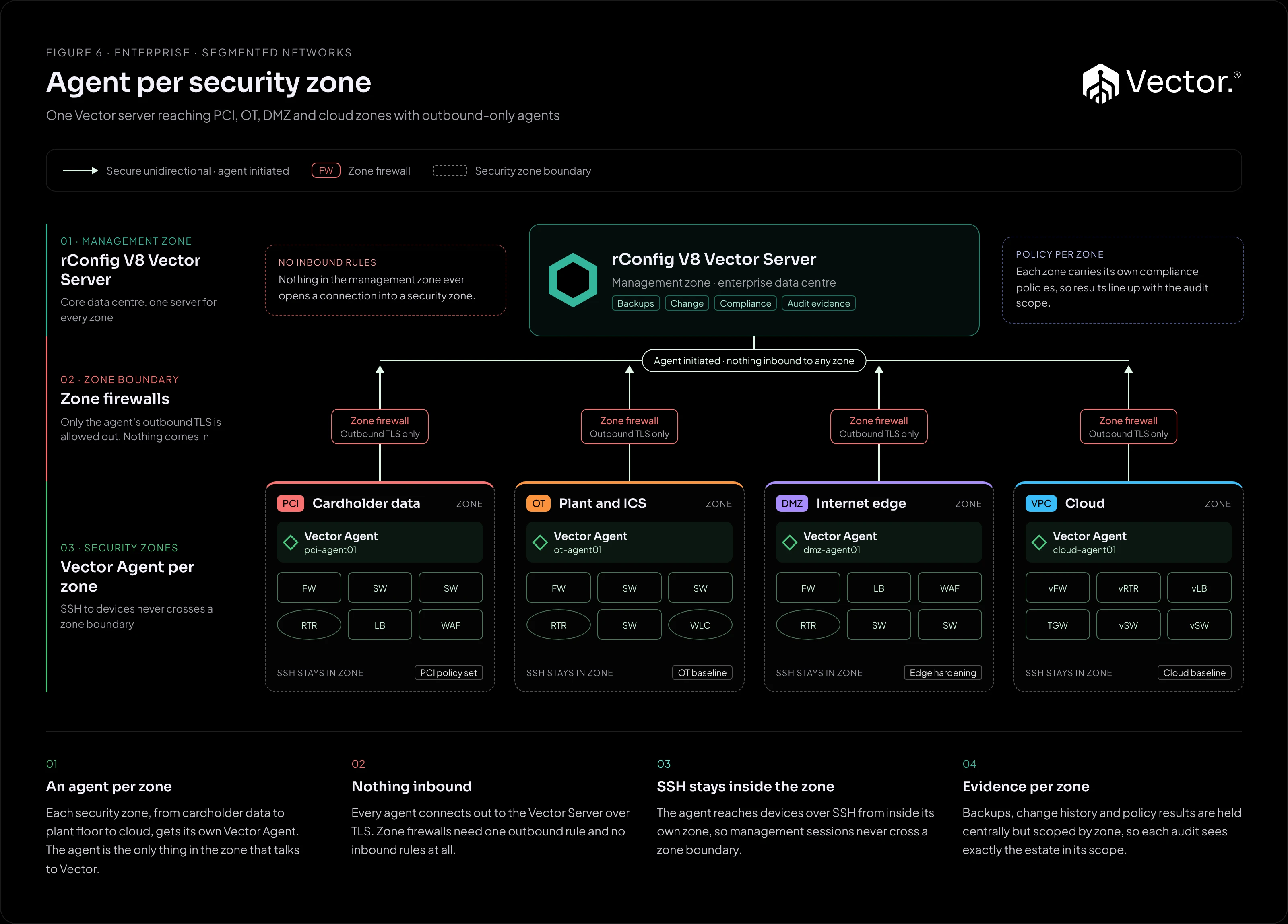
One rConfig V8 Vector Server in the enterprise management zone, and a Vector Agent inside each security zone: for example the PCI cardholder data environment, the OT/ICS plant network, the DMZ and a cloud VPC. The agent is the only thing in the zone that talks to Vector, and it only ever connects outwards.
What it implements
| Component | Runs where | Role |
|---|---|---|
| rConfig V8 Vector Server | Enterprise management zone | Backups, change history, compliance and audit evidence for every zone. |
| Zone firewall | At each zone boundary | Allows the agent’s outbound connection to the Vector Server. No inbound rules. |
| Vector Agent | Inside each security zone | Collects from the zone’s devices over SSH and applies changes, from inside the zone. |
Scoping per zone
Devices in each zone are assigned to that zone’s agent. On the compliance side, a policy assignment targets one scope: a single device, a device category, a tag or a Smart Group (V8.2.1 and later). Tag or group each zone’s devices consistently, and you can give each zone its own policy assignments, so results line up with that zone’s audit scope. See Policy assignments.
Access to the data can be scoped the same way. Users can be restricted to a zone’s backups and change history by role and tag, so a zone’s engineers or auditors see only that zone. See Roles and permissions.
How traffic flows
- Agent connects out: each agent opens an outbound, encrypted connection to the Vector Server over HTTPS (port 443 or the configured port), through its zone firewall. All connections are agent initiated.
- Jobs: the agent picks up its scheduled backup and change jobs over that connection.
- Collection inside the zone: the agent reaches its devices over SSH from inside its own zone, so management sessions never cross a zone boundary.
- Results out: the agent returns configurations and results to the Vector Server, which stores them and runs compliance against each zone’s assignments.
Nothing in the management zone opens a connection into a security zone.
Benefits
- Each zone firewall carries one outbound rule and no inbound rules.
- Device management traffic stays inside the zone it belongs to.
- One server holds the evidence for every zone, organised to match each audit scope.
Pros
- No inbound firewall rules into any zone.
- SSH stays inside the zone.
- One server for every zone.
- Audit evidence lines up with each zone’s scope.
- Add a zone by adding an agent.
Cons and trade-offs
- An agent per zone to deploy and maintain.
- Outbound-only mode supports scheduled backups and configuration changes only. There are no hub-initiated real-time backups, live interrogation or proxy jump to end devices in the zones.
- Each zone firewall still needs an outbound rule approved.
- Per-zone scoping needs consistent tagging or grouping.
When to use it
- Your network is split into security zones with strict firewalls, and inbound connections into a zone are not allowed.
- Auditors need evidence scoped to a zone, such as the PCI cardholder data environment.
- You want one Vector Server rather than one per zone.
When not to use it
- Engineers need real-time, hub-initiated operations or proxy jump into the zones. Those need bidirectional connectivity (see Connectivity).
- Policy forbids even outbound connections from a zone to the management zone.
Growth path
- Add a zone by adding an agent.
- Add policy assignments for each new zone’s tag, category or Smart Group.