


Co-managed MSP with Vector Prism
At a glance
| Components | rConfig Vector Prism, one or more rConfig V8 Vector Servers, Vector Agents. A layer over Figure 2 or Figure 3, or over the regional servers of Figure 1 |
| Connectivity | Customer users to Prism over HTTPS. Prism to each Vector Server over the rConfig API, read only. Agents connect as in the underlying design |
| Where data lives | On the Vector Servers. Prism stores no device data or configuration content of its own |
| Vector Access | For MSP engineers in Vector, as in the underlying design. Customer users have none |
| Typical customer | MSPs whose customers want to see their own configurations and change history |
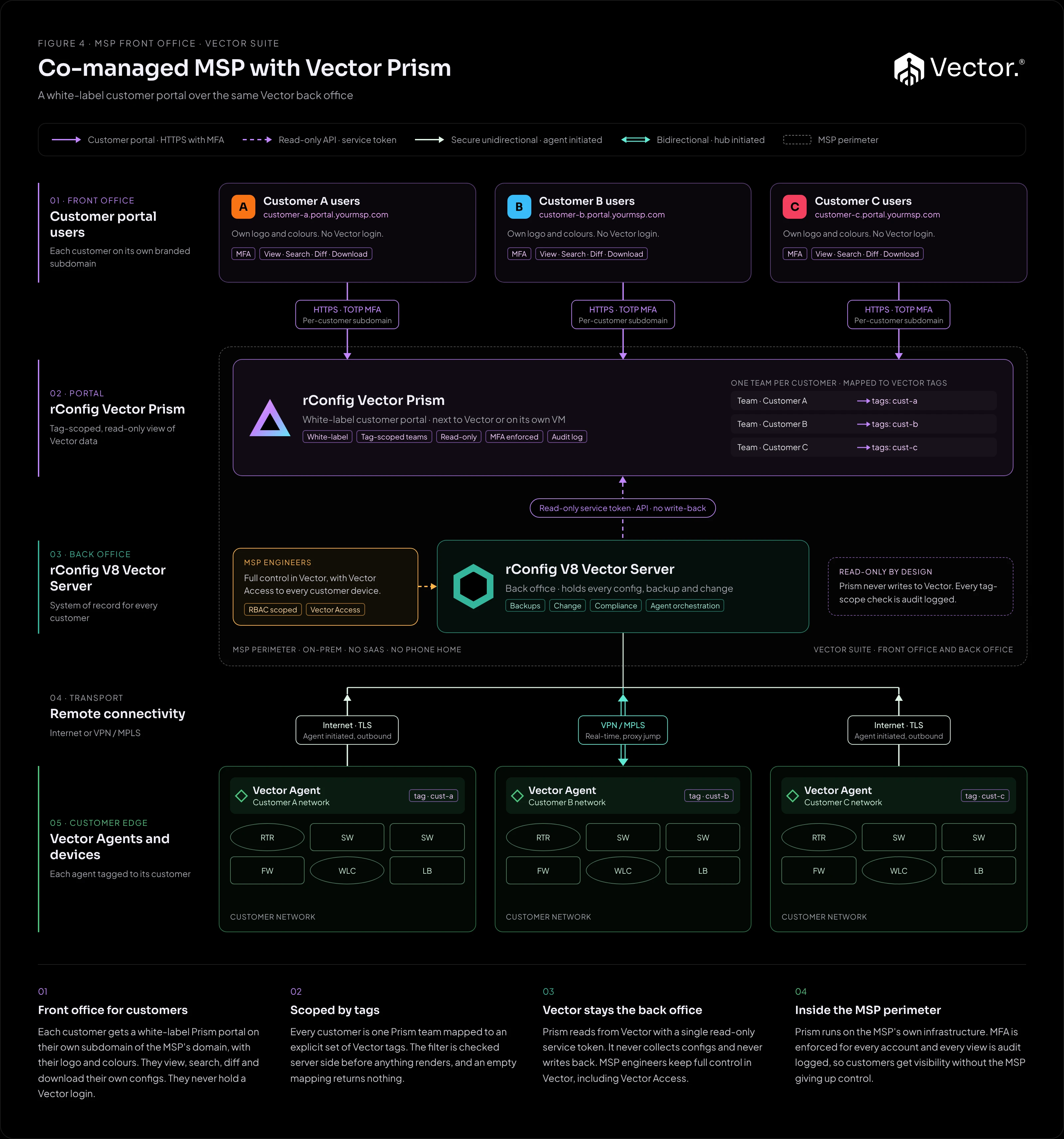
What it is
Vector Prism is a white-label customer portal: the front office of the Vector suite, with Vector as the back office. Each customer’s users sign in to a portal that wears that customer’s brand, on a branded subdomain of the MSP’s domain (for example customer-a.portal.yourmsp.com), and see only the devices that belong to them. MSP engineers keep working in Vector exactly as before.
What it implements
| Component | Runs where | Role |
|---|---|---|
| rConfig Vector Prism | The MSP’s own infrastructure, usually next to Vector or on a dedicated VM | Multi-tenant portal. Applies each customer’s tag scope to every request and renders the result under that customer’s brand. |
| rConfig V8 Vector Server | MSP data centre or cloud | System of record for every customer. Owns the configuration data and talks to the agents. |
| Vector Agents | As in Figure 2 or Figure 3 | Collect configurations. Each device carries its customer’s tag in Vector. |
Teams and tags
Each customer is one Prism team, mapped to an explicit set of Vector tags. A device is visible to a team only if it carries one of the team’s mapped tags, and the check is enforced server side on every request. An empty mapping shows nothing: Prism fails closed. Tag mappings combine with OR, so a device matching any mapped tag is visible. One customer-specific tag per customer is the recommended pattern.
Read only by design
Prism is a read-only consumer of the rConfig API. It reads device and tag data with a single rConfig API token. The token is read-only, and Vector enforces it, so Prism never collects configurations, never touches a device and never writes back to Vector.
Users and sign-in
Customer users view, search, diff and download their own configurations. They never hold a Vector login. Every account, admin or customer, must enrol TOTP two-factor authentication before it can use the portal.
How traffic flows
- Customer sign-in: a customer user signs in to their branded portal over HTTPS and completes TOTP.
- Tag-scoped read: Prism applies the user’s team scope, then returns a cached response or calls the Vector Server’s API live.
- Render: only devices carrying the team’s mapped tags are rendered. Nothing goes back to Vector.
- MSP operations: in parallel, MSP engineers run backups, changes, compliance and Vector Access from Vector, over the connectivity of the underlying design.
If the Vector Server is unreachable, Prism serves a last-good cache and shows customers a “data may be out of date” badge instead of an error.
Benefits
- Customers get self-service visibility of their own configurations, which takes routine requests off the MSP’s service desk.
- The MSP keeps one system of record and one set of operational tools in Vector.
- Every customer view of a device or configuration is audit logged, along with admin changes, sign-ins and permission denials, which gives evidence for customer reviews.
Pros
- Customers self-serve config visibility.
- No Vector logins handed out.
- Tag-scoped and read-only by design.
- MFA and audit logging built in.
- Per-customer branding, each on its own subdomain of the MSP’s domain.
- Runs inside the MSP perimeter: no rConfig-hosted SaaS, and Prism does not phone home.
Cons and trade-offs
- Another application to run and patch: a Laravel application on PHP with the Apache web server, a MariaDB or MySQL database, and a queue worker (Horizon or
queue:work) for mail. - Tag hygiene in Vector becomes an access control, so a wrong tag means a device shows up for the wrong customer.
- Read only, so customers cannot request or make changes through it.
- Customers cannot use their own domain. Each portal is a branded subdomain of the MSP’s domain, so the MSP’s DNS and certificate (a wildcard works well) must cover every customer subdomain.
- A Prism licence is required on top of the Vector licence.
When to use it
- You run Figure 2 or Figure 3 and customers ask for access to their own configurations.
- You want to give customers visibility without handing out Vector accounts.
- Your devices already carry, or can carry, one tag per customer.
When not to use it
- Customers need to request or make changes themselves. Prism is read only.
- Your tagging in Vector is inconsistent and you cannot commit to maintaining it. Fix the tags first.
Growth path
- Start with instance-wide branding, then enable per-team branding as customers ask for their own logo and colours.
- Onboard each new customer as a team with its own tag mapping.
- One Prism instance can front several Vector servers, including the regional servers of a multi-country estate (Figure 1), so customers keep one portal as you expand into new countries.