


Distributed by point of presence
At a glance
| Components | One rConfig V8 Vector Server in the NOC, a Vector Agent in each point of presence (PoP) |
| Connectivity | Bidirectional, over the provider’s own management network (out-of-band DCN or in-band management) |
| Where data lives | On the single Vector Server in the NOC |
| Vector Access | From the NOC, through the PoP’s agent, to any element |
| Typical customer | ISPs and telcos running one provider network across several PoPs |
What it is
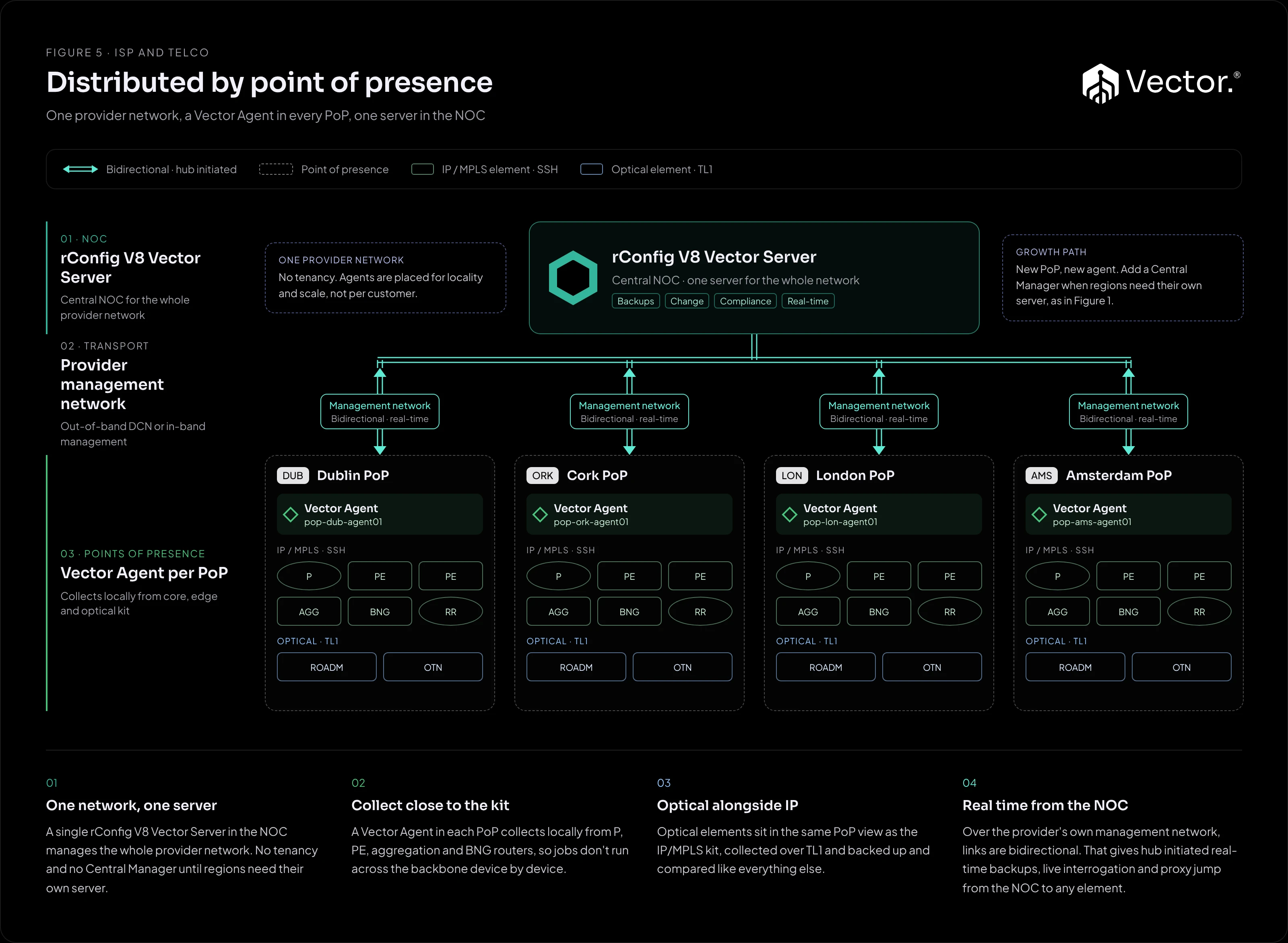
A single provider network with no tenancy. One rConfig V8 Vector Server in the NOC manages the whole network, and a Vector Agent in each PoP collects from the equipment in that PoP. Agents are placed for locality and scale, not per customer.
What it implements
| Component | Runs where | Role |
|---|---|---|
| rConfig V8 Vector Server | Central NOC | Backups, changes, compliance and real-time operations for the whole provider network. |
| Vector Agent | One in each PoP | Collects locally from the PoP’s kit: P, PE, aggregation, BNG and route reflector routers over SSH, and optical elements over TL1. |
Collecting inside the PoP means jobs do not run across the backbone device by device. Each agent works on its own PoP’s kit and returns the results to the NOC.
Optical elements
The PoP agent also collects the PoP’s optical elements, such as ROADM and OTN nodes, over TL1, alongside SSH for the IP/MPLS kit. Optical configurations are backed up and compared in the same view as the routers. For how TL1 collection works, including elements reached through a gateway node, see the Optical (TL1) library.
How traffic flows
- Jobs down: the Vector Server in the NOC sends jobs to each PoP’s agent over the management network.
- Local collection: the agent connects to the routers in its PoP over SSH and to the optical elements over TL1, and collects configurations or applies the change.
- Results up: the agent returns configurations and results to the Vector Server.
- Real time from the NOC: because the management network is bidirectional, the NOC can start real-time backups, interrogate devices live and proxy jump through the PoP’s agent to any element.
Benefits
- Collection traffic stays inside each PoP instead of crossing the backbone.
- The NOC has one server and one view of the whole provider network.
- Engineers in the NOC get hub-initiated operations to every PoP.
Pros
- Collection close to the kit in every PoP.
- One server and one view of the whole network.
- Scale by adding agents.
- IP/MPLS and optical in one place.
- Real-time operations from the NOC.
Cons and trade-offs
- The management network must reach every PoP agent in both directions.
- One server holds the whole network, so size it for that, and it sits in one location.
- An agent per PoP to deploy and keep updated.
Size a single server for a whole provider network with the rConfig team. Contact them at info@rconfig.com.
When to use it
- You run one provider network, with no customer tenancy in rConfig.
- Your PoPs share a management network (out-of-band DCN or in-band) that reaches the NOC in both directions.
- You want collection to stay local to each PoP.
When not to use it
- Regions need their own server, for example for data residency. Use Figure 1.
- You manage many separate customer networks rather than one provider network. Use Figure 2 or Figure 3.
Growth path
- Add a PoP by adding an agent.
- Add a Central Manager when regions need their own server, as in Figure 1.