


Vector Access for MSP operations
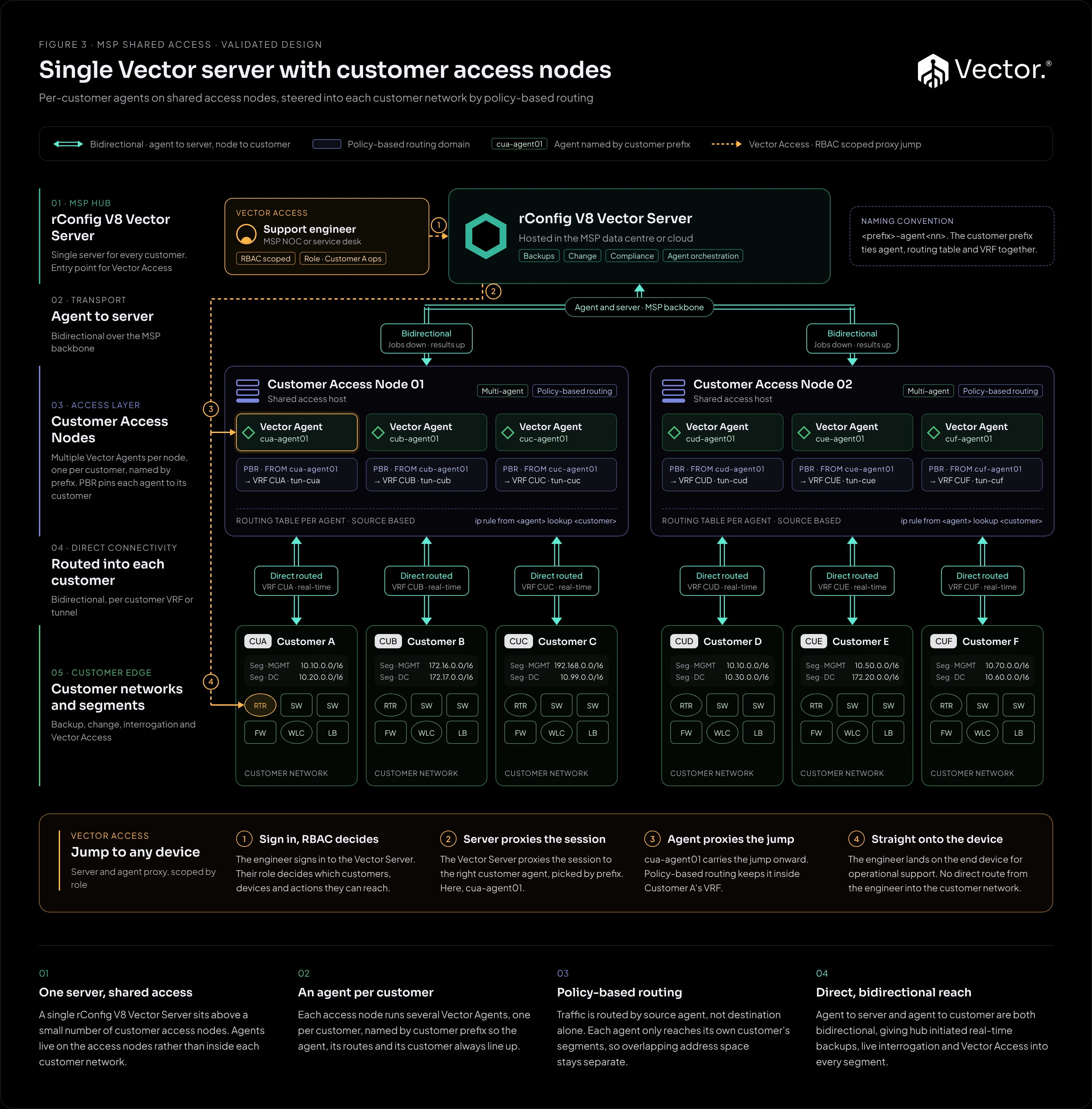
Vector Access lets a support engineer jump from the Vector Server, through the customer’s Vector Agent, to an end device. The engineer never needs a direct route into the customer network, and device credentials stay on the server.
Vector Access requires bidirectional mode: a VPN, MPLS or a private WAN between the Vector Server and the agent’s site. It does not run over an agent’s outbound-only connection.
This page covers the concept. The procedure, commands and settings are in Vector Access in the main docs.
The path
The path below follows Figure 3, where agents run on shared access nodes. The same server-to-agent-to-device chain applies to an agent inside a customer network, as in Figure 2.
What makes it work
- Bidirectional connectivity: a VPN, MPLS or private WAN between the Vector Server and the agent’s site. See Connectivity.
- Vector Hub: an optional service on the rConfig server that gives each enabled agent a persistent live channel. Vector Access sessions are relayed over it. See Vector Hub and the live channel.
- The live channel on the agent: enabled per agent, off by default. The agent must show as connected on the Hub page.
- Credentials on the server: device credentials are resolved on the rConfig server and are never printed or written to any log, including session transcripts.
- Optional recording: a session can be recorded to a readable transcript.
Where it fits
| Architecture | Vector Access |
|---|---|
| Figure 1: Multi-country | Through the regional Vector Server, over bidirectional links |
| Figure 2: Single server | For bidirectional (VPN or MPLS) customers |
| Figure 3: Access nodes | For every customer, scoped by role |
| Figure 4: Prism co-managed | For MSP engineers in Vector, as in the underlying design. Prism users have none |
| Figure 5: ISP by PoP | From the NOC, through the PoP’s agent, to any element |
| Figure 6: Security zones | Not in outbound-only mode |
Vector Access is available wherever the agent’s site is connected in bidirectional mode, and not for agents on an outbound-only connection.