


Vector architecture overview
Vector separates collection, processing and control so that each can scale on its own. Vector Agents collect configurations close to the devices. The rConfig V8 Vector Server stores and processes them. For multi-country estates, the optional Vector Central Manager orchestrates inventory across several Vector Servers.
Agents connect to their Vector Server in one of two modes, and one server can mix both:
- Secure unidirectional (internet): the agent opens an outbound, encrypted connection to the server. No inbound rules at the customer edge. Scheduled backups and changes are supported.
- Bidirectional (VPN, MPLS or private WAN): the server has a routed path into the customer network, which adds hub-initiated real-time backups, live interrogation and proxy jump to end devices.
See Connectivity for the detail.
Figures 1 to 3 are validated designs. Figures 4 to 6 are reference designs.
The six designs
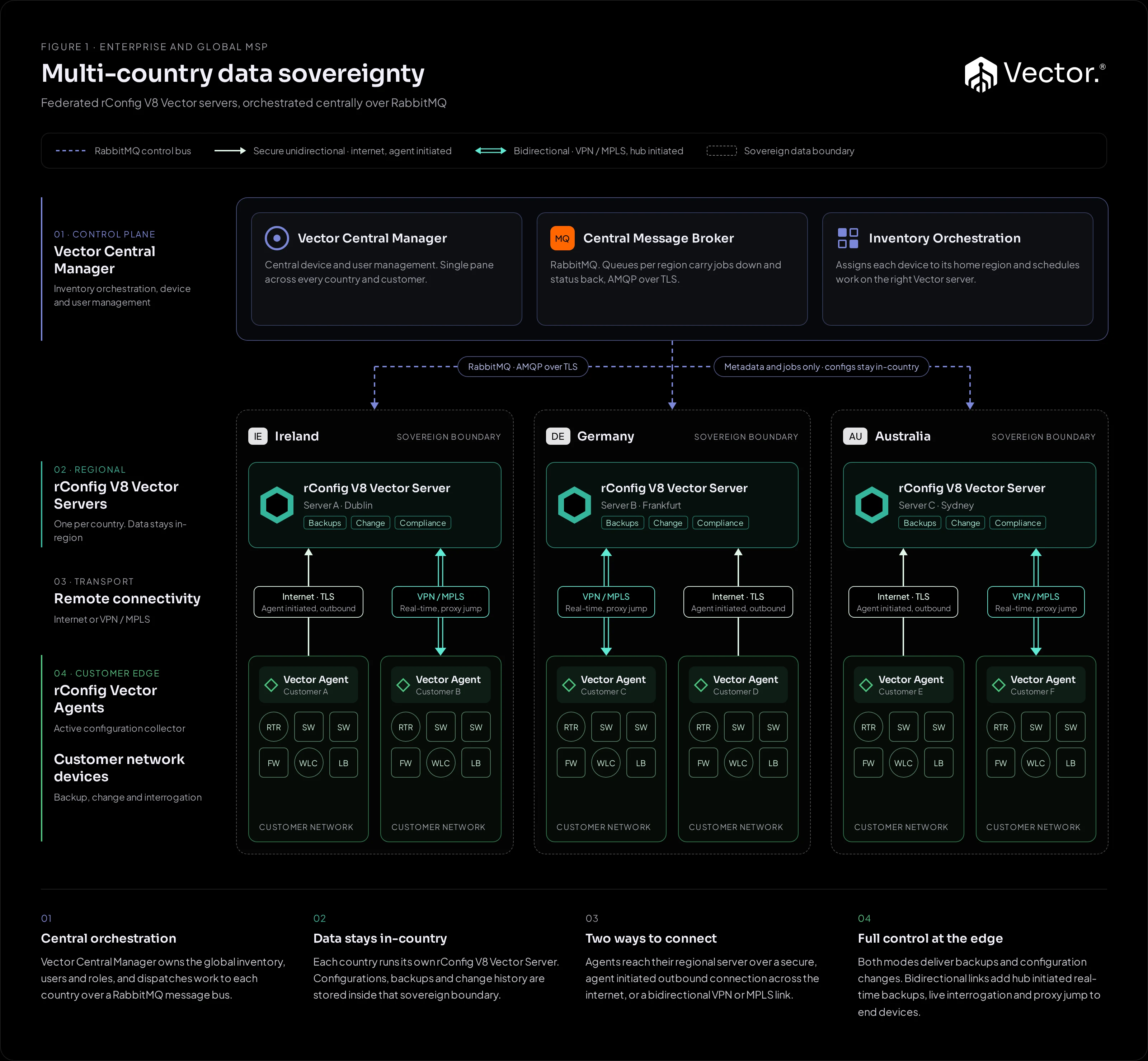
Figure 1Validated design Multi-country data sovereignty A Vector Server per country under a Central Manager. Configuration data stays in-country.
Interactive diagram ↗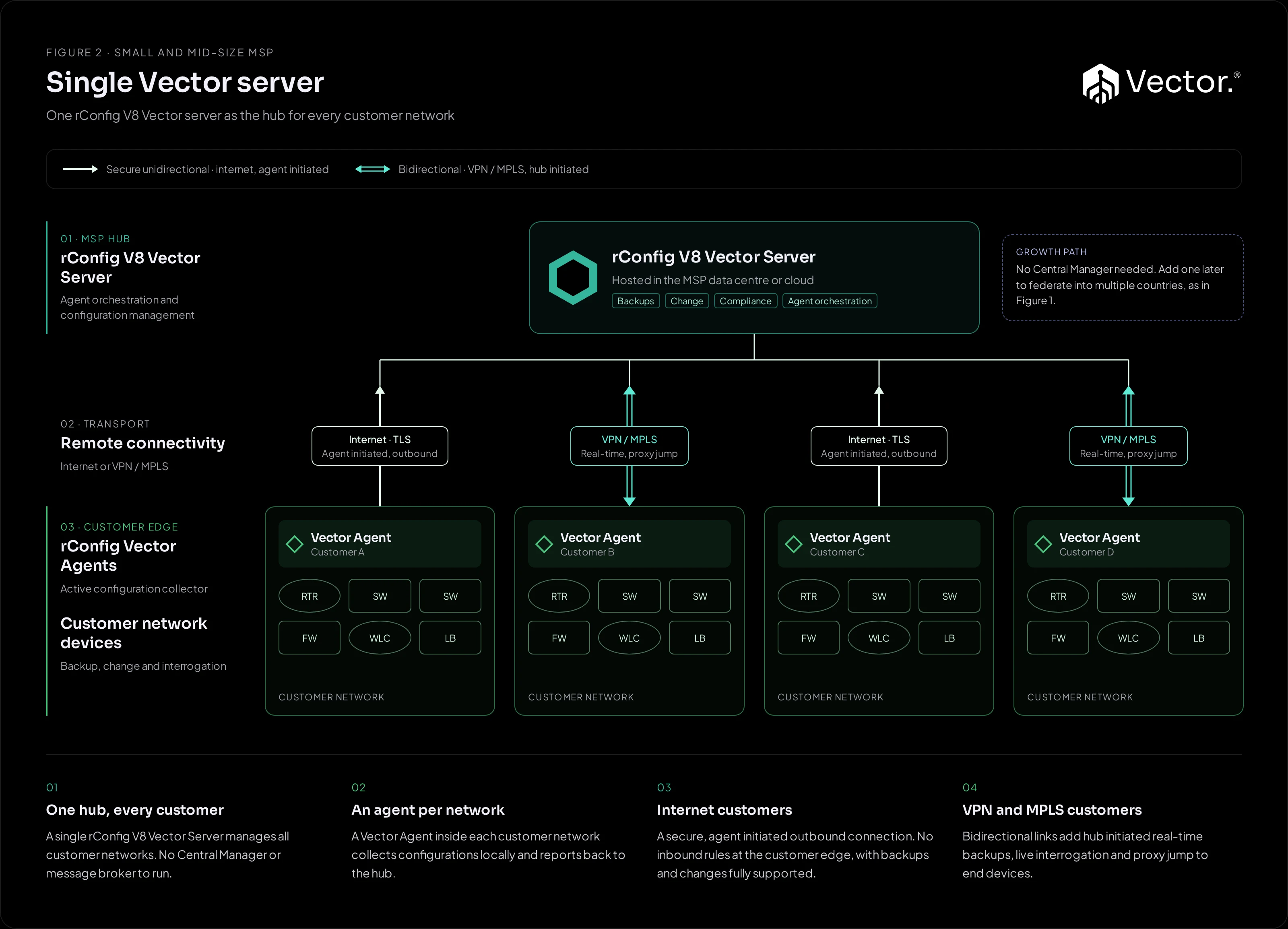
Figure 2Validated design Single Vector server One hub for every customer network, with an agent in each. The fewest moving parts.
Interactive diagram ↗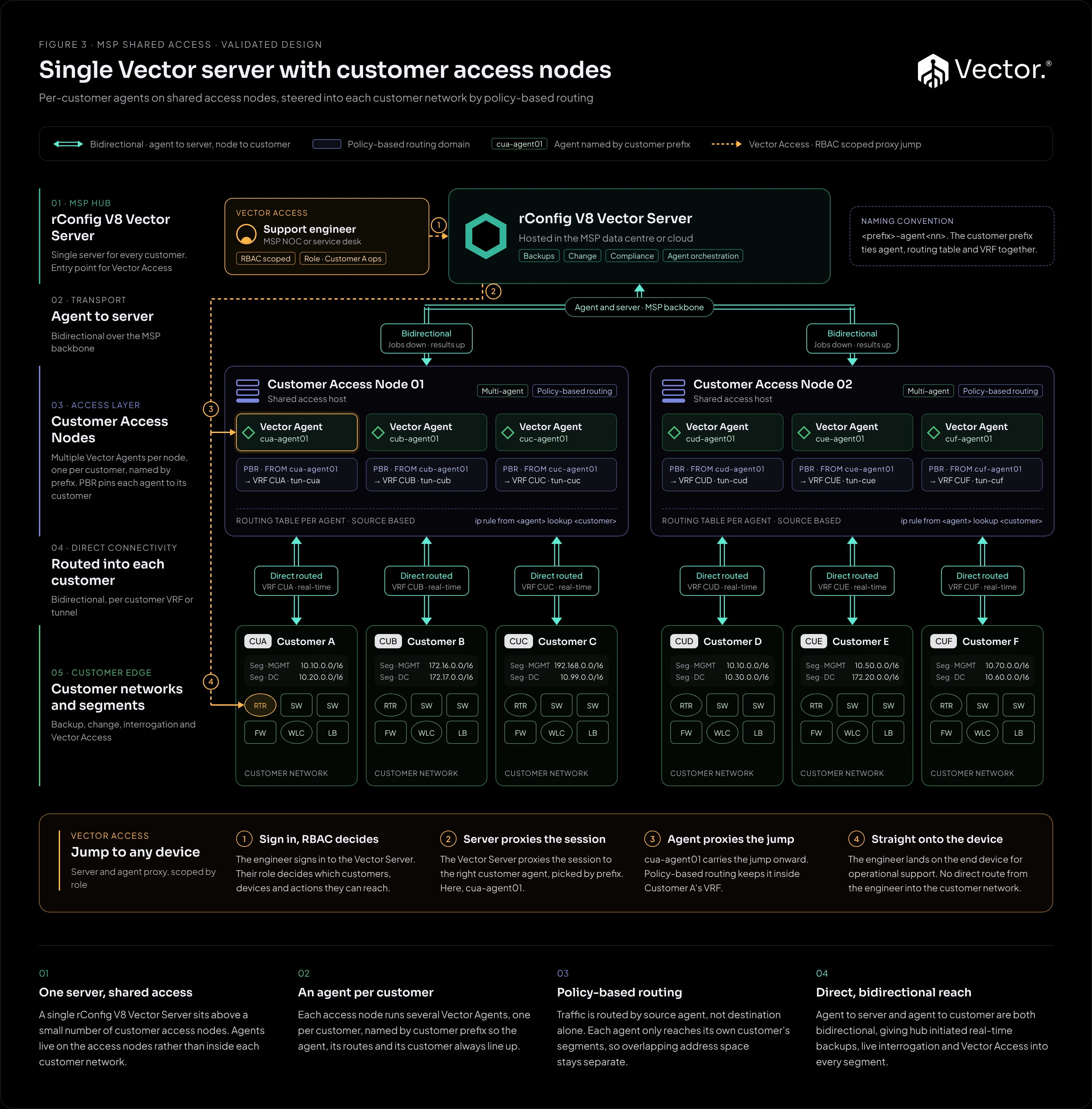
Figure 3Validated design Customer access nodes Per-customer agents on shared access nodes, with Vector Access for operational support.
Interactive diagram ↗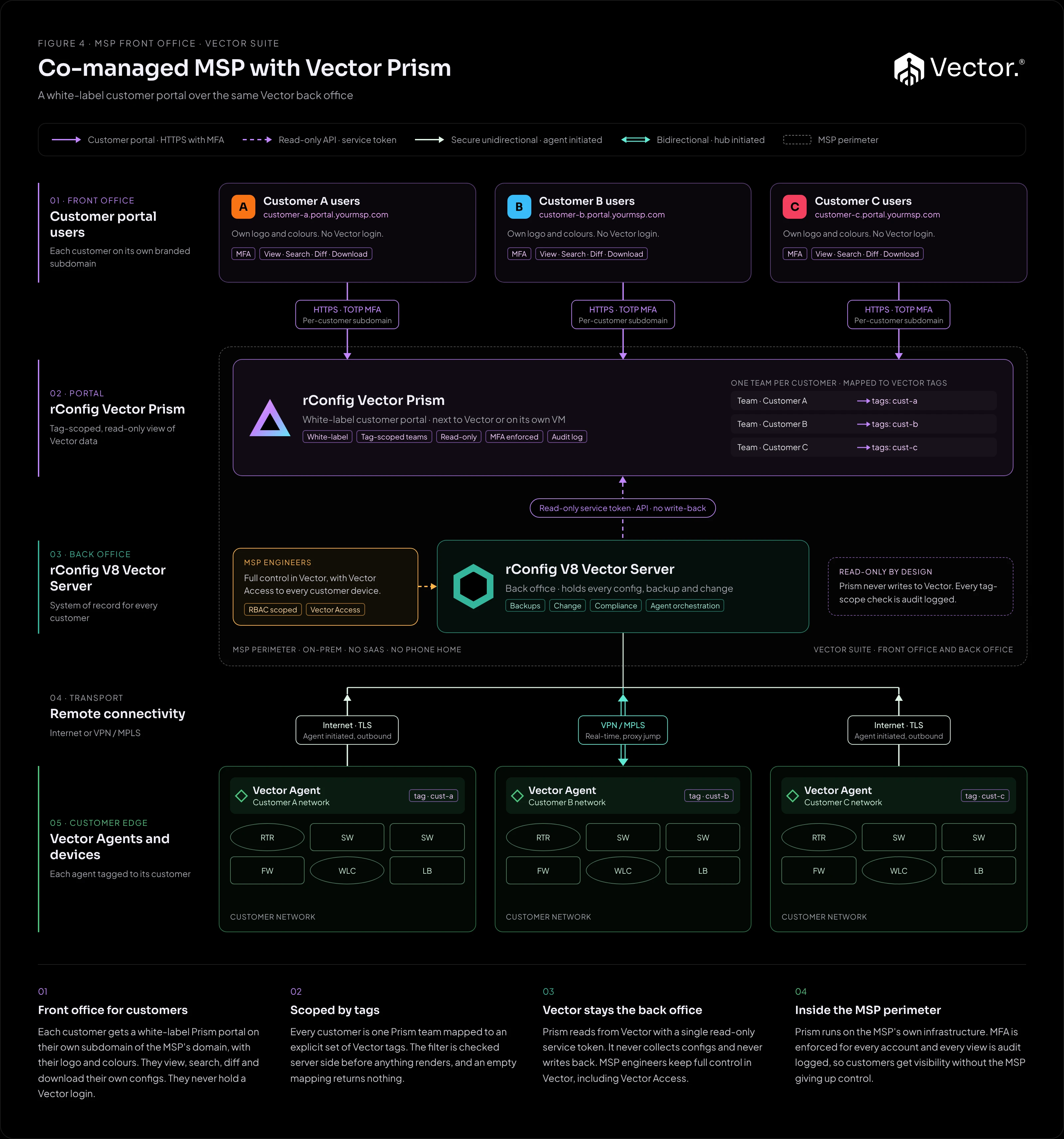
Figure 4Reference design Co-managed MSP with Vector Prism A white-label, tag-scoped, read-only customer portal over Figure 2 or Figure 3.
Interactive diagram ↗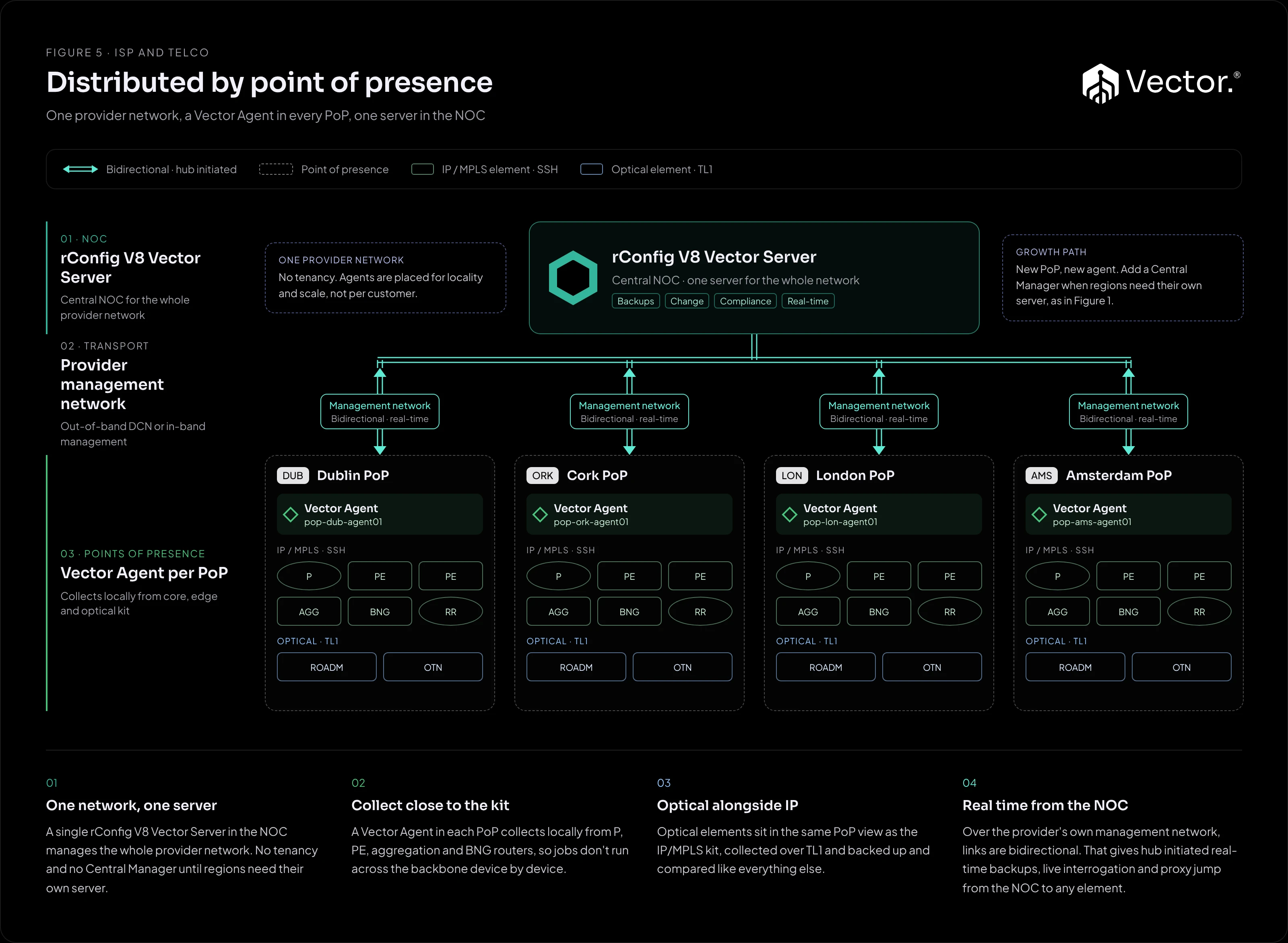
Figure 5Reference design Distributed by point of presence One server in the NOC and an agent in every PoP of a single provider network.
Interactive diagram ↗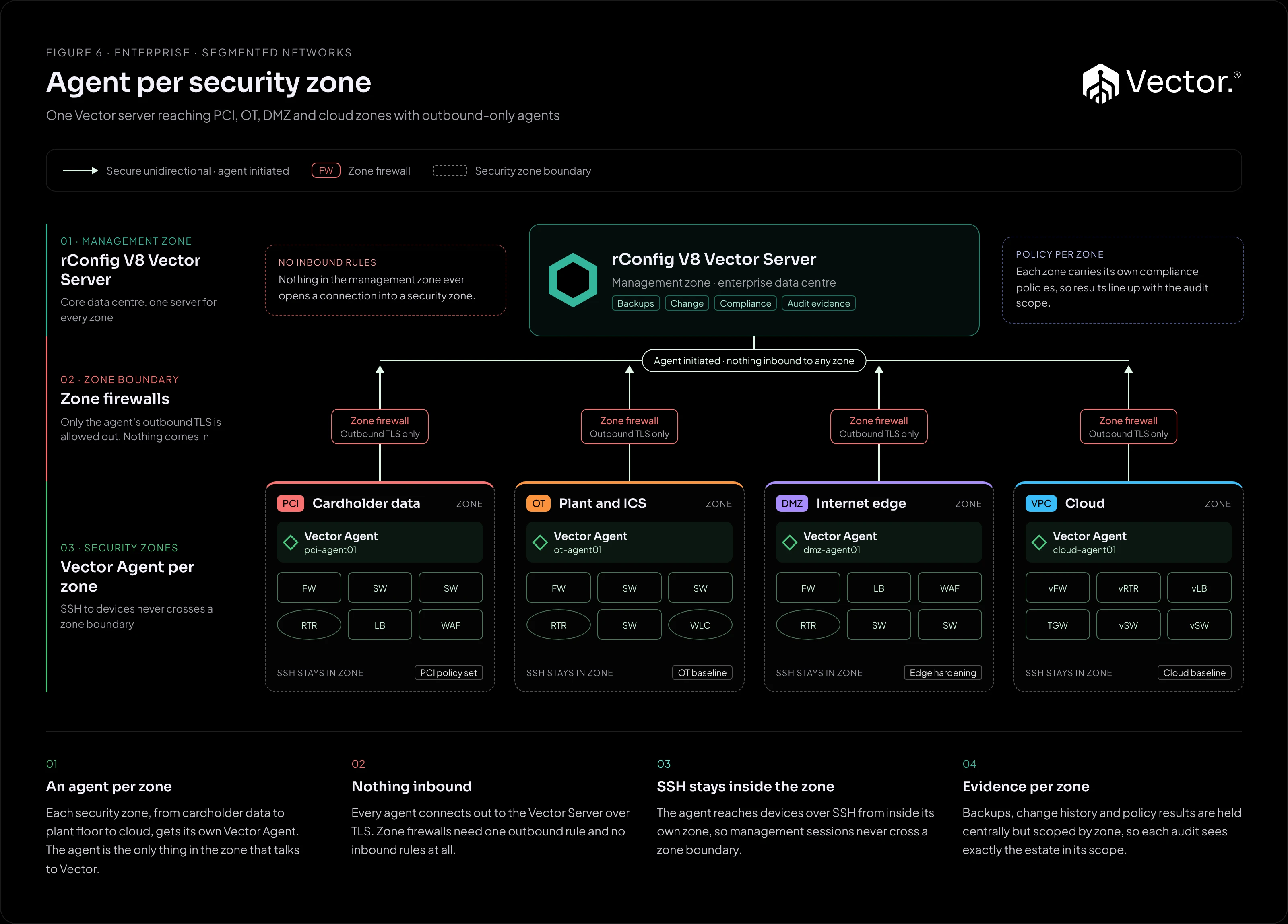
Figure 6Reference design Agent per security zone Outbound-only agents inside each security zone. No inbound rules, and SSH stays in the zone.
Interactive diagram ↗
Each card opens its guide. Use Interactive diagram to open the full-size figure in a new tab, or open all six figures on one page.
Comparison
One row per architecture. On a narrow screen, scroll the table sideways.
| Architecture | Shape | Components to run | Where config data lives | Connectivity | Vector Access | Best fit | Status |
|---|---|---|---|---|---|---|---|
| Figure 1: Multi-country | Central Manager above one Vector Server per country | Central Manager, RabbitMQ, a Vector Server per country, agents | On each country’s Vector Server. Only metadata and jobs cross regions | Agents to their regional server in either mode. Central Manager to servers over RabbitMQ (AMQP over TLS) | Over bidirectional links, as in Figure 2 | Global enterprises and MSPs with data residency obligations | Validated design |
| Figure 2: Single server | One Vector Server as the hub, an agent in each customer network | One Vector Server, agents | On the single Vector Server | Either mode, mixed on one server | For bidirectional (VPN or MPLS) customers | Small and mid-size MSPs, single-region enterprises | Validated design |
| Figure 3: Access nodes | One Vector Server above shared access nodes, one agent per customer on each node | One Vector Server, access nodes running the agents | On the single Vector Server | Bidirectional: agent to server, and access node to each customer segment | For every customer, scoped by role | MSPs with routed reach into each customer whose engineers need operational access | Validated design |
| Figure 4: Prism co-managed | A customer portal layered over Figure 2 or Figure 3, or over the regional servers of Figure 1 | Vector Prism, plus the underlying design | On the Vector Server. Prism stores no configuration content | Customers to Prism over HTTPS. Prism reads the Vector API. Agents as in the underlying design | For MSP engineers in Vector. Customers have none | MSPs whose customers want to see their own configs | Reference design |
| Figure 5: ISP by PoP | One Vector Server in the NOC, an agent in every PoP | One Vector Server, an agent per PoP | On the single Vector Server in the NOC | Bidirectional over the provider’s management network | From the NOC to any element | ISPs and telcos running one provider network | Reference design |
| Figure 6: Security zones | One Vector Server in the management zone, an agent in each security zone | One Vector Server, an agent per zone | On the single Vector Server, scoped per zone | Secure unidirectional: outbound TLS through each zone firewall | Not in outbound-only mode | Segmented enterprises with strict zone firewalls | Reference design |
Choosing an architecture
- Do you have data residency obligations, or customers in several countries? Use Figure 1. Configuration data stays inside each country’s boundary, with one pane across all of them.
- Are you managing one provider network spread across points of presence? Use Figure 5. An agent in each PoP collects locally, and the NOC runs one server.
- Is your enterprise network split into security zones behind strict firewalls? Use Figure 6. Outbound-only agents mean no inbound rules into any zone.
- Do you have many customers, reached from shared infrastructure? Use Figure 3. Nothing is installed in the customer network, and Vector Access gives engineers role-scoped jumps to end devices.
- Otherwise, use Figure 2. It is the quickest to stand up and the simplest to run.
Do customers need to see their own configurations? Add Figure 4 on top. One Prism instance can front Figure 1, 2 or 3.