


Single Vector server
At a glance
| Components | One rConfig V8 Vector Server, a Vector Agent in each customer network |
| Connectivity | Secure unidirectional (internet, agent initiated) or bidirectional (VPN or MPLS, hub initiated), mixed on one server |
| Where data lives | On the single Vector Server, in the MSP data centre or cloud |
| Vector Access | For bidirectional (VPN or MPLS) customers, through the customer’s agent |
| Typical customer | Small and mid-size MSPs, and enterprises with centralised IT in a single region |
What it is
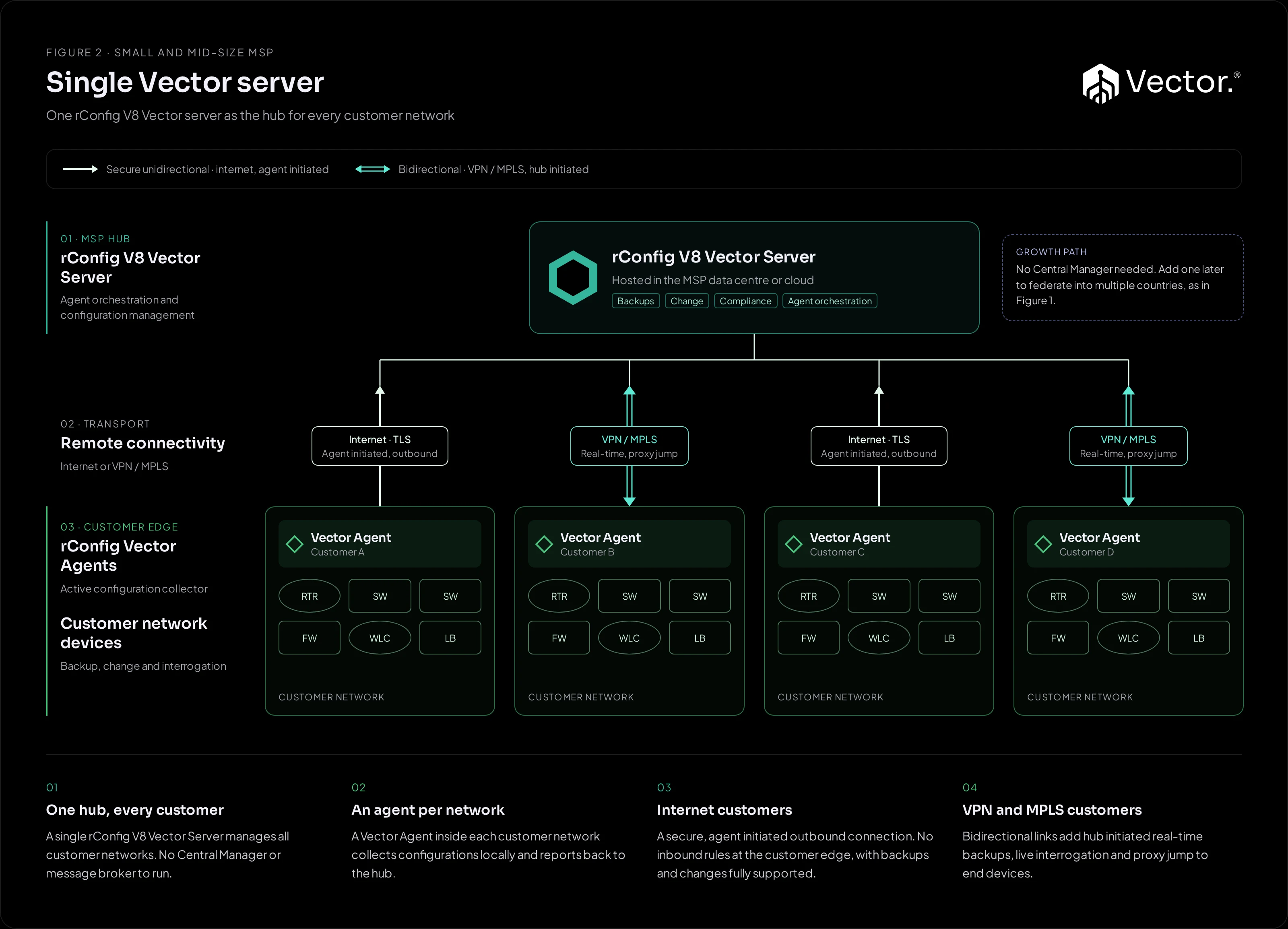
A hub-and-spoke deployment. One rConfig V8 Vector Server, hosted in the MSP data centre or cloud, manages every customer network. A Vector Agent inside each customer network collects configurations locally and reports back to the hub. There is no Central Manager or message broker to run.
What it implements
| Component | Runs where | Role |
|---|---|---|
| rConfig V8 Vector Server | MSP data centre or cloud | Agent orchestration and configuration management: backups, changes, compliance, reporting and notifications for every customer. |
| Vector Agent | Inside each customer network | Active configuration collector. Connects to devices over SSH, collects configurations and applies changes. |
How traffic flows
- Jobs down: the Vector Server schedules backup and change jobs for each customer’s agent.
- Collection: the agent connects to the customer’s devices, collects configurations or applies the change.
- Results up: the agent sends the results to the Vector Server over its secure connection. The server stores them and processes them for notifications, reports and compliance.
How the agent and server talk depends on the customer’s connectivity:
- Internet customers use a secure, agent-initiated outbound connection. No inbound rules are needed at the customer edge, and backups and changes are fully supported.
- VPN and MPLS customers get bidirectional mode, which adds hub-initiated real-time backups, live interrogation and proxy jump to end devices.
Both modes can run side by side on the same server. See Connectivity.
Benefits
- One server to install, patch and back up for every customer.
- Onboard internet customers without asking them to open inbound firewall rules.
- Add hub-initiated operations for customers that already have a VPN or MPLS link, without changing the design.
Pros
- Fewest moving parts.
- Fastest to stand up.
- Mixed connectivity on one server.
- No inbound rules at the customer edge for internet customers.
Cons and trade-offs
- All customer data sits in one location, so it does not meet per-country residency on its own.
- Capacity planning for every customer happens on one server.
- An agent is deployed inside each customer network.
When to use it
- You are a small or mid-size MSP, or an enterprise with centralised IT in one region.
- Your customers are happy to host a Vector Agent in their network.
- You want the simplest design to run.
When not to use it
- You have per-country data residency obligations. Use Figure 1.
- You cannot install anything inside customer networks, but you do have routed reach into them. Use Figure 3.
Growth path
- Add a Vector Central Manager to federate into several countries, as in Figure 1.
- Add shared customer access nodes, as in Figure 3.
- Add Vector Prism so customers can see their own configurations, as in Figure 4.