

rConfig Vector Prism – Overview
rConfig Vector Prism Overview: Multi-Tenant Customer Portal for Network Configuration Management
Section titled “rConfig Vector Prism Overview: Multi-Tenant Customer Portal for Network Configuration Management”rConfig Prism is a multi-tenant customer portal that sits in front of an rConfig v8 server. It lets a service provider (MSP) or large enterprise expose configuration backups, change history, and config diffs to end customers — each customer seeing only the devices that belong to them, in a portal that wears that customer’s brand.
Operators run a single Prism instance. End customers log in to a clean, white-label portal that looks and feels like part of their own service catalogue. Behind the scenes, Prism speaks to rConfig over its API, scopes the response to the team’s tagged devices, and renders the result through a hardened, audited UI.
For positioning, pricing, and packaging information see the official product page at rconfig.com/products/rconfig-vector-prism.
What Prism Is For
Section titled “What Prism Is For”Prism solves three problems at once:
Customer self-service. Each customer logs in to a portal scoped to their devices. They can browse device inventories, view the latest configuration, compare versions, and download a config — without touching the underlying rConfig server.
Operator multi-tenancy. A single rConfig server typically holds devices for many customers. Prism uses rConfig tags to slice that inventory into customer-scoped views, with hard isolation enforced server-side. A customer cannot URL-hack their way to another customer’s device.
White-label delivery. Logos, colours, login backgrounds, support links, footer text, and email templates are all customizable — instance-wide and (optionally) per-team. Customers see your brand, not rConfig’s.
Who Runs Prism, Who Uses Prism
Section titled “Who Runs Prism, Who Uses Prism”There are two distinct personas in every Prism deployment:
Prism Administrators (Operators) — the engineers and technicians at the MSP or enterprise IT team that runs the platform. They install Prism, connect it to an rConfig server, configure mail and branding, create customer teams, invite users, manage tag mappings, and monitor health. Prism Administrators see the admin surface at /admin/*.
Customer Users (End Users) — the people from each tenant organization who log in to view their own devices and configurations. They cannot create teams, invite peers (unless designated as primary contact for their team), or change global settings. They see the customer portal at /dashboard, /devices, and /configs.
The same Prism instance serves both audiences with separate sidebars, separate routes, and separate visual treatments.
How It Works
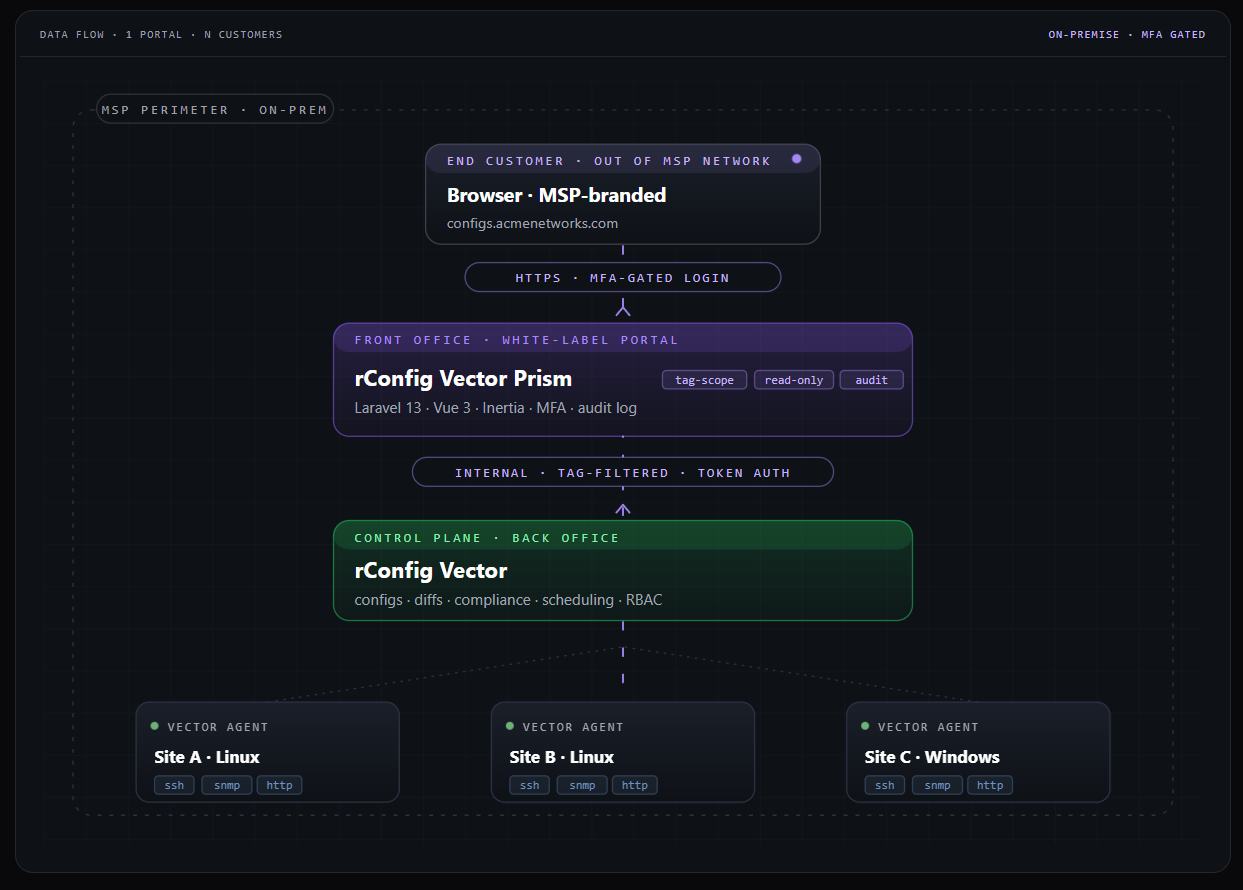
Section titled “How It Works”Prism is a read-only consumer of the rConfig API. It stores no device data and no configuration content of its own. Every device list, every config snapshot, and every diff is fetched live from rConfig (with caching), then filtered to the team’s tag scope before being rendered.
The request flow is straightforward:
- Users sign in to one of two surfaces — operators reach the admin surface at
/admin/*; customer users reach the portal at/dashboard,/devices, and/configs. - Prism’s tag-scope and cache layer receives every request, applies the requesting user’s team scope, and either returns a cached response or makes a live call upstream.
- rConfig owns the actual configuration data and talks to the underlying network devices. Prism never touches a device directly.
Tag-scoped visibility. Every customer team has zero or more rConfig tags mapped to it. A customer only sees a device if the device carries one of their tags. Empty mapping means zero devices visible — a fail-closed default.
Cache and circuit breaker. Prism caches API responses in two tiers: a hot cache for normal traffic and a last-good cache that’s only served if the upstream is unreachable. A circuit breaker opens after consecutive failures so a degraded rConfig server doesn’t get hammered. Customers see a “data may be out of date” badge instead of an error when this happens.
Operator audit trail. Every admin action — invite a user, add a tag mapping, reset 2FA, change a brand setting — is recorded with timestamp, IP, user agent, and before/after metadata. Logins and permission denials go into a separate access audit feed.
No write paths to rConfig. Prism never writes to rConfig. Customers can read, compare, and download — they cannot push config changes through the portal.
Key Features at a Glance
Section titled “Key Features at a Glance”Multi-tenant customer portal. Per-team device and config isolation, enforced server-side. Each team is a separate customer.
White-label branding. Logos, colours, fonts, login background, support links, footer text, and email templates — all editable from the admin UI. Optional per-team override for MSPs that want each customer’s portal to wear that customer’s brand.
Mandatory 2FA. Every user — admin and customer — must enrol a TOTP authenticator before they can use the system. Recovery codes are issued at enrolment.
Audit trails. Action audit (every admin change) and access audit (logins, permission denials) with retention policies and exports.
Exception alerting. Configurable email alerts on unhandled errors, with status code filters and throttling so a noisy bug doesn’t flood your inbox.
API health and brownout survival. Two-tier cache, circuit breaker, health probe, and “API connection is down” landing page when rConfig is unreachable.
Operator onboarding checklist. Gamified setup card on the admin dashboard guides new operators through brand setup, mail config, API connection, customer creation, and security hardening.
Custom impersonation. Admins can step into any user’s session for support without that user’s password and without re-issuing 2FA — fully audited.
Locale and timezone. A single instance-wide locale (BCP-47) and timezone (IANA) governs date and time formatting for every user and every audit row, so screenshots taken by one operator match what another operator sees in the logs.
On-site help center. Markdown-based operator docs render at /admin/docs inside the running Prism instance, with deep links from onboarding tasks and contextual help buttons.
A more complete catalogue is available in Key Features.
Where Prism Fits in the rConfig Stack
Section titled “Where Prism Fits in the rConfig Stack”Prism is separate from rConfig Vector. The two products solve different problems:
| Product | Audience | Role |
|---|---|---|
| rConfig | Network engineers in a single org | Configuration backup engine; talks directly to network devices |
| rConfig Vector | Distributed enterprises and MSPs | Multi-site backup architecture with remote collector agents |
| rConfig Prism | MSPs delivering rConfig as a service | Multi-tenant customer portal in front of an rConfig server |
You can run Prism in front of a single rConfig server, in front of an rConfig Vector deployment, or both. Prism only cares about the upstream rConfig API — it doesn’t know or need to know how the configurations got there. The Vector + Prism story is summarised on the rConfig Vector & Prism product page.
Where to Go Next
Section titled “Where to Go Next”Operators starting from scratch: read Getting Started, then walk through the on-screen onboarding checklist on the admin dashboard.
Operators who want a feature catalogue: Key Features and the in-app /admin/docs.
Operators running Prism day-to-day: Admin Guide, Best Practices, and Troubleshooting.
Customer users logging in to a portal: Portal Guide.
Anyone with a question: FAQ and Support.
Related Documentation
Section titled “Related Documentation”- Getting Started — Stand up a new Prism instance and walk through first-day setup.
- Admin Guide — Operator workflows for customers, users, branding, and settings.
- Portal Guide — End-customer walkthrough for the daily-use portal.
- Key Features — Feature catalogue with links to in-app deep-dive docs.
- Best Practices — Hardening, retention, branding, and operations advice.
- Troubleshooting — Common issues and how to resolve them.
- FAQ — Frequently asked questions.
- Support — How to reach the rConfig support team.
- rConfig Vector & Prism product page — Marketing overview, packaging, and pricing.