

How to set up Vector Hub and the agent live channel
Vector Hub and the Live Channel: Vector Access, Agent Restarts, and Instant Job Pickup
Section titled “Vector Hub and the Live Channel: Vector Access, Agent Restarts, and Instant Job Pickup”Vector Hub is an optional service on the rConfig server that gives each enabled Vector Agent a persistent, bidirectional live channel. After reading this page you can install the hub, enable the live channel per agent, restart agents remotely, and fix the common hub problems.
When should I use Vector Hub?
Section titled “When should I use Vector Hub?”Without the hub, Vector Agents only poll the rConfig server on a timer, so the server cannot reach into an agent on demand and new jobs wait for the next poll. Install the hub when you want operators to SSH to remote-site devices without a VPN or jump host, restart agents without logging in to the agent host, or have queued jobs start near-instantly.
The hub is additive. If it is not installed, rConfig and its agents behave exactly as before.
What does the live channel unlock?
Section titled “What does the live channel unlock?”| Capability | What it does |
|---|---|
| Vector Access | Opens a live SSH session to a device, proxied through its agent, with optional session recording. |
| Restart an agent | Restarts an agent from the Hub page over the live channel. |
| Auto job pickup | Nudges an agent to poll the moment a job is queued for it. |
| Self-healing certificates | Restores the server’s hub client certificates automatically if they go missing. |
How does Vector Hub work?
Section titled “How does Vector Hub work?”The hub runs on the rConfig server as the hardened systemd service vector-hub.service, under the dedicated vector-hub user. The binary lives at /usr/local/bin/rconfig/activehub/vector-hub. Agents dial in to the hub over an outbound WebSocket, and once connected the server can push commands to them in real time.
The hub opens three listeners:
| Listener | Default address | Who connects | Transport |
|---|---|---|---|
| Public tunnel | :8443 (all interfaces) | Vector Agents, outbound | WSS (WebSocket over TLS), path /tunnel |
| Control API | 127.0.0.1:8444 (loopback only) | the rConfig Laravel app | HTTPS with mutual TLS (mTLS) |
| Session broker | 127.0.0.1:8445 (loopback only) | the vector:access command | authenticated, loopback only |
flowchart LR
  subgraph Site["Remote site"]
    A[Vector Agent] --> D[Network devices]
  end
  subgraph Server["rConfig server"]
    H["vector-hub.service (:8443 tunnel)"]
    L[rConfig app] -- "mTLS :8444" --> H
    S["php artisan vector:access"] -- ":8445" --> H
  end
  A -- "outbound WSS :8443/tunnel" --> H
Prerequisites
Section titled “Prerequisites”- Vector installed and enabled in rConfig. The Hub navigation item and its settings only appear when Vector is installed. See Vector Server installation.
- At least one Vector Agent registered and enabled. See Adding agents to Vector.
- Root access to the rConfig server, to install the Vector Hub helper.
- Egress from each agent site to the rConfig server on TCP
8443. - Optional: your own TLS certificate and key for the public tunnel. If you leave them out, the installer generates them.
Install helper
Section titled “Install helper”Vector Hub installs a systemd service and private keys, which needs root. Horizon runs as the web server user (apache on RHEL, Rocky and Alma, www-data on Ubuntu), so from V8.4.1 every hub action goes through a small root-owned helper that the web user may run through sudo. Nothing the web user can change is ever run as root.
| Item | Path or value |
|---|---|
| Helper | /usr/local/libexec/rconfig/rconfig-vector-hub |
| Install script it runs | /usr/local/libexec/rconfig/rconfig-vector-hub-install.sh |
| Sudo rule | /etc/sudoers.d/rconfig-vector-hub, mode 0440, allowing the web user to run only the helper, with env_reset |
| Group | vector-hub. The web user is added to it so it can read the CA certificate and the rConfig client certificate and key. |
When is the helper installed?
Section titled “When is the helper installed?”The two Vector deploy scripts (RHEL and Ubuntu) install it on every install and upgrade. If that step fails, the deploy fails. The standard rConfig V8 Pro deploy scripts do not run it.
To install or repair it by hand, run this from the rConfig folder, then restart Horizon so its workers pick up the new group:
cd /var/www/html/rconfig8/currentsudo php artisan rconfig:vector-hub-install-helpersudo supervisorctl restart horizonIt must run as root. It checks the sudo rule with visudo -c before installing it, and refuses to continue if the web user does not exist or has uid 0. It is safe to run again.
How do I know the helper is missing?
Section titled “How do I know the helper is missing?”Until the helper is in place, the Vector Hub page shows a Vector Hub helper is not installed banner, and install, uninstall, restart and certificate re-sync are turned off. Settings → System Optimization shows the same problem on the Vector Hub helper row. The banner lists what is wrong:
| Message | Meaning |
|---|---|
The helper /usr/local/libexec/rconfig/rconfig-vector-hub is missing. | The helper has never been installed. |
The install script /usr/local/libexec/rconfig/rconfig-vector-hub-install.sh is missing. | Only part of the helper is in place. |
The helper … is not owned by root. | Someone changed its owner. Reinstall it. |
The helper … can be changed by users other than root. | Its mode or folder lets other users change it. Reinstall it. |
sudo does not let the web user run /usr/local/libexec/rconfig/rconfig-vector-hub without a password, so the sudoers rule is missing or wrong. | The sudo rule is missing or was edited. |
The fix for each is the same: sudo php artisan rconfig:vector-hub-install-helper, then restart Horizon.
Who can read the hub’s keys?
Section titled “Who can read the hub’s keys?”| Files | Owner and mode |
|---|---|
/etc/vector-hub and /etc/vector-hub/tls | root:vector-hub 0750 |
api.crt, api.key, tunnel.crt, tunnel.key, auth-ca.crt | vector-hub:vector-hub 0600, for the hub service only |
ca.key and any other file in tls | root:root 0600 |
vector-hub.env | root:root 0600 |
ca.crt, laravel-client.crt, laravel-client.key | root:vector-hub 0640, the only files the web user can read |
How do I install Vector Hub?
Section titled “How do I install Vector Hub?”Install from the UI (recommended)
Section titled “Install from the UI (recommended)”-
Open Settings → System Management → Vector Hub (
/settings/vector-hub), or click Hub in the left sidebar (/hub). Both open the same page. -
In the Install Vector Hub card, fill in the fields below.
Field Required Meaning rConfig URL Yes The HTTPS address of this rConfig server. The hub calls back here to verify the install, so it must match this server’s TLS certificate. Tunnel host Yes Hostname or IP agents dial for the tunnel. Agents connect outbound to it on port 8443(wss://<host>:8443/tunnel).Tunnel certificate path No TLS certificate presented on the tunnel. Its subject or SAN must match the tunnel host. Leave blank to generate one. Tunnel key path Only with a certificate Private key for the tunnel certificate. Give both or neither. Auth CA path No CA used to verify the rConfig URL during the install’s auth callback. Only needed for a private CA. Local binary path No Installs a hub binary already on this server instead of downloading it. -
Click Install Hub.
-
Watch the status badge. It shows the install state and exit code only, never the raw command output.
When the install succeeds, the page switches from the install card to the hub dashboard.
The web server user must be able to read every file you name. The installer copies each one as that user into a root-only folder, so it cannot be used to read files the web user could not already read. Certificates, keys and CA files can be up to 1 MB, and the binary up to 256 MB.
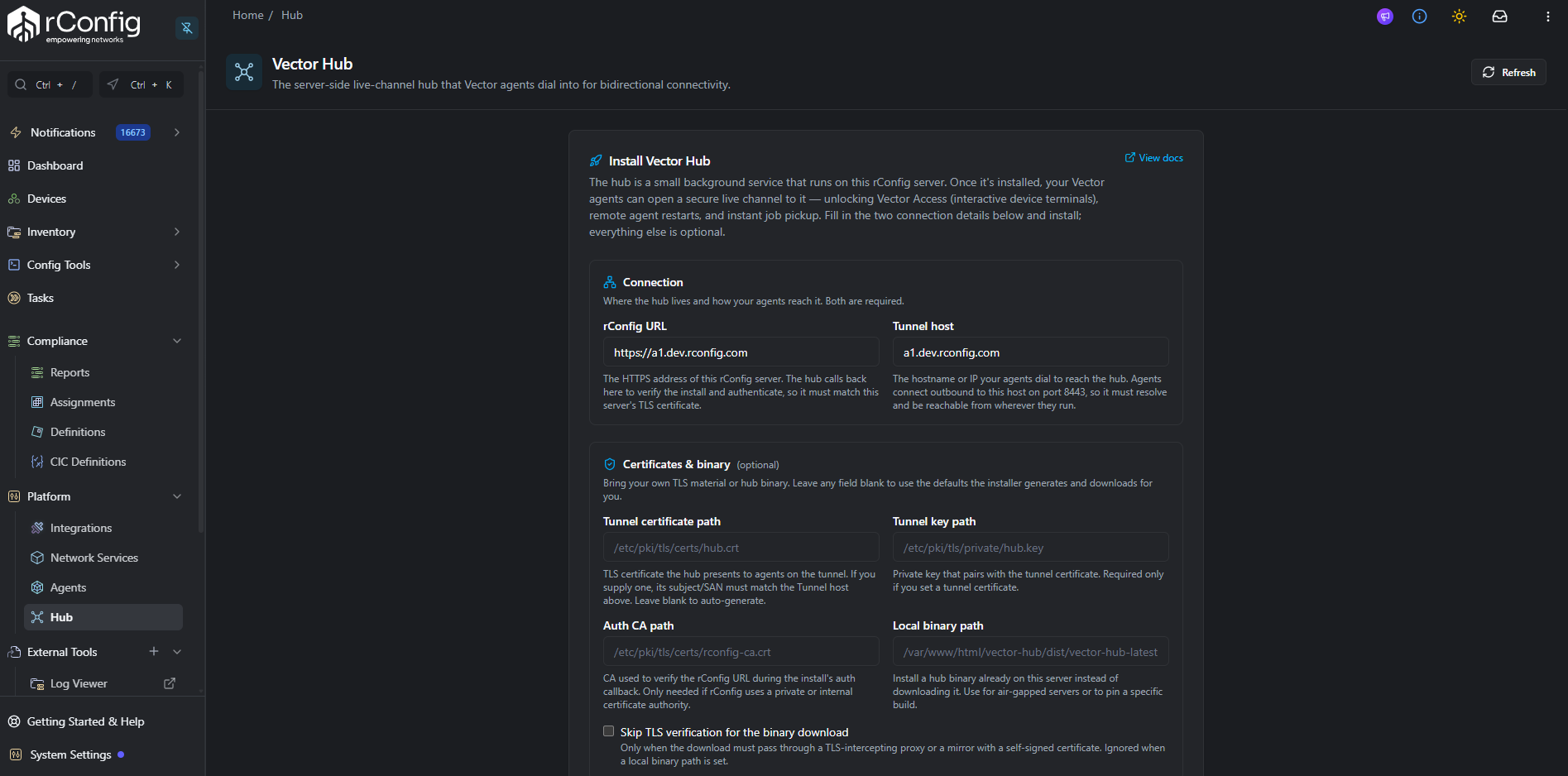
Install from a terminal
Section titled “Install from a terminal”The UI runs the same helper as root through sudo. You can run it yourself on the rConfig server:
sudo /usr/local/libexec/rconfig/rconfig-vector-hub install \ --rconfig-url https://rconfig.example.com \ --tunnel-host hub.example.com| Flag | Required | Value |
|---|---|---|
--rconfig-url URL | Yes | http or https URL of this rConfig server, up to 255 characters |
--tunnel-host HOST | Yes | Hostname or IP agents dial |
--tunnel-cert PATH | No | Your tunnel certificate. Must be given with --tunnel-key. |
--tunnel-key PATH | No | Your tunnel key. Must be given with --tunnel-cert. |
--auth-ca PATH | No | CA for the auth callback |
--hub-bin PATH | No | Local hub binary to install instead of downloading |
Each flag can be given once. Paths must be absolute and contain only letters, digits, ., _, - and /. Any other flag, including the old --insecure-download, is refused. The listeners always use their defaults (:8443, 127.0.0.1:8444, 127.0.0.1:8445).
The other actions take no flags:
sudo /usr/local/libexec/rconfig/rconfig-vector-hub status # service state, then the last 100 journal linessudo /usr/local/libexec/rconfig/rconfig-vector-hub startsudo /usr/local/libexec/rconfig/rconfig-vector-hub stopsudo /usr/local/libexec/rconfig/rconfig-vector-hub restartsudo /usr/local/libexec/rconfig/rconfig-vector-hub uninstall| Exit code | Meaning |
|---|---|
64 | Bad action or flag |
65 | A file you named is unreadable by the web user, or too large |
77 | Not run as root |
78 | The install script is missing or can be changed by users other than root. Run sudo php artisan rconfig:vector-hub-install-helper. |
In one pass, install:
- Installs or updates the hub binary. It downloads
https://dl.rconfig.com/download-vector-hub/vector-hub-latestand its.sha256checksum unless a local binary path was supplied. - Generates an internal CA and leaf certificates: the loopback API certificate (
api.crt, SANIP:127.0.0.1,DNS:localhost), the tunnel certificate (tunnel.crt), and a Laravel client certificate (laravel-client.crt, withclientAuth). - Generates the shared secret
VECTOR_HUB_AUTH_SECRET, or reuses an existing one. - Writes the hub environment file and the
vector-hub.servicesystemd unit. - Copies the client certificate, key, and CA into
storage/app/vector-hub/asclient.crt,client.key, andca.crt, as the web user, and writes theVECTOR_HUB_*keys into rConfig’s.env. - Runs a health check and verifies the auth callback.
How does rConfig decide the hub is installed?
Section titled “How does rConfig decide the hub is installed?”rConfig treats the hub as installed when the binary exists at VECTOR_HUB_BIN_PATH (default /usr/local/bin/rconfig/activehub/vector-hub).
Uninstall the hub
Section titled “Uninstall the hub”Uninstall from the Hub page, or run sudo /usr/local/libexec/rconfig/rconfig-vector-hub uninstall. It removes the service, the binary, and the TLS material, and strips the VECTOR_HUB_* keys from .env. Agents fall back to timer-based polling.
How do I enable the live channel on an agent?
Section titled “How do I enable the live channel on an agent?”The live channel is per agent and off by default. Turn it on in either place:
- Agent edit dialog: navigate to Settings > Agents, edit the agent, and set the toggle to Live Channel Enabled. The help text reads “Enables bidirectional connectivity for this agent (hub live channel).”
- Hub page: click the Enable button on the agent’s row in the Agents card.
Enabling sets the agent’s desired state. The agent then dials the hub, and once the tunnel is up rConfig records the observed state and shows the agent as connected. Each enable or disable is written to the agent audit log as Live channel enabled/disabled for agent <name>.
| Status | Colour | Meaning |
|---|---|---|
| Connected | Green | Enabled and a live tunnel is up. |
| Enabled · waiting | Amber | Enabled, but the agent has not dialled in yet. |
| Disabled | Grey | The live channel is off for this agent. |
The scheduled command vector:hub-sync-status refreshes the connection state, round-trip latency, and last-seen time every minute.
What does the Hub page show?
Section titled “What does the Hub page show?”The Hub page (/hub, titled Vector Hub) shows KPI tiles, including service status, and an Agents card listing each agent’s live-channel status and actions. The roster is built to stay usable with 100+ agents:
- Server-side pagination: page size between 5 and 100, with “Page X of Y” and Previous/Next controls.
- Search by name or ID: the box labelled “Search agents by name or ID…” matches the agent name or its numeric ID.
- Enabled agents first: rows are ordered with enabled agents at the top, then alphabetically by name.
- Built-in agent hidden: the built-in vector-server agent (ID 1) is not a live-channel participant and does not appear.
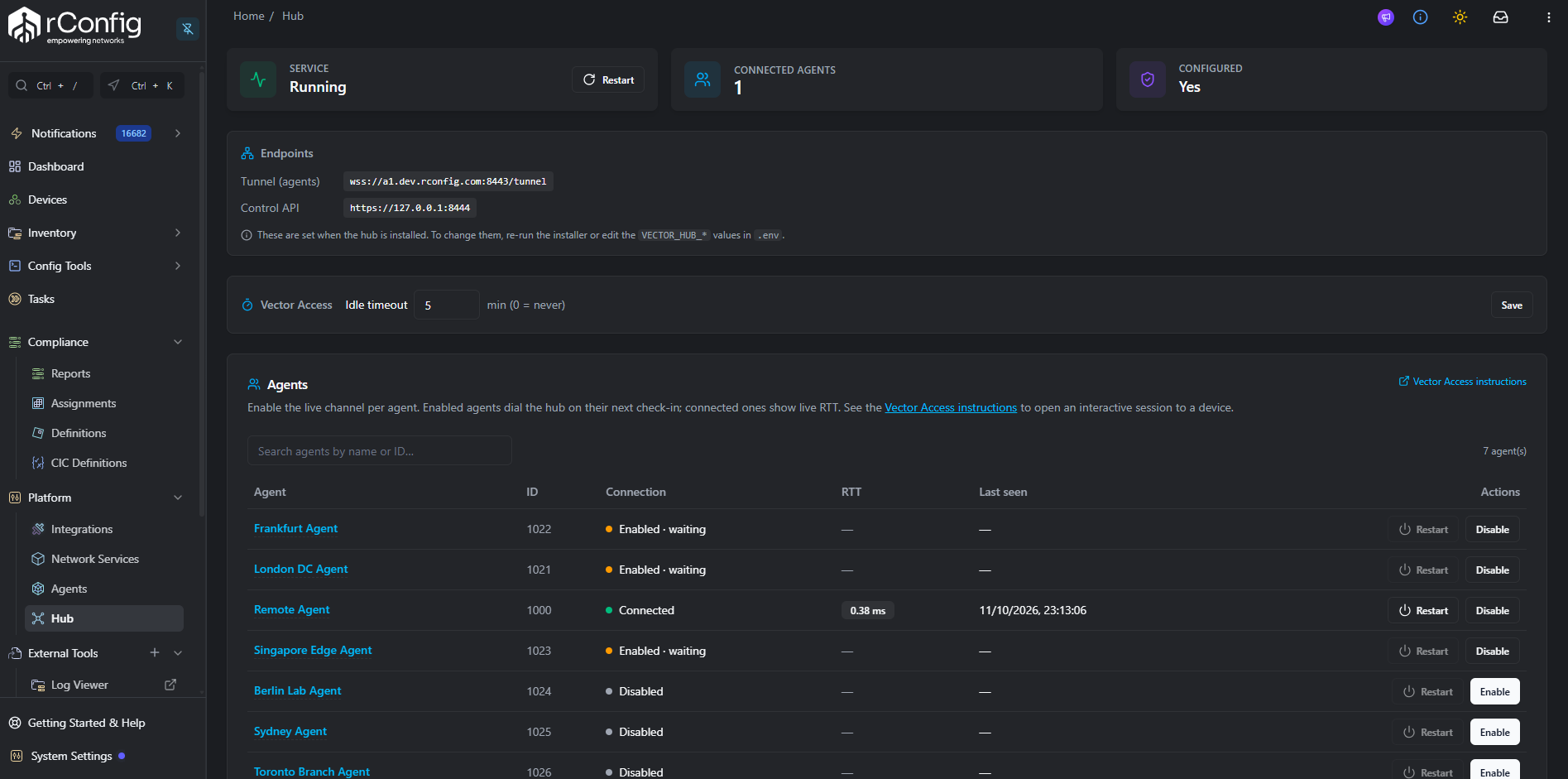
The page also holds the Vector Access panel, which sets the Vector Access idle timeout.
How do I SSH to a device through its agent?
Section titled “How do I SSH to a device through its agent?”Use Vector Access. It opens a live, optionally recorded SSH session to a device through its agent’s live channel, run on the rConfig server with php artisan vector:access. The session idle timeout is set in the Vector Access panel on the Hub page.
How do I restart an agent remotely?
Section titled “How do I restart an agent remotely?”- Open the Hub page and find the agent in the Agents roster.
- Click Restart. The button is only active when the agent’s live channel is connected.
- Click Confirm at the “Restart <name>?” prompt.
rConfig pushes the restart over the live channel. The agent acknowledges, exits gracefully, and its supervisor (systemd with Restart=always) starts it again. Agents installed the standard way run under systemd and come back automatically.
How does auto job pickup work?
Section titled “How does auto job pickup work?”Without the live channel, an agent finds new work on its next scheduled poll, so a job can wait up to one poll interval. With the live channel enabled, rConfig nudges the agent to poll the moment a job is queued for it, so jobs start near-instantly.
- It applies only to agents with the live channel enabled. Other agents keep polling on their timer.
- It is best-effort. If the agent is briefly disconnected or the hub is unreachable, the agent still picks the job up on its next normal poll.
- Bursts of queued jobs are debounced into a single nudge within a few seconds, and the agent collapses repeated nudges into at most one extra fetch.
There is nothing to configure. Enabling the live channel is enough.
How do the certificates self-heal?
Section titled “How do the certificates self-heal?”rConfig talks to the hub using client.crt, client.key, and ca.crt in storage/app/vector-hub/. If those files are lost, for example after a storage wipe, redeploy, or permissions reset, the hub would appear to be not responding. rConfig recovers them automatically:
- Every minute:
vector:hub-sync-statuschecks the hub. If the hub is unreachable, installed, and the client certificates are missing, it dispatches a re-sync job that copies the files back from the hub’s TLS directory (default/etc/vector-hub/tls). The job runs as the web user and reads them through thevector-hubgroup, so the install helper must be in place. This auto-heal runs at most once every 5 minutes. - On page load: if the Hub page detects missing certificates, it triggers one re-sync automatically. The service KPI tile shows Certs missing, and an amber Hub client certificates missing banner offers a manual Re-sync certificates button.
Missing certificates are usually restored within about a minute, or immediately when the Hub page is opened.
Common gotchas
Section titled “Common gotchas”Configuration reference
Section titled “Configuration reference”The hub integration lives in the hub block of config/vector-server.php. If hub.api_url is unset, the hub integration is disabled entirely.
| Config key | Env var | Example / default | Meaning |
|---|---|---|---|
hub.tunnel_url | VECTOR_HUB_TUNNEL_URL | wss://rconfig.local:8443/tunnel | Tunnel URL delivered to agents. |
hub.api_url | VECTOR_HUB_API_URL | https://127.0.0.1:8444 | Control API (loopback mTLS). Unset disables the hub. |
hub.session_addr | VECTOR_HUB_SESSION_ADDR | 127.0.0.1:8445 | Session broker used by vector:access. |
hub.auth_secret | VECTOR_HUB_AUTH_SECRET | (generated) | Shared secret between rConfig and the hub. |
hub.client_cert | VECTOR_HUB_CLIENT_CERT | storage/app/vector-hub/client.crt | mTLS client certificate. |
hub.client_key | VECTOR_HUB_CLIENT_KEY | storage/app/vector-hub/client.key | mTLS client key. |
hub.ca_cert | VECTOR_HUB_CA_CERT | storage/app/vector-hub/ca.crt | CA used to verify the hub. |
hub.bin_path | VECTOR_HUB_BIN_PATH | /usr/local/bin/rconfig/activehub/vector-hub | Hub binary path. Its presence means installed. |
hub.tls_source_dir | VECTOR_HUB_TLS_SOURCE_DIR | /etc/vector-hub/tls | Source directory for the certificate re-sync. |
The hub binary reads its own environment:
| Env var | Default | Meaning |
|---|---|---|
VECTOR_HUB_TUNNEL_ADDR | :8443 | Public tunnel listener. |
VECTOR_HUB_API_ADDR | 127.0.0.1:8444 | Control API listener. |
VECTOR_HUB_SESSION_ADDR | 127.0.0.1:8445 | Session broker listener. |
VECTOR_HUB_AUTH_SECRET | (generated) | Shared secret. |
VECTOR_HUB_HEARTBEAT_INTERVAL | 15s | Tunnel heartbeat interval. |
The log level defaults to info.
Two related agent-run watchdogs sit outside the hub block: task_unit_timeout_seconds (VECTOR_TASK_UNIT_TIMEOUT_SECONDS, default 300) limits each device run, and task_run_wait_timeout_seconds (VECTOR_TASK_RUN_WAIT_TIMEOUT_SECONDS, default 900) caps the overall run.
Troubleshooting
Section titled “Troubleshooting”Why are install, restart and re-sync turned off?
Section titled “Why are install, restart and re-sync turned off?”Cause: the root-owned helper is missing or wrong, and the page shows Vector Hub helper is not installed. A failed action can also report Run as root: php artisan rconfig:vector-hub-install-helper, then restart Horizon.
Fix: run sudo php artisan rconfig:vector-hub-install-helper from the rConfig folder, then restart Horizon. See Install helper.
Why is the Restart button greyed out?
Section titled “Why is the Restart button greyed out?”Cause: the agent’s live channel is not connected. The tooltip reads “Agent must have its live channel connected to restart”.
Fix: enable the live channel and wait for Connected. Status refreshes every minute.
Why does the hub show Certs missing or not responding?
Section titled “Why does the hub show Certs missing or not responding?”Cause: the client certificates in storage/app/vector-hub/ are missing, usually after a storage wipe, redeploy, or permissions reset.
Fix: wait about a minute for the scheduled re-sync, or open the Hub page and click Re-sync certificates. If it persists, confirm the source files exist in /etc/vector-hub/tls, that the rConfig scheduler is running, and that the web user is in the vector-hub group (id apache, or id www-data on Ubuntu). If it was only just added, restart Horizon.
Why wasn’t a job picked up instantly?
Section titled “Why wasn’t a job picked up instantly?”Cause: auto job pickup only applies to live-channel-enabled agents, and the nudge is best-effort. If the agent was disconnected or the hub unreachable when the job was queued, the nudge is skipped.
Fix: none needed. The agent picks the job up on its next normal poll. To get instant pickup, enable the live channel and confirm the agent shows Connected.
Where are the Vector Access troubleshooting steps?
Section titled “Where are the Vector Access troubleshooting steps?”See Vector Access troubleshooting for session errors and finding transcripts.
Quick reference
Section titled “Quick reference”| I want to… | Do this |
|---|---|
| Install the hub helper | sudo php artisan rconfig:vector-hub-install-helper, then restart Horizon. |
| Install the hub | Hub page > fill in the install card > Install Hub (or sudo /usr/local/libexec/rconfig/rconfig-vector-hub install …). |
| Turn on the live channel for an agent | Settings > Agents > edit agent > Live Channel Enabled (or the Enable button on the Hub page). |
| See which agents are live | Hub page roster > Connected / Enabled · waiting / Disabled. |
| SSH to a device through its agent | php artisan vector:access <device> (or run with no argument and pick). See Vector Access. |
| Record an SSH session | php artisan vector:access <device> --log. Transcript in storage/logs/vector-ssh/. |
| Change the SSH idle timeout | Hub page > Vector Access panel > Idle timeout (minutes, 0 = never). |
| Restart an agent | Hub page roster > Restart (active only when connected). |
| Get jobs picked up instantly | Enable the live channel. Auto job pickup is automatic. |
| Fix “certs missing” | Wait about a minute, or Hub page > Re-sync certificates. |
| Remove the hub | sudo /usr/local/libexec/rconfig/rconfig-vector-hub uninstall. |