

rConfig active/passive HA architecture
This is the standard highly available rConfig: two identical application nodes behind a virtual IP, only one of them active, with every component behind them made redundant. It fits most teams that need failover in minutes within one site, and it’s the base for the two-site and Vector designs.
The design
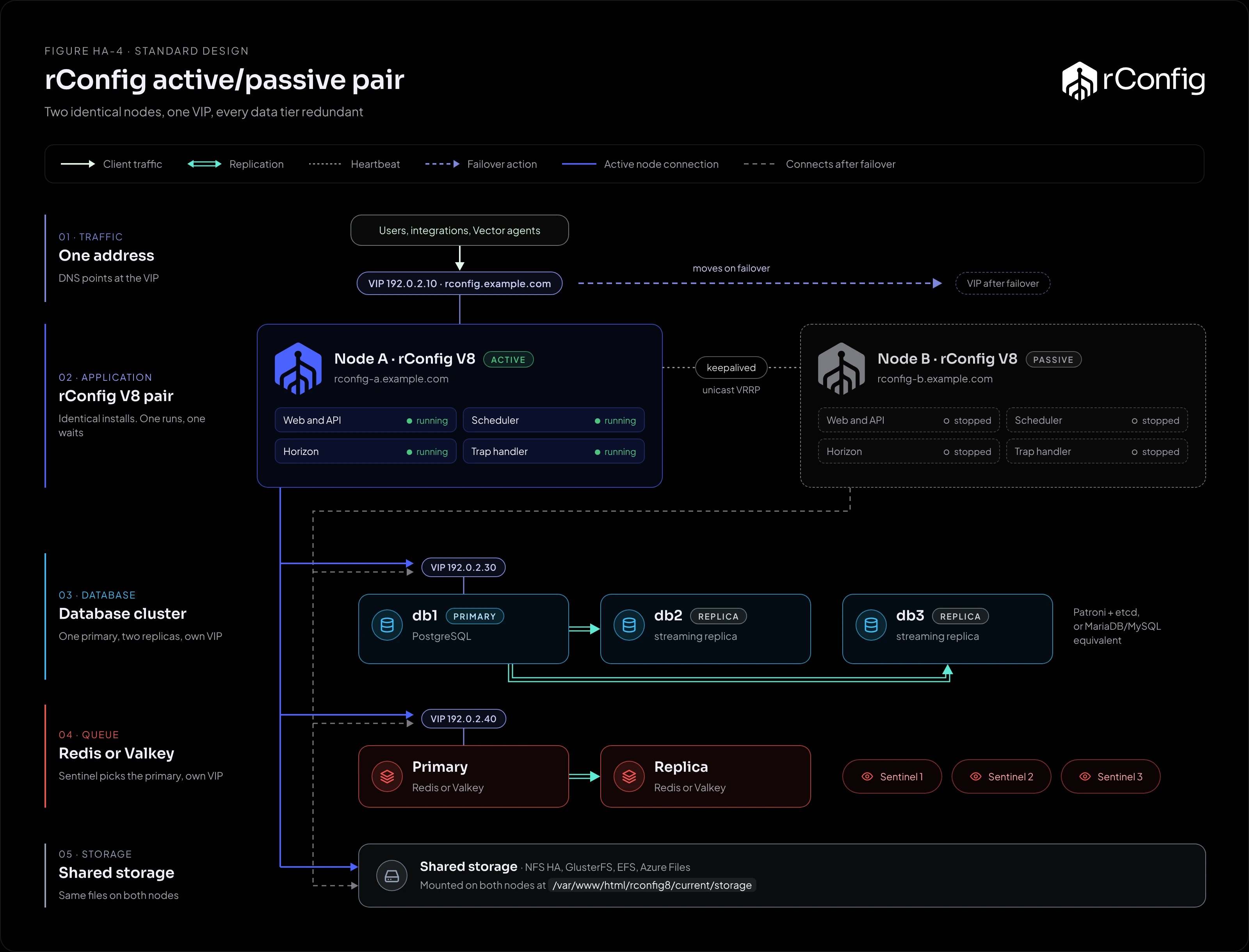
| Tier | Nodes | Role |
|---|---|---|
| Traffic | VIP held by keepalived on the application nodes | Users, integrations and Vector agents connect to the VIP |
| Application | Node A (active), Node B (passive) | A runs web, API, scheduler and Horizon. B has everything stopped |
| Database | Primary and replica (three nodes for automatic failover), with a database VIP or proxy | rConfig’s DB_HOST is the database VIP |
| Redis or Valkey | Primary and replica, three Sentinels, with a Redis VIP | rConfig’s REDIS_HOST is the Redis VIP |
| Storage | Highly available shared storage, mounted on both nodes at the same path | Or replication from A to B |
Each tier fails over independently. A database failover doesn’t move the application VIP, and an application failover doesn’t promote the database. That keeps each failover simple, and means a problem in one tier doesn’t drag the others along.
What runs where
| Service | Active node | Passive node |
|---|---|---|
| Web server (and PHP) | Running | Stopped |
| Scheduler cron entry | Enabled | Disabled |
| Horizon (Supervisor) | Running | Stopped |
| SNMP trap handler (if used) | Running | Stopped |
| keepalived | Running, holds the VIP | Running, ready to take it |
rConfig release and .env |
Current | Identical |
| Storage | Mounted (or source of replication) | Mounted (or target of replication) |
Failover, step by step
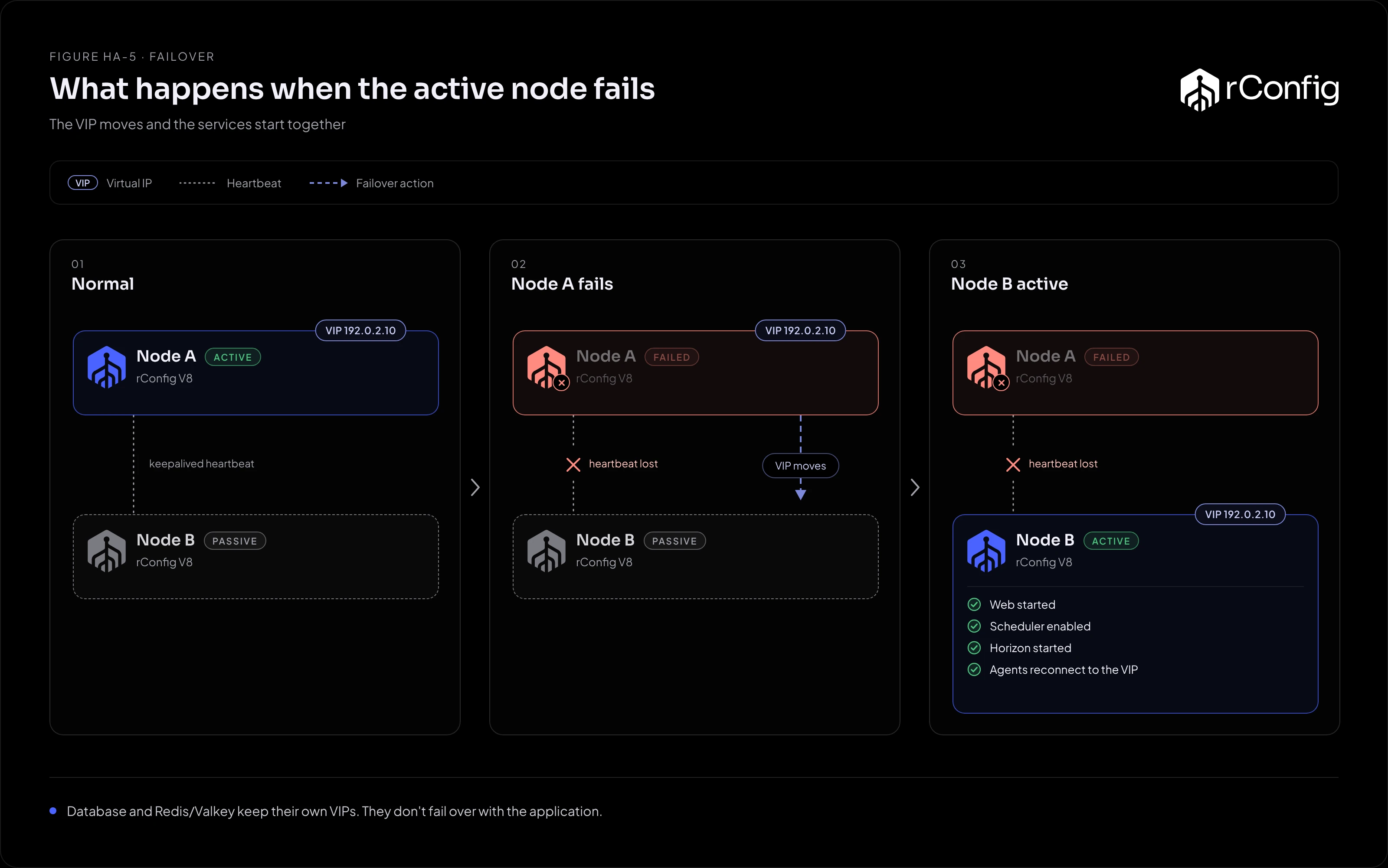
When node A fails, or its health check does:
- keepalived on node B stops hearing from node A, or A’s health check fails, and B takes the VIP.
- A keepalived notify script on B starts the web server, enables the scheduler cron entry and starts Horizon.
- If A is still running (a failed health check, not a dead host), its notify script stops the same services there.
- Users, integrations and Vector agents reconnect to the VIP and reach node B.
- Scheduled tasks resume at their next interval; any manual download that was in flight is re-run.
If you replicate storage instead of sharing it, the notify scripts also reverse the replication direction, so B becomes the source.
Failing back is the same steps the other way round, done in a maintenance window.
Health checks that matter
keepalived’s own heartbeat only notices a dead host. Add a check script that fails when node A can’t do its job:
- The web server answers on the local address.
- Horizon is running under Supervisor.
- The node can reach the database VIP and the Redis VIP.
- The storage mount is present and writable.
Weight the check so a failure moves the VIP, and add a short delay so a single slow check doesn’t cause a flap.
Split-brain
Split-brain is both nodes believing they’re active: both hold the VIP, both run workers, both write to storage. In rConfig that means duplicate device sessions and conflicting writes.
- Use unicast VRRP between the two nodes’ addresses, on a dedicated or reliable link.
- Make a node that loses its uplinks drop the VIP (track the interface, or check the default gateway).
- Where the risk justifies it, use Pacemaker with fencing (STONITH), which powers off the failed node before the survivor takes over.