

Keep .env and APP_KEY in step on rConfig HA nodes
Every other component in a highly available rConfig is shared or replicated: the database, Redis or Valkey, storage. .env is the exception. Each node reads its own local copy, and nothing copies it for you. If the passive node’s copy is out of date when it takes over, failover can look successful and still break every backup. This page covers what’s in .env, why it must be identical, and how to keep it that way.
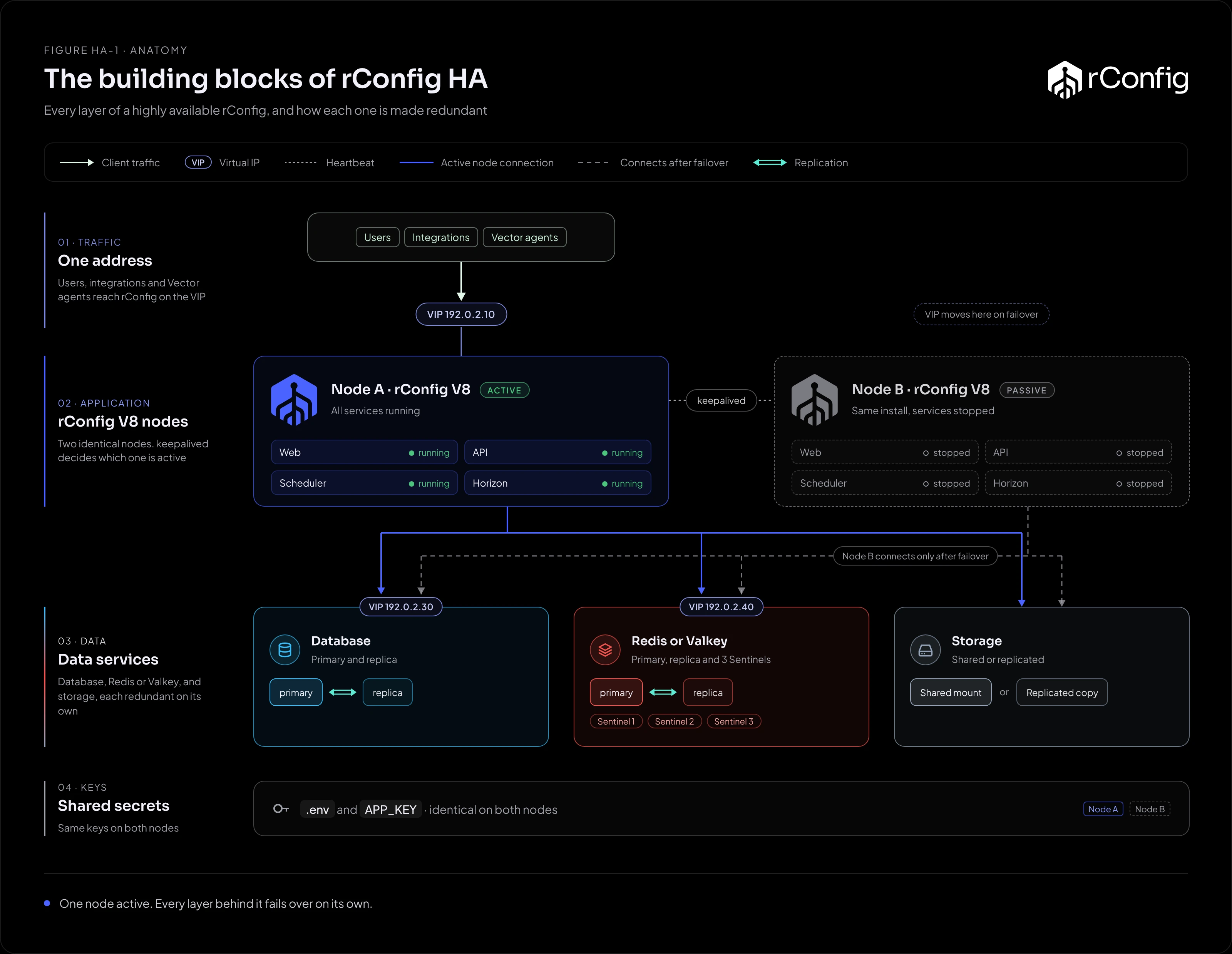
.env and APP_KEY must be identical on both nodes. Click the diagram to open the interactive version.What’s in .env
The file is /var/www/html/rconfig8/current/.env. For HA, the settings fall into four groups:
| Group | Examples | Why it matters on failover |
|---|---|---|
| The encryption key | APP_KEY |
Encrypts every device credential, and configs when configuration encryption is on. A different key on the passive node can’t decrypt any of them, so every backup fails |
| Where the data is | DB_HOST, DB_PORT, DB_DATABASE, DB_USERNAME, DB_PASSWORD, REDIS_HOST, REDIS_PASSWORD |
Must point at the database and Redis or Valkey VIPs, with the same credentials, or the passive node can’t reach the data |
| How rConfig is reached | APP_URL |
Should be the VIP’s DNS name, so links in emails, webhooks and notifications work from either node |
| Behaviour | HORIZON_MAX_PROCESS, SCRIPT_FEATURE_ENABLED, MASK_DEVICE_CREDENTIALS, mail settings, configuration obfuscation settings |
A difference changes how rConfig behaves after failover, for example scripts stop running because the Script Integration Engine is off |
The rule: both nodes have the same .env, byte for byte. There are no node-specific values in a correct HA design: every address in it is a VIP, not a node’s own address.
What isn’t in .env
More settings live in the database each release, and those follow the database automatically. For example, key vault settings moved into the database in V8.4.2 and the Config Hard Link setting in V8.4.3. When a setting moves into the UI, check the release notes: rConfig often keeps reading the old .env value until the setting is saved in the UI, so both nodes still need the same .env until then.
Keeping the copies in step
Pick one way and use it for every change.
| Method | How | Fits |
|---|---|---|
| Configuration management (Ansible, Puppet, Salt) | The .env is a template or vaulted file in your configuration repository, pushed to both nodes |
Teams that already manage servers this way. The best option: changes are reviewed and both nodes always get the same file |
| Copy after every change | Edit on the active node, then copy to the passive node over SSH, keeping owner and mode | Smaller teams. Simple, but depends on someone remembering every time |
Copying by hand, as root on the active node:
ENV=/var/www/html/rconfig8/current/.envrsync -a --chmod=F600 "$ENV" root@rconfig-b.example.com:"$ENV"ssh root@rconfig-b.example.com "chown apache:apache $ENV" # www-data on UbuntuDon’t keep .env on the shared storage to avoid copying it. If that storage is unavailable, neither node can start, and you’ve turned one failure into two.
After every change
On whichever node runs rConfig at the time (the active node), apply the change:
cd /var/www/html/rconfig8/currentphp artisan rconfig:clear-all # pick up the new valuesphp artisan horizon:terminate # Supervisor restarts the workers with the new valuesThe passive node has nothing running, so it reads the new file when it next starts its services, on failover.
Check they match
Compare checksums on both nodes after every change, after every upgrade, and before every failover test:
sha256sum /var/www/html/rconfig8/current/.envThe two values must be identical. Add the same check to your monitoring, so a drift is caught before a failover finds it.
APP_KEY in particular
- Never generate a key on the passive node. A fresh install creates a new
APP_KEY. Build the passive node, then replace its.envwith the active node’s before it ever connects to the shared database. - Never rotate the key on one node. Rotation re-encrypts data and must only be done with rConfig support. See System Encryption Key. After a rotation, copy the new
.envto the passive node straight away. - Back up
.envwith the database. A database backup without the matchingAPP_KEYcan’t decrypt any device credential. See Backups.
Upgrades
Upgrade both nodes in the same maintenance window. Updates can add or change values in .env: for example, from V8.4.1 the deploy script sets REDIS_PASSWORD if .env has none. After upgrading both nodes, compare the checksums, and copy the active node’s .env to the passive node if they differ.