

The building blocks of rConfig HA
A highly available rConfig is a stack of components, each failing in its own way. Making the application nodes redundant achieves nothing if the database or storage behind them is a single point of failure. This page goes through each component: what it holds, what happens when it fails, and how it’s made redundant.
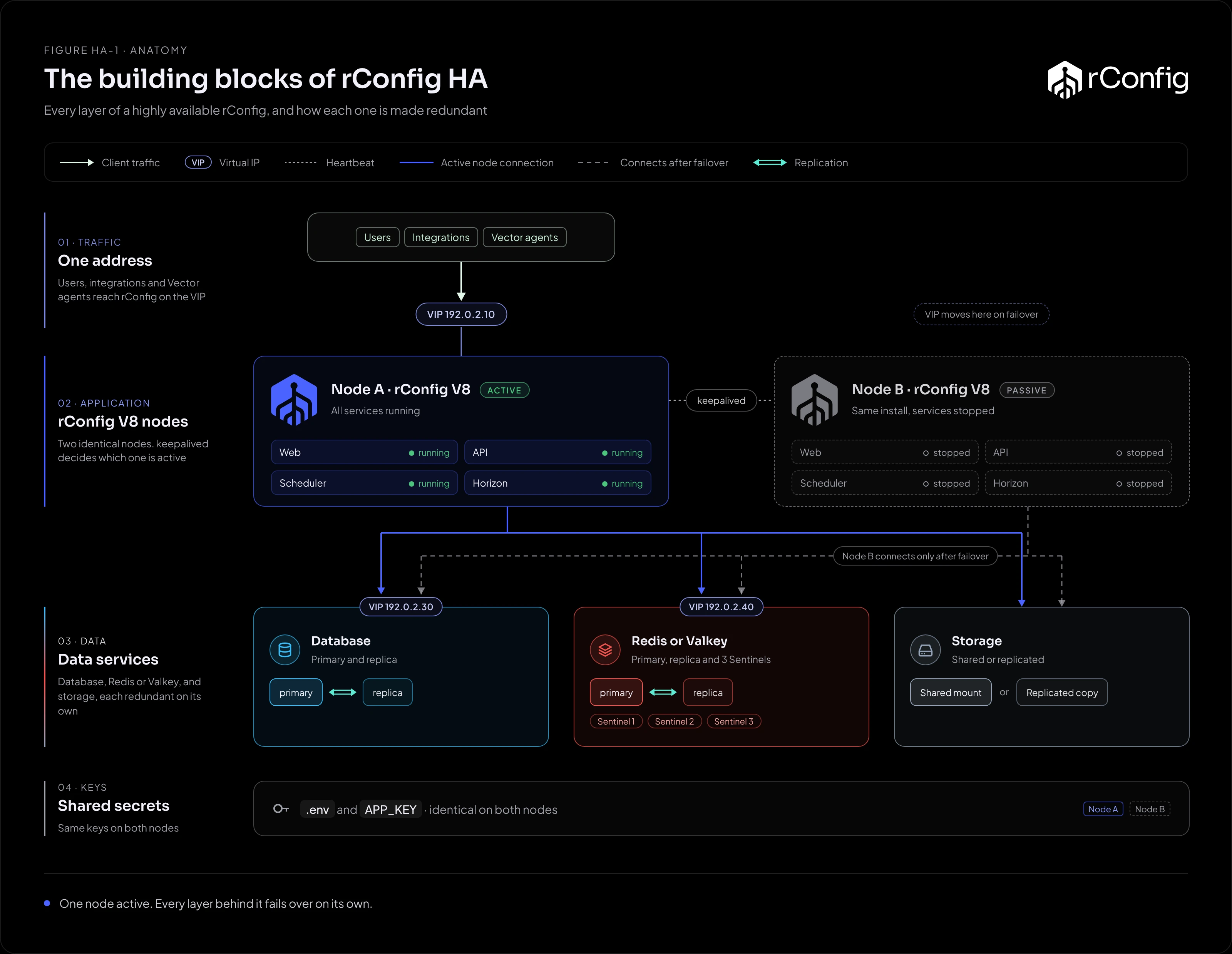
The stack
| Component | Holds | If it fails without HA | Made redundant by |
|---|---|---|---|
| VIP or load balancer | The address users, integrations and Vector agents connect to | Nobody can reach rConfig, even if the nodes are fine | keepalived/VRRP, Pacemaker, or an active/passive load balancer pair |
| Active node | Nothing unique: it runs the web interface, API, scheduler and workers | Everything stops until it’s back | A passive node that takes over |
| Passive node | The same release, .env and keys, ready to start |
Nothing, until you need it | Being identical to the active node |
| Database | Devices, credentials (encrypted), tasks, policies, users, compliance history, audit trail | rConfig stops; data since the last backup is at risk | Replication with failover behind a VIP or proxy |
| Redis or Valkey | The job queue, cache, user sessions and locks | Queued jobs stop and in-flight jobs may be lost; users are logged out and the web interface fails | Replication and Sentinel, behind a VIP |
| Storage | Downloaded configs, compliance results, system backups, logs, uploads | Configs can’t be stored or read | Shared storage, or replication to the passive node |
Keys and .env |
APP_KEY, connection settings |
A node with the wrong key can’t read any device credential | An identical copy on each node |
| RabbitMQ (Vector Central Manager) | Short-lived messages between the Central Manager and its Vector Servers | Messages between them are delayed | Optional clustering |
Application nodes
The active node runs four things: the web server (and PHP), the scheduler (a cron entry for the web server user), Horizon queue workers (under Supervisor), and, if you use traps, the SNMP trap handler. The passive node runs none of them until it becomes active. See why one node is always passive.
The nodes hold no unique data of their own, which is what makes failover safe: everything that matters is in the database, Redis or Valkey, storage and .env.
Database
The database is the heart of rConfig. rConfig connects to one endpoint (DB_HOST) and expects it to always reach the primary. Failover is the replication tool’s job: promote a replica and move the endpoint. rConfig needs no change.
Supported databases are MySQL, MariaDB and, on Enterprise, PostgreSQL. Each has its own page: PostgreSQL, MariaDB and MySQL.
Redis or Valkey
Redis (or Valkey on EL10) holds the Horizon job queue, the cache, user sessions and the locks that stop the same task overlapping itself. Treat it as stateful. rConfig connects to one host (REDIS_HOST), so the HA design is replication with Sentinel deciding which instance is primary, and a VIP that follows the primary. See Redis and Valkey.
Storage
Every downloaded config is a file under storage/app/rconfig. The passive node needs those files when it takes over. Two approaches:
- Shared storage (NFS, GlusterFS, cloud file services): both nodes mount the same storage. Zero lag, but the storage service must itself be highly available, and needs low latency and working file locks.
- Replication from the active node (rsync or lsyncd): the active node copies changes to the passive node. No extra storage cluster, but files written in the last seconds before a failure can be missing, and the direction must reverse after failover.
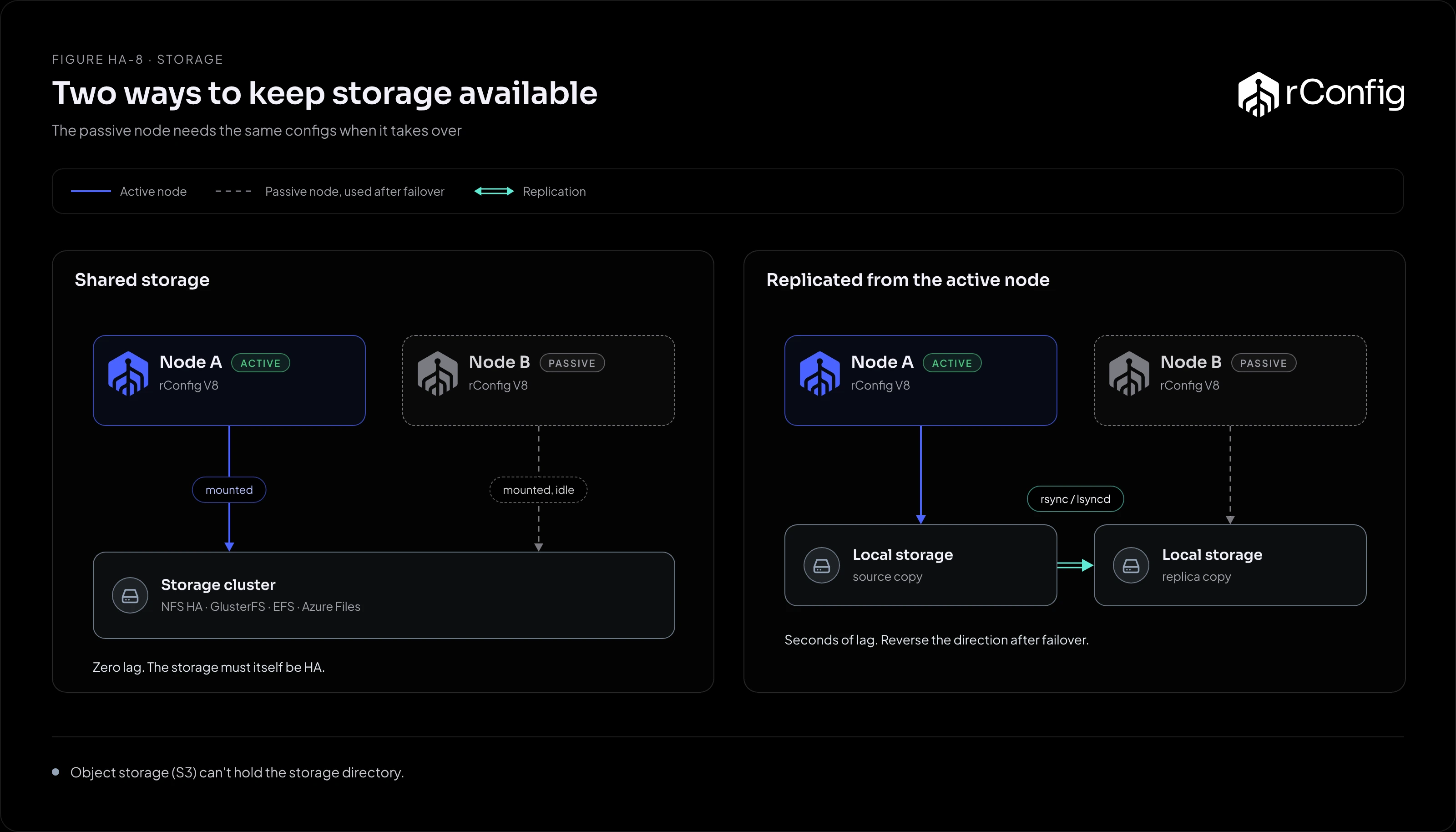
Object storage (S3 and similar) can’t hold the storage directory. See Storage for every option, including DRBD, and the settings that matter.
Keys and .env
APP_KEY in .env encrypts every device credential, and configs too when configuration encryption is on. A passive node with a different key reads none of them, and every backup fails after failover. Keep .env identical on both nodes and copy it again after any change. See .env and keys for how, and System Encryption Key for what the key protects.