

Storage high availability for rConfig
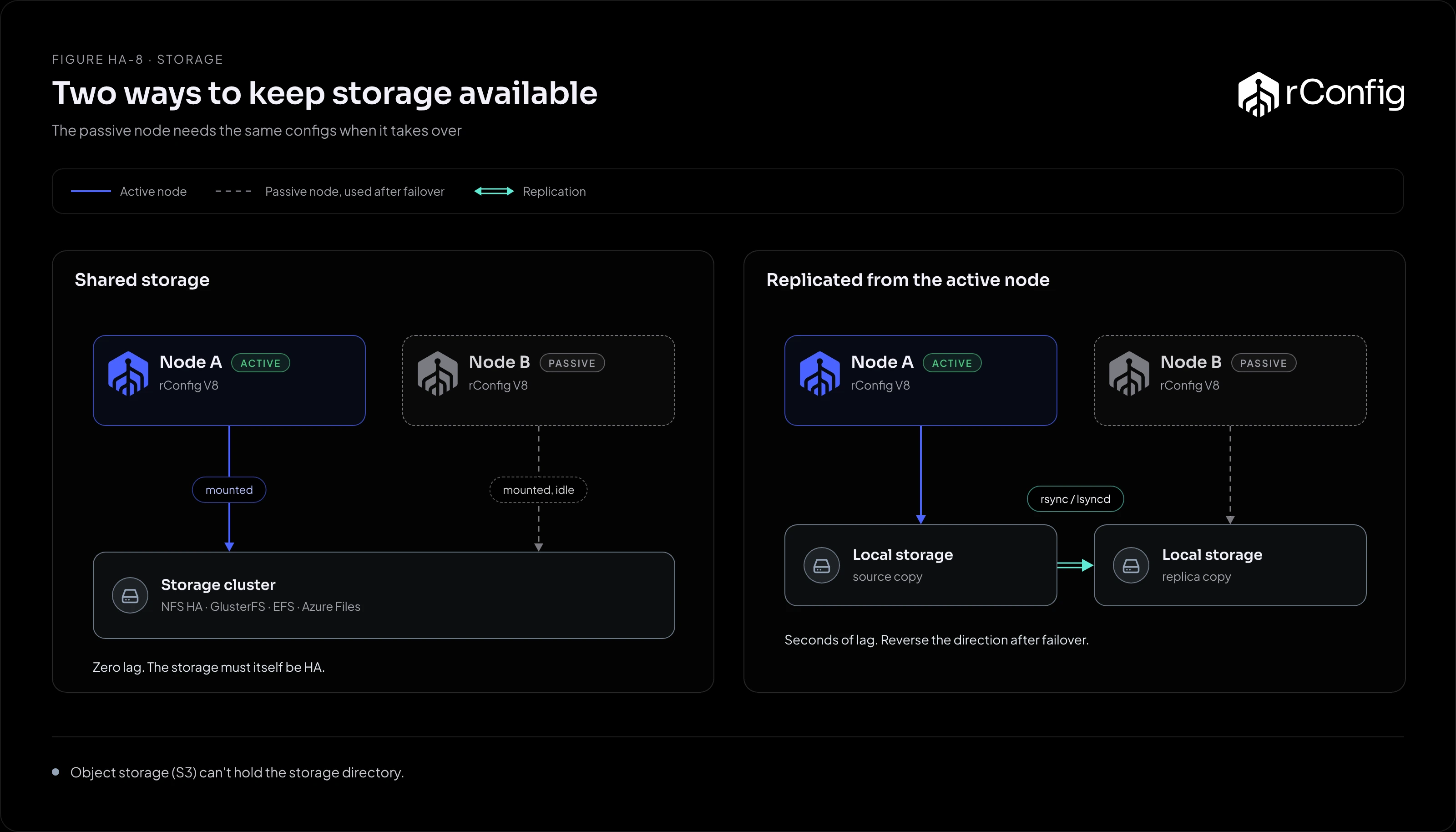
Every config rConfig downloads is a file. When the passive node takes over, it needs those files, and the compliance results, logs and uploads next to them. This page covers what’s in the storage directory, the ways to make it available on both nodes, and the settings that decide whether it works under load.
What’s in the storage directory
The directory is /var/www/html/rconfig8/current/storage. What matters most is under storage/app:
| Path | Holds |
|---|---|
storage/app/rconfig/data |
Downloaded device configurations, one file per download |
storage/app/rconfig/exports |
Exports and reports |
storage/app/rconfig/scripts |
Script Integration Engine scripts and their keys folder |
storage/app/rconfig (other folders) |
System backups (unless you send them to FTP) and other rConfig files |
storage/app (other folders) |
Uploads such as import files, temporary files |
storage/logs |
Application logs |
The database records where each config file is. If the database says a config exists and the file isn’t there, that config can’t be shown, diffed or checked. So storage and the database must fail over to the same point in time, or as near as you can get.
The options
| Option | How it works | Data loss on failover | Watch out for |
|---|---|---|---|
| Highly available NFS (a NAS or filer with controller failover, or Linux NFS with Pacemaker) | Both rConfig nodes mount one NFS export at the same path | None | The NFS service itself must fail over; a single NFS server just moves the single point of failure |
| GlusterFS (replica 3, or replica 2 plus an arbiter) | Files are replicated across storage nodes; both rConfig nodes mount the volume | None | More to run; small-file performance needs tuning; a two-way replica without an arbiter risks split-brain |
| Cloud file storage (Amazon EFS, Azure Files over NFS, Google Filestore) | The provider replicates across zones; both nodes mount it | None | Latency and throughput depend on the tier you pay for; check them against your backup volume |
| DRBD between the two rConfig nodes | A block device replicated synchronously from the active node to the passive node; the filesystem is mounted only on the active node | None with synchronous replication | Needs Pacemaker to promote DRBD and mount the filesystem as part of failover; only one node can mount it at a time, which suits rConfig’s active/passive design |
| Replication from the active node (lsyncd or scheduled rsync) | The active node copies changes to the passive node’s local disk | Files written since the last sync | The direction must reverse after failover; a gap between database and files is likely |
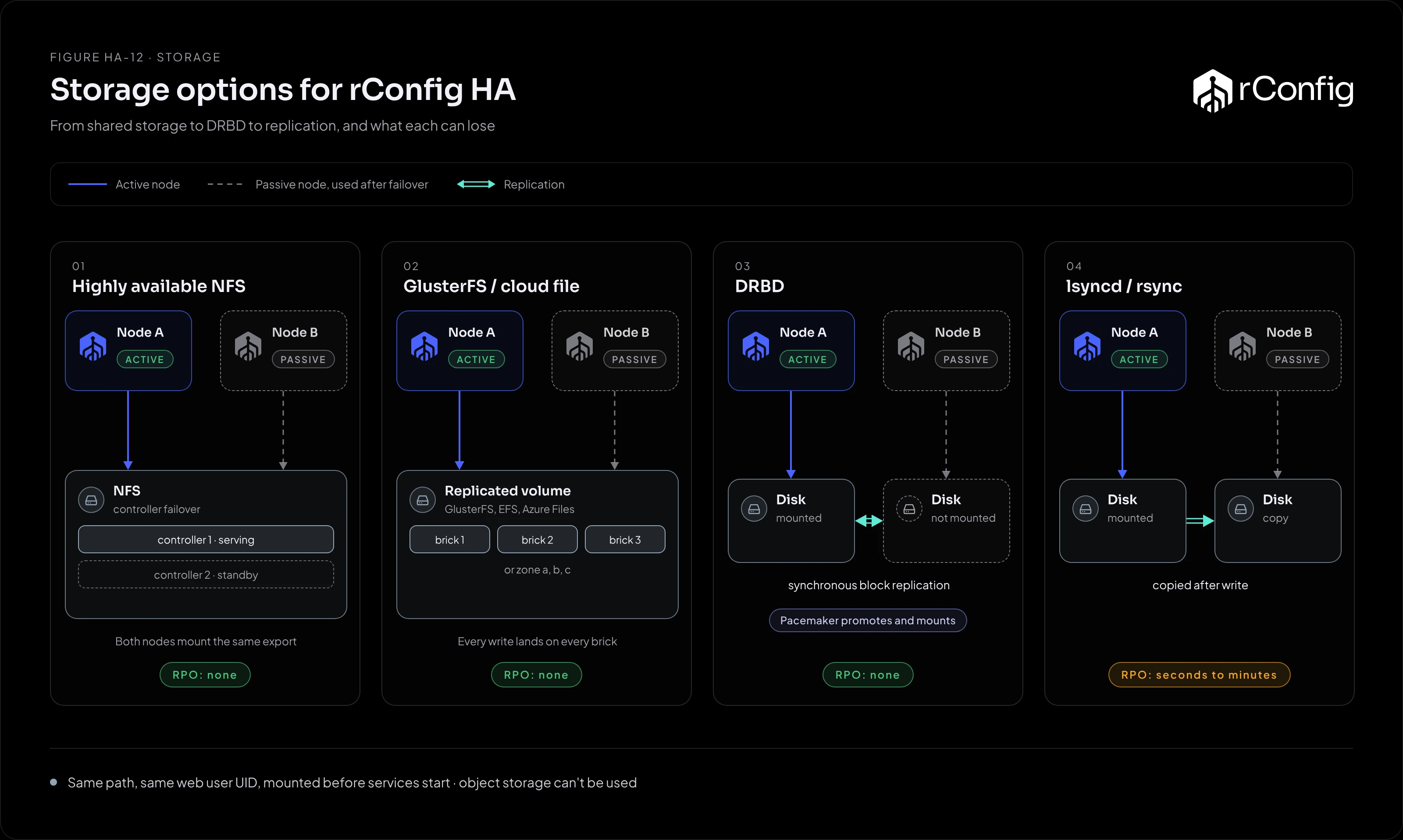
For most deployments the choice is between shared storage you already run (a highly available NAS or cloud file storage) and DRBD, which needs no extra storage system. Replication with lsyncd or rsync is the simplest to set up and the weakest on RPO.
Object storage (S3 and similar) can’t be used: rConfig needs a normal filesystem for the storage directory.
Settings that matter
- Same path on both nodes. Mount storage at the same place, so the path in the database is valid on either node.
- Same owner and permissions. Files are written by the web server user (
apacheon the RHEL family,www-dataon Ubuntu). Give that user the same UID and GID on both nodes, or files written by one node can’t be changed by the other. - NFS mounted
hard, notsoft. A soft mount returns errors to rConfig when the server is slow; a hard mount waits. Working file locking (NFSv4, orlockdandstatdon NFSv3) is required. - Low latency. rConfig reads and writes many small files. Aim for under 10 ms per file operation; slow storage shows up as slow backups and a slow web interface.
- Mount before services start. On failover, mount storage (or promote DRBD) before the web server and Horizon start. With Pacemaker, order the resources; with keepalived, do it first in the notify script.