

MariaDB high availability for rConfig
MariaDB holds rConfig’s devices, encrypted credentials, tasks, policies, users, compliance history and audit trail. rConfig connects to one endpoint and needs it to always reach a node that can take writes. This page covers the two common ways to make MariaDB highly available for rConfig, and what each costs. MariaDB is available on rConfig Pro and Enterprise.
What rConfig needs from the database tier
- One endpoint in
DB_HOSTthat always reaches a writable node. rConfig doesn’t split reads and writes, and doesn’t know about replicas. - Failover without a change to rConfig. The HA tooling promotes a node and moves the endpoint; rConfig reconnects to the same address.
- Every node sized like the primary, because after failover it carries the full load.
Two designs
| Primary/replica with automatic failover | Galera cluster | |
|---|---|---|
| How it works | One primary, one or more replicas using MariaDB replication. MaxScale (or orchestrator) watches the primary and promotes a replica when it fails | Three nodes, each holding a full copy. A write commits only when the cluster agrees, so every node has it |
| Endpoint for rConfig | MaxScale’s listener, or a VIP that follows the primary | MaxScale, ProxySQL or HAProxy, sending all rConfig traffic to one node at a time |
| Data loss on failover | Asynchronous replication can lose the last transactions; semi-synchronous replication narrows that to almost nothing | None for committed writes |
| Write speed | Unaffected (asynchronous) or slightly slower (semi-synchronous) | Every commit waits for the cluster, so writes are slower, more so across sites |
| Minimum nodes | Two, plus MaxScale (run it on two hosts, or behind its own VIP) | Three, or two plus a Galera arbitrator (garbd), so a majority survives one failure |
| Fits | Most deployments: simple to run, easy to reason about | Deployments whose RPO says no committed change may be lost |
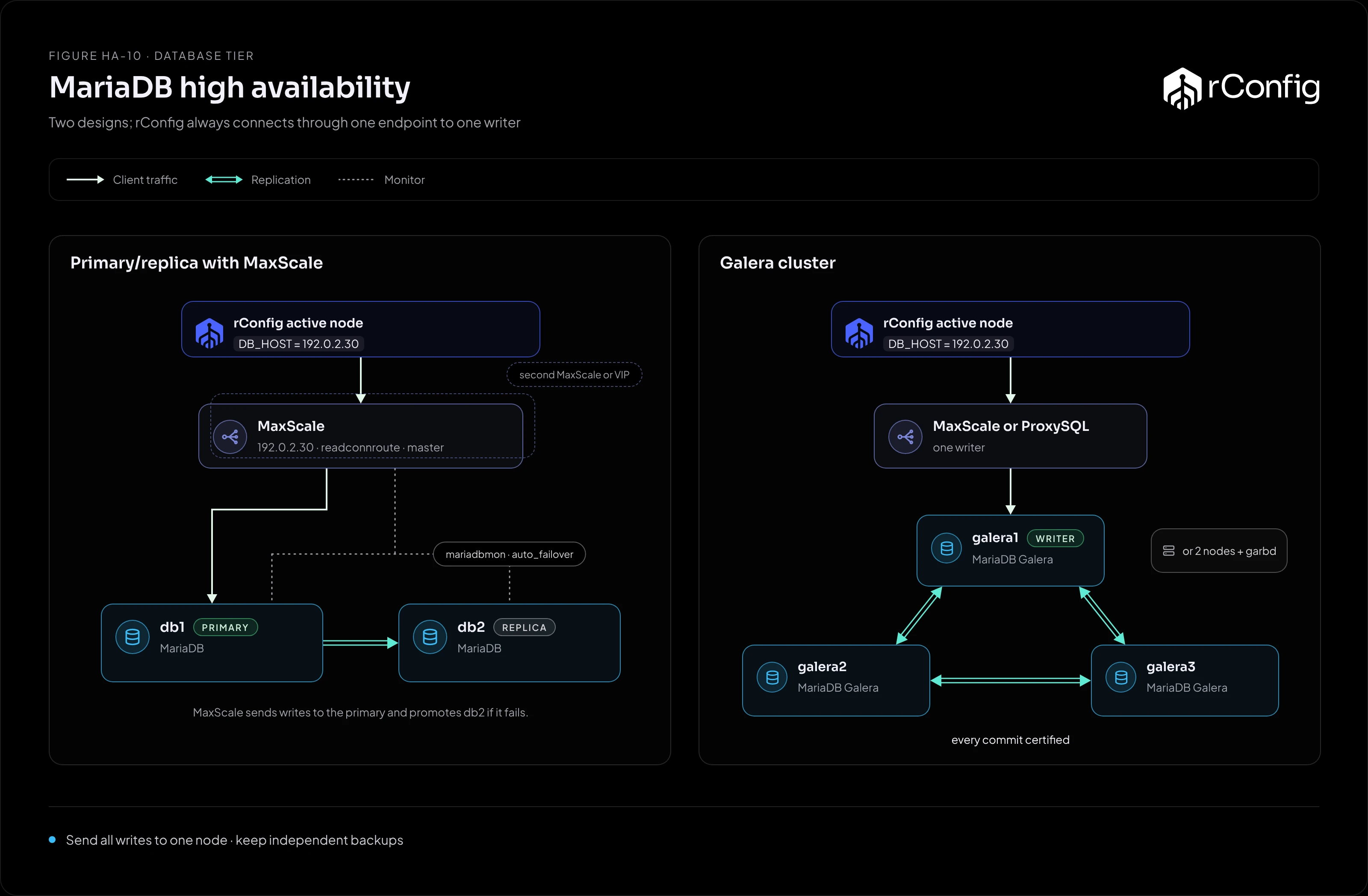
Primary/replica with MaxScale
MaxScale’s MariaDB monitor tracks which node is primary and, with automatic failover on, promotes the most up-to-date replica when the primary fails. rConfig connects to a MaxScale listener that routes everything to the current primary.
[mariadb-monitor]type=monitormodule=mariadbmonservers=db1,db2user=maxscale_monitorpassword=example-passwordauto_failover=trueauto_rejoin=true
[rconfig-service]type=servicerouter=readconnrouterouter_options=masterservers=db1,db2user=maxscale_servicepassword=example-password
[rconfig-listener]type=listenerservice=rconfig-serviceport=3306
router_options=master sends every connection to the primary, which is what rConfig needs. Don’t use a read/write splitting router: rConfig expects to read what it has just written.
MaxScale itself must not be a single point of failure. Run it on two hosts behind a VIP, or on both rConfig nodes so each reaches its local MaxScale.
Galera cluster
Galera keeps every node consistent, so any node could take writes. For rConfig, send all traffic to one node anyway, and fail over to another only when that node fails. Writing to several Galera nodes at once invites certification conflicts (two nodes changing the same row at once, one of them rolled back), which rConfig isn’t built to retry.
- MaxScale with the Galera monitor and
router_options=masterpicks one node as the writer. - ProxySQL or HAProxy can do the same, with one active backend and the others as backups.
Before choosing Galera, check:
- Large transactions. Bulk operations, such as purging old configs, produce large writes that every node must certify. Test a purge on the cluster before go-live.
- The network between nodes. Every commit crosses it. Keep the nodes close; Galera across distant sites slows every write in rConfig.
Operating it
- Watch replication lag (primary/replica) or flow control (Galera).
- Back up independently. Replication copies a dropped table to every node in seconds. Keep rConfig’s own backups and MariaDB backups (
mariadb-backupor similar). - Test failover by stopping the primary, or the writer node, during a quiet period, and check rConfig recovers without intervention.