

Central Manager integrations
Everything else in this library runs on one rConfig server: Pro, Enterprise or a single Vector Server. A multi-region Vector deployment adds a layer above the servers, the Vector Central Manager, and that changes where inventory integrations belong.
Where the Central Manager sits
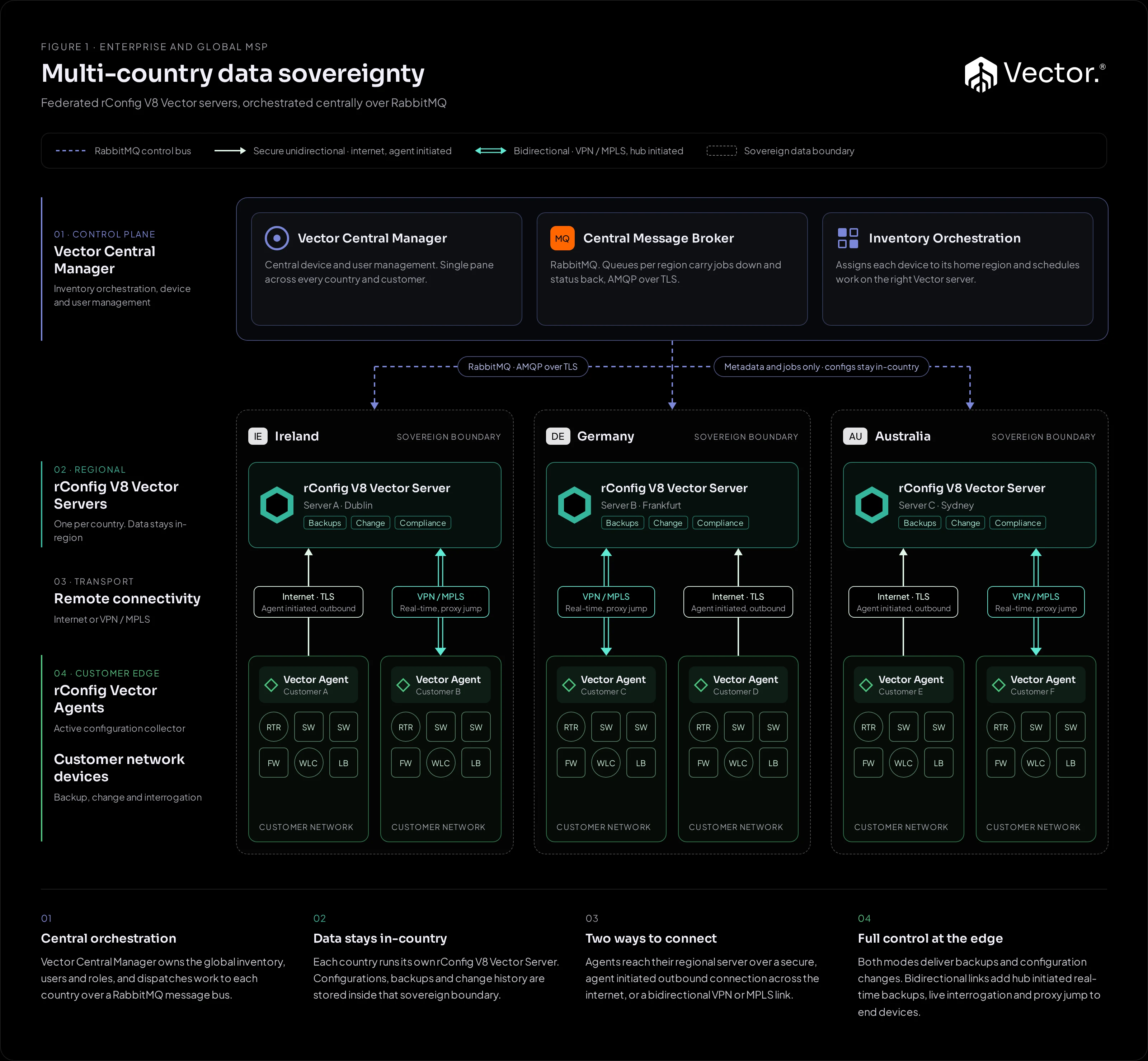
In this design the Central Manager owns the global inventory, users and roles, and assigns each device to its home region. Each regional Vector Server stores its own configurations and runs the backups. Only metadata and jobs cross regions. The full design is in Multi-country data sovereignty.
The inventory stays consistent in both directions. When a device is added on a regional server through the UI, the API or, from V8.4.3, a Device Sync run, the server proposes it to the Central Manager over RabbitMQ, the Central Manager accepts it into the global inventory, and the device is marked as synced. TL1 remote network elements are the exception: they’re discovered and managed on the regional server only.
Two limits apply to devices from Device Sync. Only newly created devices are proposed: devices created by syncs before V8.4.3 aren’t sent retroactively. And when a later sync changes a device the Central Manager already holds, the change isn’t sent as an update, whereas an edit in the UI is.
Why integrations move up a layer
With one server, Device Sync on that server is the integration. With a Central Manager, the global inventory lives above the servers, so the question becomes which layer talks to your other systems.
| Integrate at | Fits when | Built with |
|---|---|---|
| A regional Vector Server | The source is regional too (a Zabbix that only watches one country) and an out-of-the-box Device Sync driver covers it | Device Sync, configured like any other instance |
| The Central Manager | The source is global (one CMDB, one ITSM, one NMS for every region), or no Device Sync driver exists for it | rConfig Professional Services, per deployment |
Integrating at the Central Manager keeps one authority for the global inventory. Pointing every regional server’s Device Sync at the same global source would give each region its own, separately filtered copy of the same list.
What Central Manager integrations are for
Because they’re designed per deployment, Central Manager integrations aren’t limited to the twelve Device Sync drivers. Typical work includes:
- ITSM platforms, so device records, changes and approvals line up with your service management process.
- CMDBs and asset systems that are the global source of record for what exists and where.
- Network management systems with no Device Sync driver, including in-house and vendor-specific platforms.
- Provisioning and order systems in MSP environments, so a new customer site arrives in the right region with the right agent.
The out-of-the-box drivers still matter: a regional Vector Server can run Device Sync for regional sources alongside whatever the Central Manager integrates globally. Professional Services will design the split with you.
Planning questions
Bring the answers to these into the design conversation:
- Which system is the global source of record for devices, and which systems only hold part of the estate?
- Which way does data flow? Inventory into rConfig only, or results such as backup status and compliance back out to an ITSM or CMDB?
- How is a device’s region decided? By site, by customer, by country, or by a field in the source system?
- What can’t leave a region? The Central Manager carries metadata only, but your obligations decide which metadata.
- Which regional sources stay regional? Those are candidates for out-of-the-box Device Sync on the regional server.
When you don’t need this
Most MSPs and enterprises run a single Vector Server with agents, or several independent servers, and never need a Central Manager. In those designs Device Sync on each server is the integration. Start with Several sources, several instances.