

How Device Sync decides
Before you point Device Sync at a platform holding thousands of devices, it helps to know exactly what a run will do. Every driver, from NetBox to Zabbix to SolarWinds, uses the same pipeline and the same matching rules. Learn them once and every platform behaves predictably.
The pipeline
A run moves each upstream record through six stages:
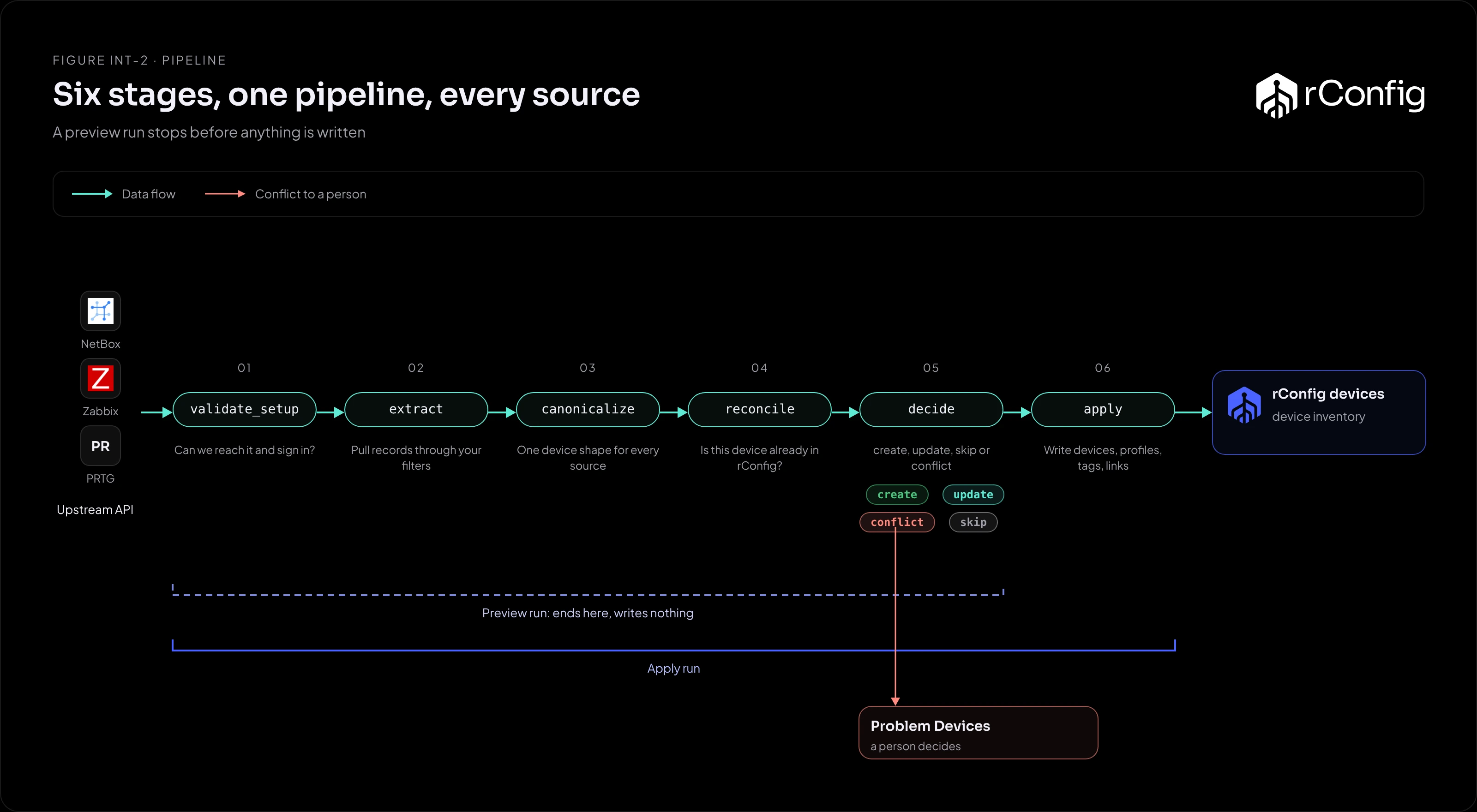
| Stage | What happens | What can stop a record |
|---|---|---|
validate_setup |
Checks rConfig can reach the platform and sign in | Network, TLS or credentials. The whole run fails fast |
extract |
Pulls records through the instance’s filters and keeps each raw record for audit | Filters that return nothing |
canonicalize |
Turns each record into one device shape: hostname, primary IP, vendor, model, tags and the Device Profile reference | No hostname, no external ID, or no usable Device Profile |
reconcile |
Works out whether the device is already in rConfig | Nothing stops here. It produces a match tier |
decide |
Turns the match into create, update, skip or conflict |
A conflict needs a person |
apply |
Writes devices, profiles, tags and the link between upstream ID and rConfig device | Only runs in apply mode |
Preview and apply
A preview run goes through decide and stops. You see every decision the run would make, including the conflicts, and nothing in your inventory changes. Missing-device handling is reported but not written either.
An apply run does the same work and then commits it.
The safe habit is the same for every platform: Extract Preview to check the filters, a preview run to check the decisions, then apply. Scheduled runs are apply runs, so get the preview clean before you schedule.
Matching: is this device already here?
Reconciliation has only two ways to recognise a device, and it trusts only one of them.
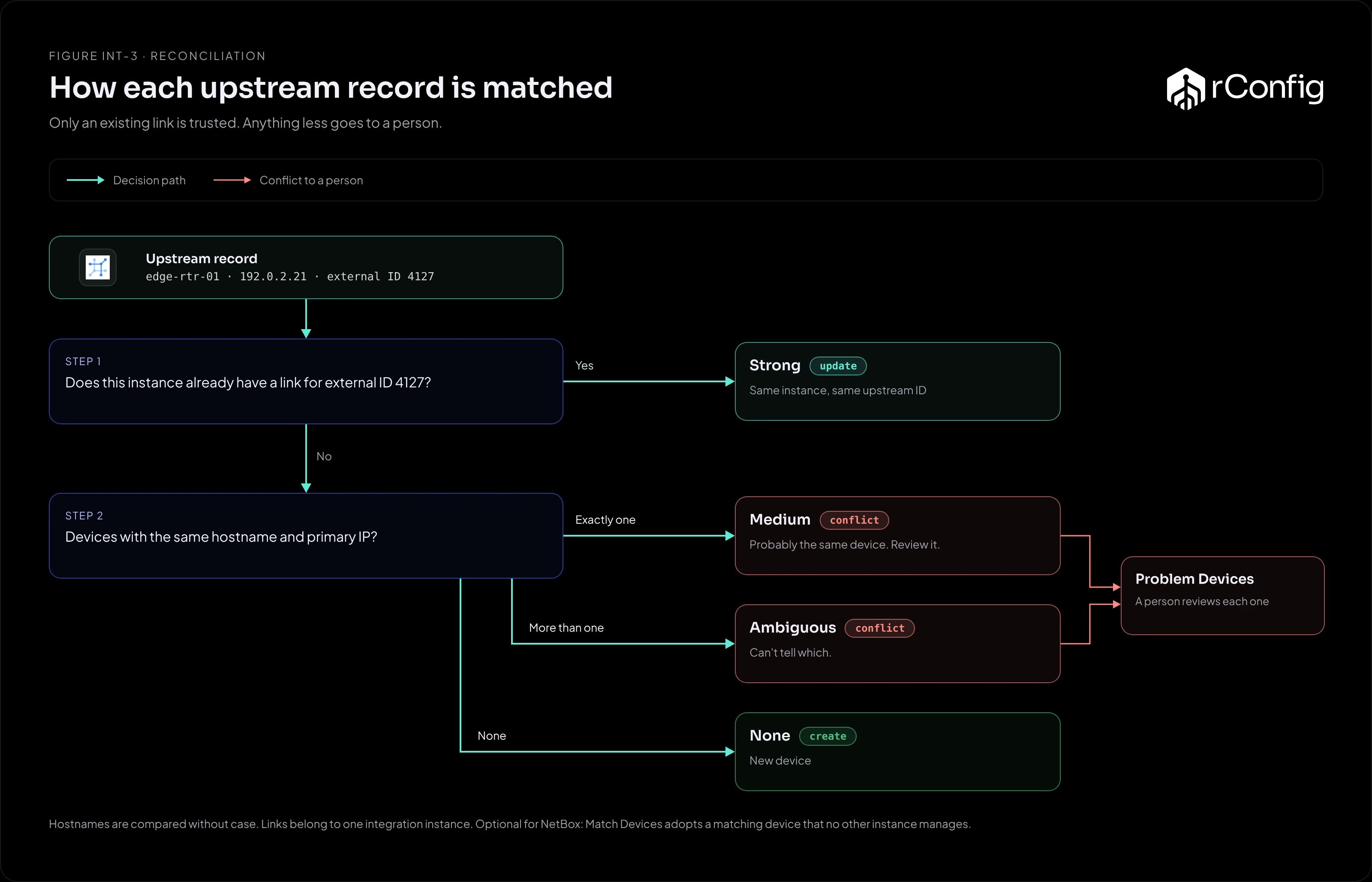
| Tier | How it matches | Decision |
|---|---|---|
| Strong | This instance already has an active link for the record’s upstream ID | update |
| Medium | No link, but exactly one rConfig device has the same hostname (ignoring case) and the same primary IP | conflict |
| Ambiguous | More than one device has that hostname and IP | conflict |
| None | Nothing matches | create |
Three consequences shape every design in this library:
- Links are what rConfig trusts. A link is written when a run creates a device, and it belongs to the instance that created it. After that, the upstream ID alone identifies the device, so it can be renamed or re-addressed upstream and still update cleanly.
- A likely match is never applied automatically. A medium match is probably the same device, but rConfig won’t take over a device it didn’t create. It goes to Problem Devices for a person to decide.
- A hostname spelt differently is a different device.
edge-rtr-01andedge-rtr-01.example.comdon’t match, so the record falls to tier None and a second device is created. The Problem Devices tab flags the new device under Same IP address already in use.
Drivers read serial numbers where the platform has them, but serials aren’t used for matching and aren’t stored on the rConfig device.
Device Profiles decide how a device is backed up
The upstream platform knows a device exists. It doesn’t know which rConfig template, credential set or category to use. A Device Profile carries those: template, vendor, category, credential set, and optionally an SNMP group, a Vector agent and default tags. Each upstream record names its profile by slug, in whatever the platform offers: a tag, a custom field, a host label, a group or a category.
Every record needs a profile. Where the record carries no reference, the instance’s Default Device Profile applies (set on the Setup tab, V8.4.3 and later); a reference on the record always wins. A record with neither is rejected at canonicalize and listed in Problem Devices under Missing required tag. One that names a profile that doesn’t exist, or can’t be used, is listed under Device profile unusable. Each platform’s carrier is in Platforms at a glance.
A profile can name a vault credential set, so devices arrive already reading their passwords from your key vault.
When a device disappears upstream
If a linked device stops appearing in an instance’s results, the instance’s missing-upstream policy applies:
| Policy | What happens |
|---|---|
| Disable the link (default) | The link is marked disabled. The device stays in rConfig with its history |
| Ignore | The link is marked missing, and nothing else changes |
Neither policy deletes the device. Removing devices from rConfig stays a human decision.
A device drops out of the results when it’s deleted upstream, but also when it falls outside the instance’s filters. Change a filter and a preview run will show the devices that would be disabled.
Problem Devices
Everything that couldn’t reach a clean create or update lands in the Problem Devices tab for the instance:
| Group | Usual cause | Usual fix |
|---|---|---|
| Missing required tag | The record has no Device Profile reference and the instance has no default | Add the tag, label, group or field upstream, or set a Default Device Profile |
| Device profile unusable | The record names a profile that doesn’t exist or can’t be used | Create the profile, or correct the slug upstream |
| Mapping failure | The driver couldn’t read a required field | Check the record upstream and the driver’s field mapping |
| Validation rejected | Another required field is missing | Fix the record upstream |
| Apply failed | The decision was right but writing the device failed | Read the error in the Logs tab, fix it and run again |
| Reconciliation conflict | A medium or ambiguous match | Decide which device is right, then remove or rename the other |
A run can complete and still leave problems behind. Treat the Open Problems count, not the run status, as the measure of a clean sync.