

Device Sync V2 Overview
Device Sync V2 Overview: Unified Network Device Inventory Pipeline in rConfig V8.2.0
Section titled “Device Sync V2 Overview: Unified Network Device Inventory Pipeline in rConfig V8.2.0”Device Sync V2 is the next-generation integration engine introduced in rConfig V8.2.0. It replaces the per-driver legacy commands and ad-hoc setup screens with a single, schema-driven pipeline that supports preview runs, multi-tier reconciliation, Device Profiles, and a growing catalog of upstream platforms: all from one consistent UI and CLI.
When to Use This Page
Section titled “When to Use This Page”Start here before setting up any V2 driver. This page explains the shared pipeline, CLI, and Device Profile model that every driver guide assumes you already understand: each driver’s setup page only covers what’s different for that platform.
Prerequisites
Section titled “Prerequisites”setting.viewpermission to view integrations,setting.create/setting.updateto configure and run them.- Read-access API credentials (or an equivalent service account) on the upstream platform you plan to sync from.
- No existing V1 integration is required: V2 drivers are configured independently under Settings → Integrations (V2).
Why V2
Section titled “Why V2”V1 device sync worked, but each driver shipped its own command, its own config form, its own staging table behavior, and its own quirks for tags, filters and reconciliation. V2 collapses all of that into a single pipeline:
- One CLI command for every driver:
rconfig:integration-v2-run - One UI, dynamically rendered per driver from a JSON schema
- One pipeline of well-defined stages:
validate_setup → extract → canonicalize → reconcile → decide → apply - One reconciliation model with strong / medium / ambiguous / none match tiers, authority tracing and conflict tracking
- Native Device Profiles so devices inherit template, vendor, category, credentials and SNMP settings from a reusable profile instead of repeating per-host tags
Supported Upstream Platforms
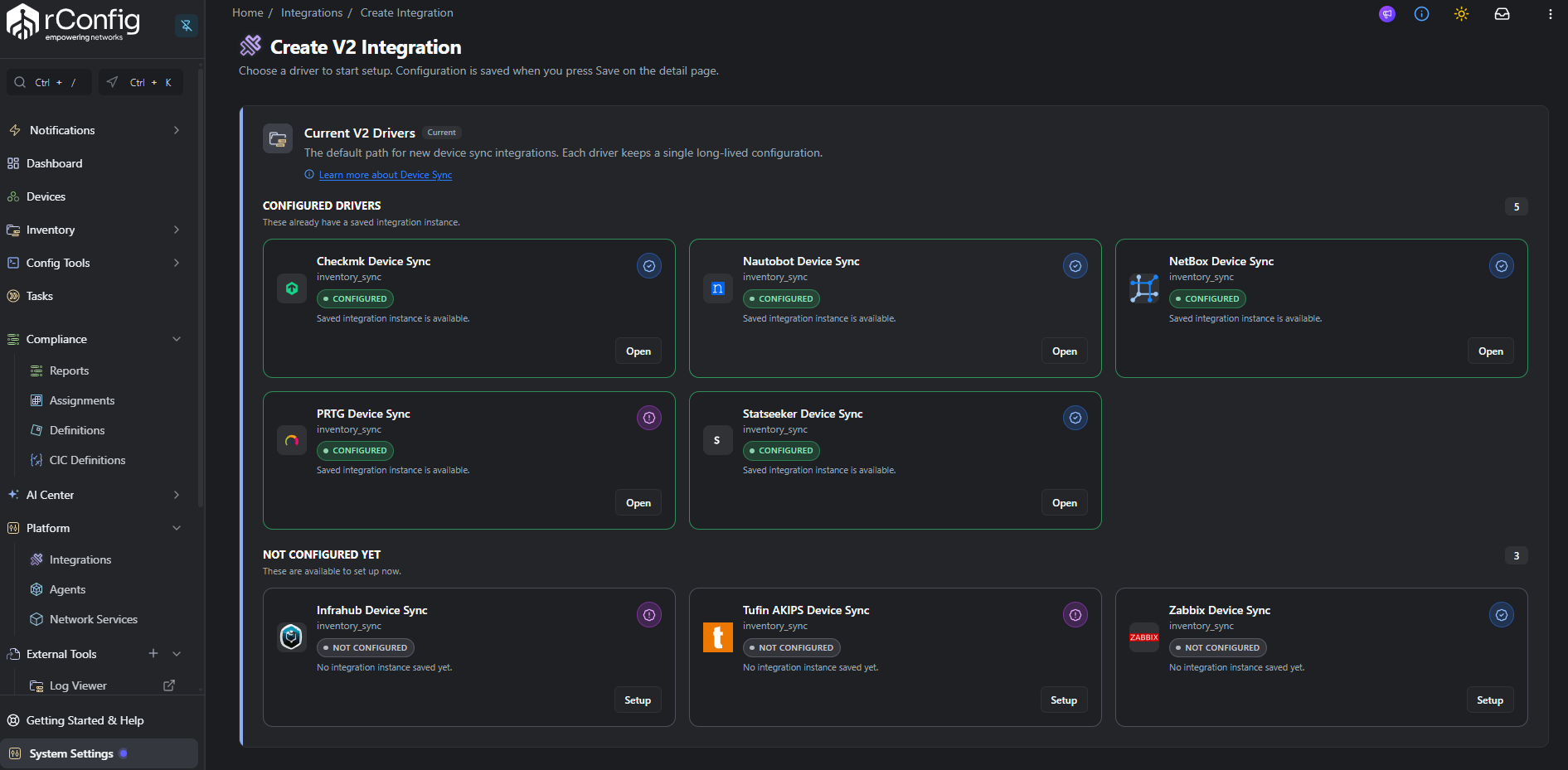
Section titled “Supported Upstream Platforms”V8.2.0 ships eight V2 drivers. Field-tested drivers have been validated against live customer environments; lab-tested drivers have been validated in the rConfig lab and are awaiting field validation by customers.
| Platform | Status | Notes |
|---|---|---|
| Zabbix | Field tested | Zabbix V2 Setup |
| Nautobot | Field tested | Nautobot V2 Setup |
| NetBox | Field tested | NetBox V2 Setup |
| Statseeker | Field tested | Statseeker V2 Setup |
| Checkmk | Field tested | Checkmk V2 Setup |
| PRTG | Lab tested | PRTG V2 Setup (customer field testing required) |
| Akips | Lab tested | Tufin AKIPS V2 Setup (customer field testing required) |
| Infrahub | Lab tested | Infrahub V2 Setup (customer field testing required) |
V2 vs V1 at a Glance
Section titled “V2 vs V1 at a Glance”| Capability | V1 (Legacy) | V2 (V8.2.0+) |
|---|---|---|
| CLI | One command per driver (rconfig:integration-zabbix, …) | Single command: rconfig:integration-v2-run |
| UI | Hardcoded per driver | Schema-driven, same form layout for every driver |
| Pipeline stages | Ad-hoc per driver | Six well-defined stages with per-stage metrics and errors |
| Run modes | Assessment / Deployment | Preview / Apply (preview is fully reconciled, dry-run) |
| Reconciliation | Basic hostname/IP | Strong / Medium / Ambiguous / None tiers + authority tracing |
| Device mapping | Per-host tags (rconfig::template, etc.) | Device Profiles + optional per-host overrides |
| Filter testing | Run full extract | Extract Preview: test filters without committing |
| Async execution | Inline only | Inline or queued, fine-grained per-stage jobs |
| Conflict handling | None | First-class conflict records with status & manual resolution |
| Missing upstream | Basic disable | Policy-driven: disable the link (default) or mark it missing and ignore it |
| Audit trail | Flat logs | Per-run stats_json, per-stage error_payload, policy version pinned |
How a V2 Run Works
Section titled “How a V2 Run Works”Every V2 run progresses through the same six stages, regardless of driver:
validate_setup: Test connectivity to the upstream API and validate credentials. Fails fast if SSL, auth or routing is broken.extract: Pull raw device records from the upstream API using the configured filters. Each record is stored inintegration_source_recordsfor replay and audit.canonicalize: Normalize the upstream payload into rConfig’s canonical device shape (hostname, primary IP, serial, vendor, model, tags, device profile input). Validation errors are surfaced per-record.reconcile: Match each canonical candidate against existing devices using identity fingerprints (external ID, hostname + primary IP, serial). Returns a match tier (strong, medium, ambiguous, none) and an authority trace.decide: Combine the reconciliation result with instance policies (reconciliation policy, missing-upstream policy, profile policy) to produce a final action per device:create,update,skip, orconflict.apply: In apply mode only, commit decisions: create or update devices, assign Device Profiles, sync tags, and updateintegration_device_links. Preview runs stop afterdecide.
Preview runs let you walk the entire decision matrix without touching production data, then review and re-run in apply mode when you’re satisfied.
Device Profiles (New in V8.2.0)
Section titled “Device Profiles (New in V8.2.0)”Device Profiles are the V2 way to apply rConfig configuration metadata to imported devices. Instead of tagging every upstream host with rconfig::template, rconfig::credentialset, rconfig::vendor, etc., you create a profile once in rConfig and reference it from upstream.
A profile bundles:
- Device template
- Vendor and category
- Credential set
- SNMP group (optional)
- Vector agent (optional, requires Vector Server)
- Default tags
- Default model and prompt patterns
Upstream platforms reference a profile by slug:
- Zabbix tag:
rconfig::device_profile = <profile-slug>: Zabbix requires this tag by default; a candidate without it is rejected and appears in Problem Devices asmissing_required_tag. - Nautobot custom field:
rconfig_device_profile = <profile-slug> - NetBox custom field:
rconfig_device_profile = <profile-slug> - Checkmk host label:
rconfig: device_profile--<profile-slug>: must be a host label, not a host tag or attribute. Checkmk requires it by default; see Checkmk V2 Setup.
For Nautobot and NetBox the profile is advisory, not required: a candidate without it is still created or updated, just without profile-derived defaults. When profile mode is active, profile values become authoritative defaults and rconfig::tag remains additive for per-host tags.
Setting Up a V2 Integration
Section titled “Setting Up a V2 Integration”The high-level flow is the same for every driver:
-
Configure upstream: create an API user / token with read access to devices and tags.
-
Tag or label devices: either apply a
rconfig::device_profilereference, or apply legacy mapping tags. -
Add the integration in rConfig: Settings → Integrations (V2) → New → pick a driver.
-
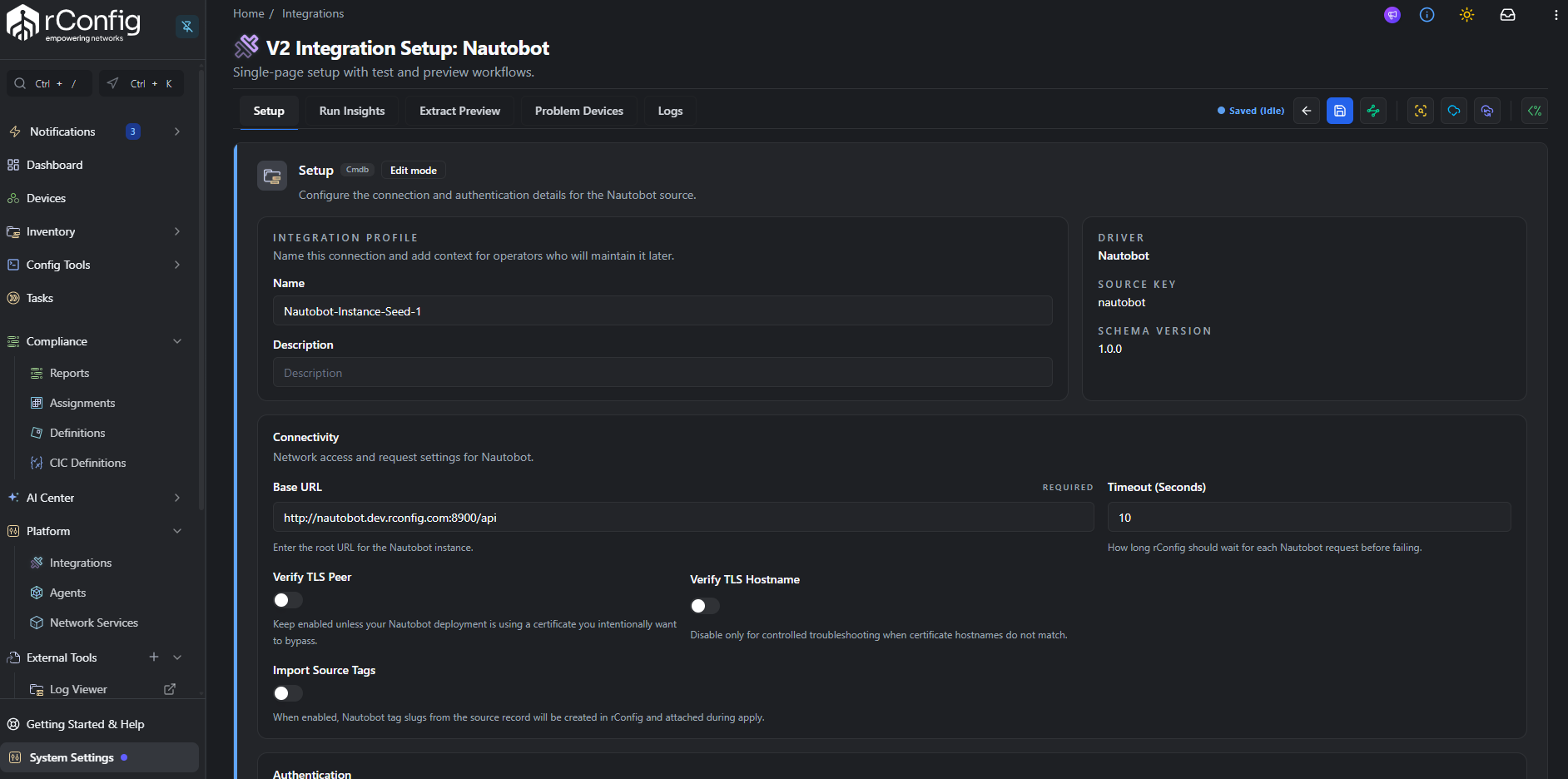
Fill in connection details: base URL, credentials, SSL, filters. The form is generated from the driver’s schema.
-
Test connection and Test credentials.
-
Run an Extract Preview to verify the configured filters return the expected hosts.
-
Run a Preview Sync to walk the full pipeline without committing.
-
Review the run summary: extracted records, validation status, reconciliation tiers, decisions, conflicts.
-
Run a Full Sync to commit changes.
-
Schedule recurring runs via Scheduled Tasks.
Each driver page covers the upstream-specific steps for that flow.
CLI Commands
Section titled “CLI Commands”Run an integration
Section titled “Run an integration”# Preview run (default: does not write to devices)php /var/www/html/rconfig8/current/artisan rconfig:integration-v2-run <instance_id>
# Apply run: commits decisions to productionphp artisan rconfig:integration-v2-run <instance_id> --mode=apply
# Run by driver key when you only have one instance per driverphp artisan rconfig:integration-v2-run --driver=zabbix --mode=preview
# Verbose debug output, queued asynchronouslyphp artisan rconfig:integration-v2-run <instance_id> --mode=apply --debug --queue| Option | Shortcut | Description |
|---|---|---|
--driver= | Source key (e.g. zabbix, nautobot, netbox). Alternative to instance ID | |
--mode= | preview (default) or apply | |
--trigger= | -t | Trigger type for audit metadata (default manual) |
--debug | -d | Verbose stage timings, metrics and a debug summary at the end of the run |
--task-id= | Associate the run with a Scheduled Task for completion notifications | |
--queue | Dispatch the run to the queue instead of executing inline |
Refresh driver definitions
Section titled “Refresh driver definitions”After upgrading rConfig or installing a new driver, sync the registry into the database:
php artisan rconfig:integration-v2-sync-definitions
# Deactivate definitions no longer present in the registryphp artisan rconfig:integration-v2-sync-definitions --cleanup
Scheduling Automated Sync
Section titled “Scheduling Automated Sync”V2 runs can be scheduled the same way as other rConfig tasks:
- Navigate to Scheduled Tasks → Add Task.
- Select Integration V2 Job as the task type.
- Pick the integration instance.
- Choose the run mode: usually Apply for a production schedule, Preview for periodic drift detection without changes.
- Set the cron schedule.
- Save.
The scheduled task ID is forwarded to the run via --task-id=<id> so completion notifications can fan out correctly.
Run History, Conflicts and Logs
Section titled “Run History, Conflicts and Logs”Every run writes detailed metadata that you can inspect from the V2 UI or the database:
integration_runs: run-level status, mode, stage, policy version, summary statsintegration_run_stages: per-stage status, attempt count, metrics and error payloadsintegration_source_records: raw upstream payloads (for replay and audit)integration_canonical_candidates: normalized candidates with validation statusintegration_reconciliation_results: match tier, target device, authority traceintegration_sync_decisions: final action and reason code per candidateintegration_conflicts: open conflicts requiring manual resolutionintegration_device_links: long-lived links between upstream IDs and rConfig devices, withfirst_seen,last_seen,missing_since
The V2 UI surfaces these as the Run Insights, Problem Devices and Logs tabs on each driver detail page.
Troubleshooting Common Issues
Section titled “Troubleshooting Common Issues”validate_setup fails
Section titled “validate_setup fails”- Check the base URL is reachable from the rConfig server (try
curlfrom the box). - Disable SSL Verify Peer / Host for self-signed certs (only on internal networks).
- Confirm the API token / credentials are still active on the upstream.
- Look at the run’s stage
error_payload: V2 stores the full exception chain when--debugis used.
extract returns zero records
Section titled “extract returns zero records”- Run an Extract Preview with the same filters to compare results.
- Verify the API user can see the target objects (Zabbix host groups, NetBox/Nautobot tenant scope, etc.).
- Check filter operators: V2 schemas declare which operators each platform supports.
canonicalize produces invalid candidates
Section titled “canonicalize produces invalid candidates”- Inspect
integration_canonical_candidates.validation_errorsfor the failing field. - Most common: missing hostname, missing primary IP, or unresolvable Device Profile slug.
- Add the missing field upstream, or attach a Device Profile.
reconcile returns ambiguous matches
Section titled “reconcile returns ambiguous matches”- More than one existing rConfig device matched the candidate’s identity fingerprint.
- Open the run in the UI, view the candidate, and pick the correct target device. The decision becomes a
conflictuntil resolved.
apply skips devices unexpectedly
Section titled “apply skips devices unexpectedly”- Check
integration_sync_decisions.decision_reason_code: common codes includeNO_MATCH_CREATE_CANDIDATE(created),MEDIUM_MATCH_REQUIRES_REVIEWandAMBIGUOUS_MATCH_MULTIPLE_DEVICES(both parked in Problem Devices), andREJECTED_MISSING_REQUIRED_DEVICE_PROFILE_TAG(Zabbix candidates missing the required profile tag). - Review the instance’s reconciliation policy and missing-upstream policy.
Common Gotchas
Section titled “Common Gotchas”Related Documentation
Section titled “Related Documentation”- Zabbix Device Sync V2: Zabbix-specific setup
- Nautobot Device Sync V2: Nautobot-specific setup
- NetBox Device Sync V2: NetBox-specific setup
- Statseeker Device Sync V2: Statseeker-specific setup
- PRTG Device Sync V2: PRTG-specific setup (lab tested)
- Tufin AKIPS Device Sync V2: Tufin AKIPS-specific setup (lab tested)
- Device Sync (Legacy V1): V1 reference for existing deployments
- Scheduled Tasks: Automating V2 runs