

Source of truth first
If your team already records every device in NetBox, Nautobot or Infrahub before it goes live, that’s the natural place for rConfig’s inventory to come from. Engineers add a device once, in the tool they already use, and rConfig starts backing it up on the next scheduled run.
What the pattern gives you
- One place to add a device. The source of truth is where the device’s name, address, site and role are decided. rConfig follows.
- Intent, not discovery. Devices are synced because someone planned them, not because they answered a poll. Lab kit and devices nobody has documented stay out.
- Decommissioning that follows. Set a device to a status outside your filter, or delete it, and the next run disables its link in rConfig. The device and its config history stay until someone removes them.
- A clean audit story. Every device in rConfig traces back to a record in the source of truth through its link.
The cost is discipline: rConfig is only as complete as the source of truth. A device that never made it into NetBox never gets backed up.
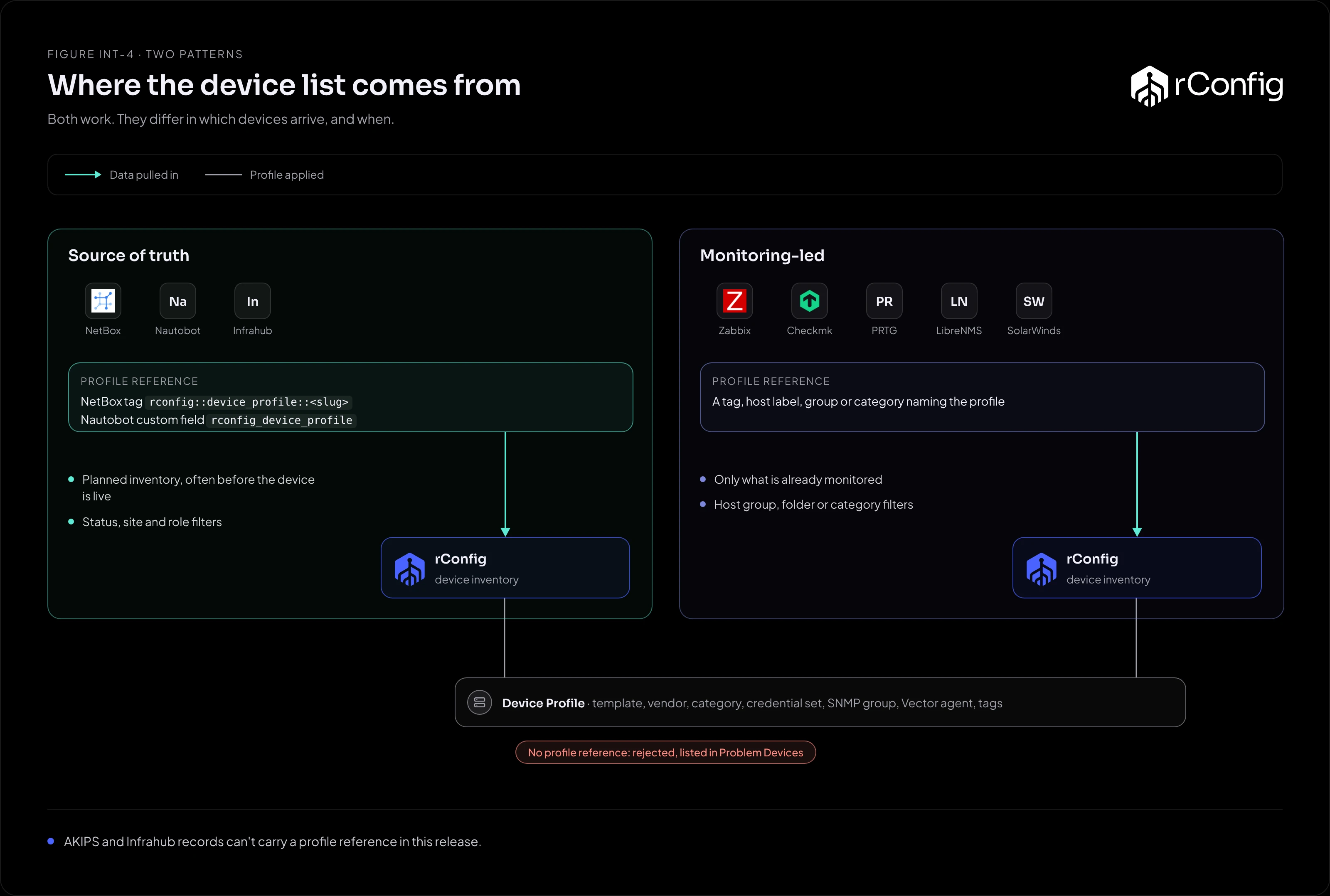
How each platform carries the profile
Every synced record needs a Device Profile reference, which tells rConfig the template, credentials and category to use. The source of truth is where engineers set it.
| Platform | Profile reference | Filters |
|---|---|---|
| NetBox | A tag rconfig::device_profile::<slug> on the device |
Tag, site, status |
| Nautobot | The custom field rconfig_device_profile, or the tag rconfig::device_profile::<slug> when the field is empty |
Tag, site, status |
| Infrahub | None per device. The default schema has no profile attribute, so every device takes the instance’s Default Device Profile (V8.4.3 and later) | The GraphQL query itself |
A record without a profile reference takes the instance’s Default Device Profile if one is set (V8.4.3 and later). Without a default, it’s rejected and listed in Problem Devices, so a missing tag or field shows up straight away rather than as a device that silently fails to back up. For a source of truth, leaving the default unset is often the better choice: it makes engineers choose a profile for every device.
Filters: sync what’s live
The source of truth usually holds more than you want backed up: planned devices, decommissioned ones, patch panels and power. Filter to what rConfig should manage.
- Status is the most useful filter. Sync
activeonly, and planned devices join rConfig the day they go live. - Site splits a large estate across several instances, for example one per region or per Vector Server.
- Tag opts devices in explicitly, if your team prefers to mark what rConfig manages.
Remember the other side of a filter: a device that stops matching is treated as missing, and its link is disabled. Moving a device to offline for maintenance will disable its link until it’s back.
Bringing a source of truth to an existing rConfig
The hard case is an rConfig that already has devices, added by hand or by an import, when you switch on NetBox. The existing devices have no links, so the first run finds them by hostname and IP and raises a conflict for each one.
You have two ways through:
- NetBox Match Devices (V8.4.0 and later). Switch it on for the first run and NetBox adopts each existing device that matches, instead of raising a conflict. Switch it off afterwards. See the Match Devices tab.
- Resolve the conflicts in Problem Devices. Practical for a few dozen devices, slow for hundreds.
Either way, check hostnames first. Where rConfig has edge-rtr-01 and NetBox has edge-rtr-01.example.com, the record won’t match at all and a duplicate is created. Make the names agree before the first apply run.
When to use it
- Your source of truth is maintained, and the team adds devices there first.
- You want rConfig’s inventory to follow change control.
- You run NetBox, Nautobot or Infrahub. Infrahub gives every device the instance’s Default Device Profile, so split device classes across instances if they need different profiles.
When something else fits better
- The most complete list you have is your monitoring platform. See Monitoring-led inventory.
- You’re moving off an older backup tool once. Use a one-off import.