

Role mapping patterns
Role mapping turns the identity provider into the place where rConfig access is managed. Group membership decides who can sign in and with which roles, and joiners, movers and leavers are handled where the rest of their access is. It’s available on the SAML 2.0 and Shibboleth connections from V8.3.3.
How a sign-in is mapped
At every SAML sign-in, rConfig:
- Reads every value of the configured group attribute from the assertion.
- Reduces each value with the match mode: as sent (Exact value), the
CNof a distinguished name (Group DN), or the capture group of your pattern (Regular expression). - Compares each reduced value, ignoring case, with every active role. A role with SSO group values matches only those. A role without them matches its ident (
Network Operationshas the identnetwork-operations). - Replaces the user’s roles with every role that matched.
- Refuses the sign-in if nothing matched, or if the attribute is missing, and removes the user’s roles.
The identity provider is authoritative. A role added by hand in Users disappears at the next sign-in.
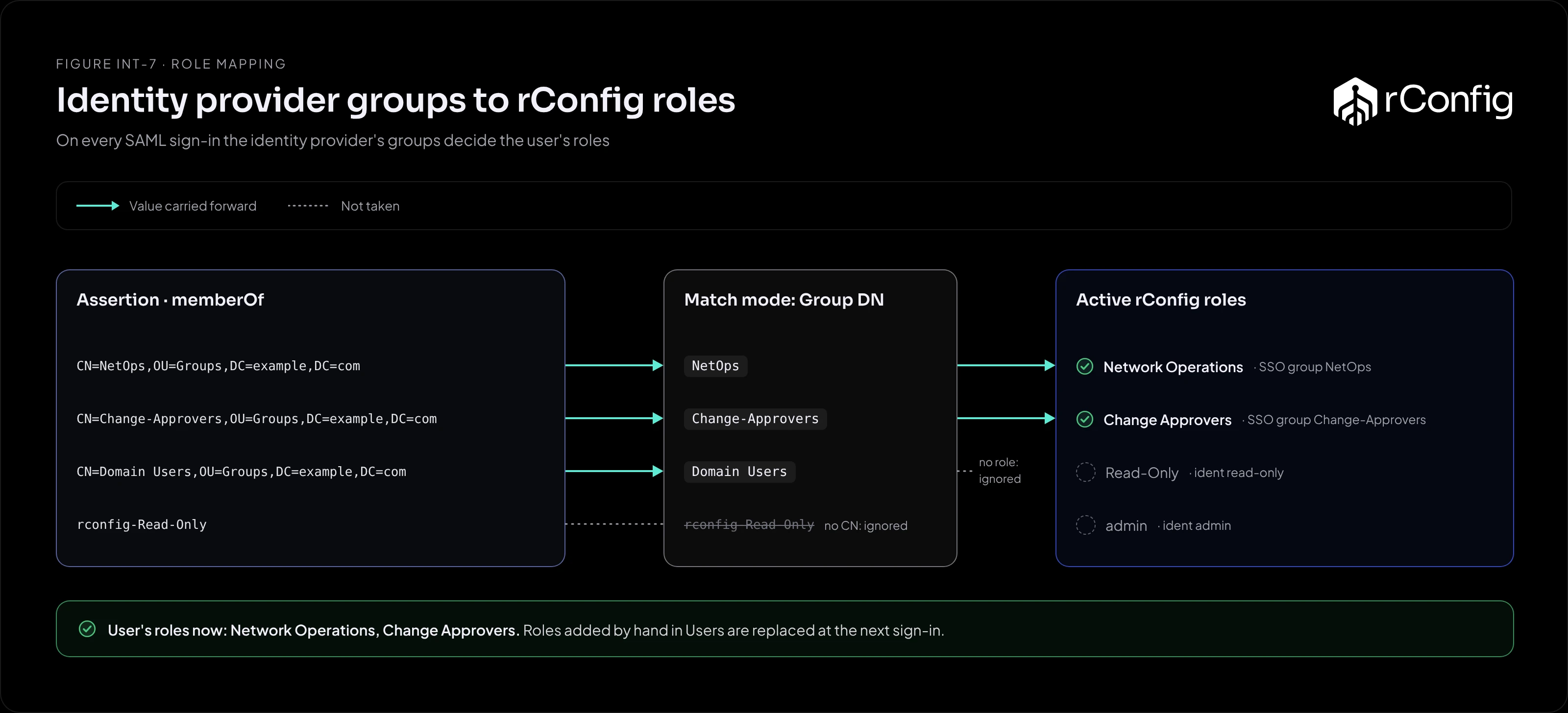
Pattern 1: Active Directory groups through ADFS
ADFS sends memberOf as distinguished names: CN=NetOps,OU=Groups,DC=example,DC=com.
- Match mode: Group DN. Each value reduces to its
CN. - Roles: set each rConfig role’s SSO group to the AD group name (
NetOps,Change-Approvers). - Why it works: AD group names rarely match rConfig role names, and the SSO group bridges them without renaming anything.
Groups that match no role, such as Domain Users, are ignored. They don’t cause a refusal as long as at least one group matches.
Pattern 2: prefixed group names (Entra ID, Okta)
The identity provider sends group names, and you create dedicated groups with a prefix: rconfig-admin, rconfig-Read-Only.
- Match mode: Regular expression, pattern
^rconfig-(.+)$. - Roles: no SSO group needed.
rconfig-Read-Onlyreduces toRead-Only, which matches the role whose ident isread-only. - Why it works: the prefix makes rConfig’s groups obvious to whoever manages the identity provider, and unrelated groups (
finance) don’t match the pattern at all.
Pattern 3: group object IDs (Entra ID)
Entra ID can send group object IDs rather than names.
- Match mode: Exact value.
- Roles: add each group’s object ID to the SSO group of the role it grants.
- Why it works: IDs survive group renames. The cost is readability: keep a note of which ID is which group.
Rolling it out safely
- Map an admin group first. Add your identity provider’s admin group to the admin role’s SSO group, or make sure a value reduces to
admin. - Use Test a value on the settings page with real values from an assertion. It shows the reduced value and the role it would grant, before you save.
- Switch on role mapping before auto-approve, and check a few existing users sign in with the roles you expect. Then switch on auto-approve for new users.
- Tell your administrators that roles now change in the identity provider, not in Users.
If someone is refused, the Application Log shows each raw value, what it reduced to and which role it matched, under resolved to [.
Least privilege with mapped roles
- Map to narrow roles. Create rConfig roles for the jobs people do (read-only, operations, change approval) rather than mapping everyone to one broad role.
- Keep the admin group small. Membership of that one group now means full control of rConfig.
- Review in one place. With role mapping, the identity provider’s group membership is the access review. There’s no second list in rConfig to reconcile.