

How vault lookups work
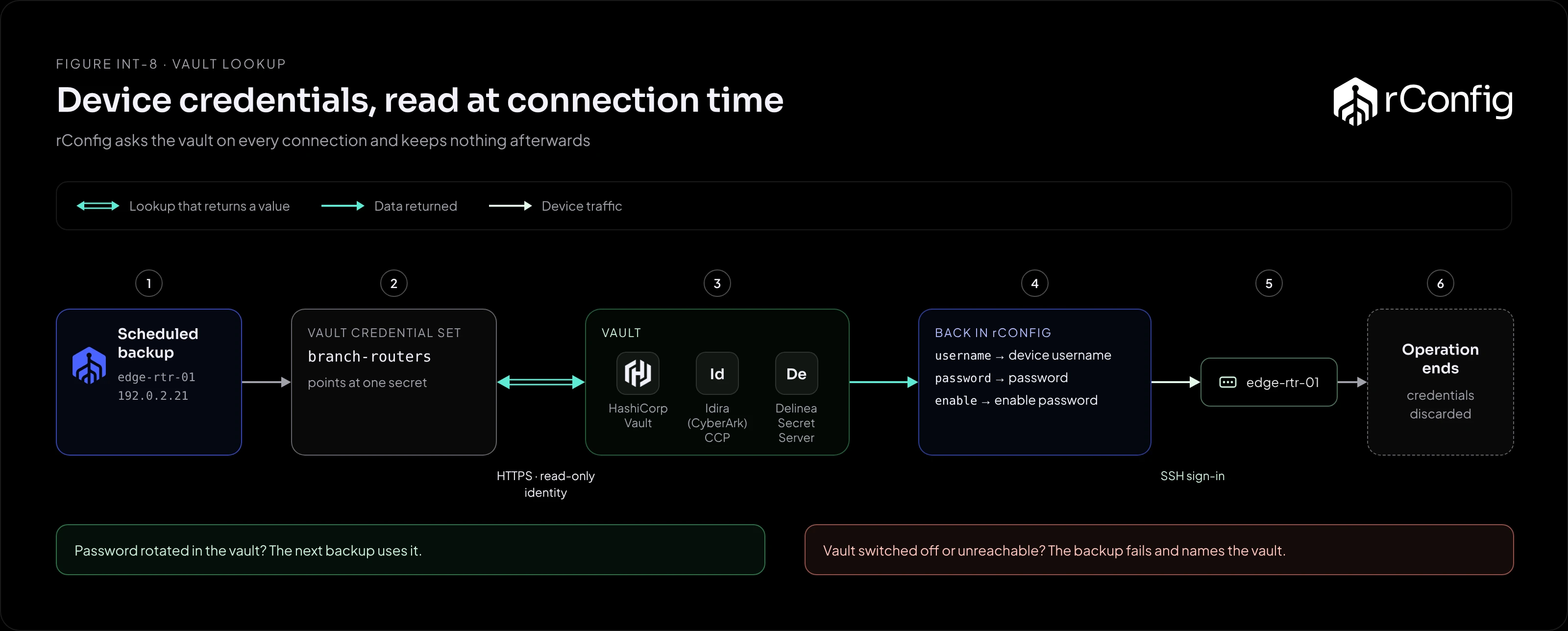
A key vault integration moves device passwords out of rConfig. rConfig keeps a pointer to a secret, not the secret itself, and reads the current value every time it connects to a device. Rotate a password in the vault and the next backup uses it.
The lookup
- A vault credential set in rConfig points at one secret or account in one vault, and is assigned to devices like any other credential set.
- When rConfig connects to one of those devices, for a backup or any other job, it asks the vault for that secret over HTTPS.
- rConfig maps the returned fields to the device username, password and enable password. The field names are configurable per credential set.
- It signs in to the device.
- When the operation ends, the credentials are discarded. Nothing is cached.
| Provider | rConfig signs in with | Default fields |
|---|---|---|
| HashiCorp Vault | A static token | device_username, device_password, device_enable_password |
| Idira (CyberArk) Central Credential Provider | An application ID with allowed machines, and optionally a client certificate | UserName, Content (the password), plus an enable password property if your platform defines one |
| Delinea Secret Server | A dedicated API user (OAuth2 password grant) | username, password, enable-password |
What reading at connection time means
Rotation needs no coordination. Because nothing is cached, a password changed in the vault is used from the next connection. There’s no sync job and no window where rConfig holds the old value.
The vault becomes a backup dependency. If the vault is unreachable, or the integration is switched off in rConfig, backups for devices using it fail, with a message naming the vault. Treat the vault’s availability as part of rConfig’s: monitor it, and include it in your high availability planning.
Every connection is a read. A scheduled backup of 2,000 devices is 2,000 vault reads in a short window. Check the vault’s rate limits and audit log volume before switching large device groups over.
The vault’s audit log shows every read. You can see exactly when rConfig fetched each credential. rConfig’s own activity log records changes to the vault settings.
Scoping rConfig’s access
- One identity for rConfig. A dedicated token, application or API user, so its reads are easy to find in the vault’s audit log and easy to revoke.
- Read only. rConfig never writes to the vault.
- A narrow path or safe. Keep network device secrets under their own path (HashiCorp), safe (Idira) or folder (Delinea), and grant rConfig that alone.
- TLS verified. For an internal CA, paste the CA bundle on the provider’s page in rConfig rather than switching verification off.
Vault settings are stored encrypted in the rConfig database from V8.4.2, and saved secrets are never sent back to the browser. Installs that configured a vault in .env before V8.4.2 keep working until the settings page is first saved.
Where vault credentials fit
rConfig has three kinds of device credential, and they mix freely across the inventory:
| Kind | Stored | Use when |
|---|---|---|
| Local credentials on a device | In rConfig, on the device | Labs and one-off devices |
| Device credential set | In rConfig, encrypted, shared by many devices | No vault, or devices outside the vault’s scope |
| Vault credential set | In the vault, read at connection time | The vault is the source of truth and passwords rotate there |
A Device Profile can name a vault credential set, so devices arriving through Device Sync use the vault from their first backup.