

Several sources, several instances
Larger networks rarely have one list of devices. There’s a Zabbix per region, an OpenNMS in the data centre, NetBox for the core, and an acquired company with its own LibreNMS. Device Sync handles this with instances: one per upstream connection, as many as you need, all feeding the same rConfig.
What belongs to an instance
| Belongs to the instance | So |
|---|---|
| Connection and credentials | Two Zabbix servers are two instances, even with the same driver |
| Filters | One server can be split into several instances, each with its own scope |
| Schedule | Each instance is its own Integration V2 Job scheduled task, so a busy source can run hourly and a quiet one daily |
| Links to rConfig devices | An instance updates only the devices it created or adopted |
| Missing-upstream policy | An instance only ever disables its own links |
| Default Device Profile | Records with no profile reference take this instance’s default (V8.4.3 and later) |
| Problem Devices, runs and logs | Each instance is reviewed on its own |
Device Profiles themselves are shared across rConfig. What’s per instance is the fallback: a record that names no profile takes its instance’s default, so two instances against the same platform can give untagged devices different profiles.
The rule that matters: links belong to one instance
Reconciliation trusts a device only when the instance that is running holds an active link for it. A device created by another instance has no link from this one, so it’s matched the slower way, by hostname and primary IP:
| What the second instance sees | Result |
|---|---|
| Same hostname and same IP | A conflict in this instance’s Problem Devices. Nothing is overwritten |
A different hostname (edge-rtr-01 against edge-rtr-01.example.com), same IP |
No match, so a second device is created. The Problem Devices tab shows it under Same IP address already in use |
| A different IP | No match, so a second device is created |
Two instances never fight over one device by silently overwriting each other. The risk is the opposite: duplicates, when the sources disagree on names. Every pattern below is about avoiding that.
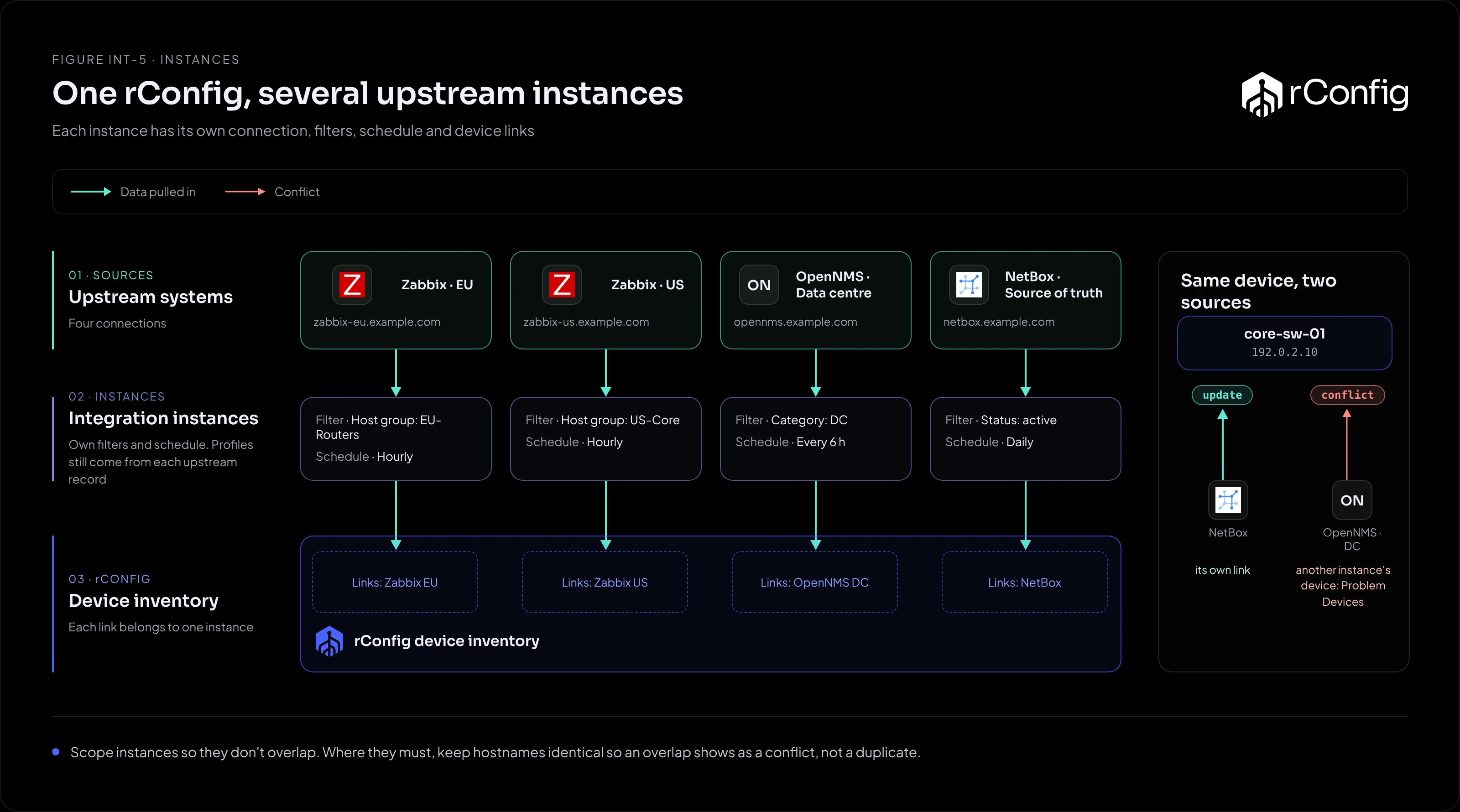
Pattern 1: one instance per server, no overlap
Example: a Zabbix server per region, each monitoring its own devices.
This is the simplest case. Create one instance per server. Their device sets don’t overlap, so there are no conflicts to manage. Give each instance a name that says which server it reads, and stagger the schedules so they don’t all run on the hour.
Use the same profile slugs on every server. A cisco-ios-core tag in Zabbix EU and Zabbix US then gives the same backup behaviour everywhere.
Pattern 2: one server, split by filter
Example: one OpenNMS, where core devices need hourly sync and branch devices daily.
Create two instances against the same server, scoped so they can’t overlap: one filtered to the Core category, the other to Branch. Each gets its own schedule.
Check the scopes really are disjoint. A device in both categories appears in both instances: the first to run creates it, and the second raises a conflict on every run.
Pattern 3: a source of truth beside monitoring
Example: NetBox holds the core network; Zabbix also monitors it, plus branch kit NetBox doesn’t have.
Pick one authority per device, and scope the other instance away from it:
- NetBox instance: everything NetBox knows that’s active.
- Zabbix instance: only the host groups NetBox doesn’t cover (the branches).
Don’t let both sync the same device and hope it works out. If the names match exactly you’ll get permanent conflicts. If they differ, you’ll get duplicates.
Pattern 4: moving from one source to another
Example: replacing an old LibreNMS with Zabbix.
The devices already have links from the LibreNMS instance. A new Zabbix instance sees them by hostname and IP only, so the first preview run will show a conflict for every device that matches, and a create for every name that differs. Plan the move:
- Make hostnames agree between the two platforms.
- Run the new instance in preview and read Problem Devices before applying anything.
- Once Zabbix is the authority, stop the old instance’s schedule.
Moving to NetBox is easier: its Match Devices pass can adopt existing devices. It won’t adopt a device another instance still actively manages, so the old instance’s links need to be inactive first.
Checks that catch problems early
- Preview each new instance before applying, even when it’s a copy of one that works.
- Watch for “Same IP address already in use” on the Problem Devices tab. It’s the clearest sign two sources describe one device under different names.
- Name instances after their source and scope (
zabbix-eu-routers, notzabbix2). Problem Devices and logs are per instance, and the name is what you’ll search for. - Keep profile slugs consistent across sources. The profile is how a device is backed up. Two sources naming different profiles for the same kind of device give inconsistent backups.