

SSO with Shibboleth
SSO with Shibboleth
Section titled “SSO with Shibboleth”This guide covers the configuration of Single Sign-On (SSO) authentication for rConfig V8 using Shibboleth, a SAML 2.0 based identity provider commonly used in educational institutions. The process involves configuring your Shibboleth IdP and uploading SAML metadata to rConfig.
Shibboleth is not a separate protocol. It is a SAML 2.0 Identity Provider. In rConfig, Shibboleth uses the same underlying SAML2 implementation. The distinction is UI-level only (separate login button).
Prerequisites
Section titled “Prerequisites”- Shibboleth Identity Provider already configured and operational
- Administrator access to Shibboleth IdP
- Administrator access to rConfig V8
- rConfig server accessible via HTTPS with valid domain name
- SAML metadata XML file from your Shibboleth IdP
Configure Shibboleth Identity Provider
Section titled “Configure Shibboleth Identity Provider”Step 1: Create Application Integration
Section titled “Step 1: Create Application Integration”Configure Shibboleth to recognize rConfig as a Service Provider (SP). This process varies by institution but generally involves:
- Registering rConfig as a new Service Provider
- Configuring attribute release policies
- Generating SAML metadata for rConfig
Helpful Resource:
Harvard University provides an excellent guide for SAML/Shibboleth integration: Harvard IAM - SAML Shibboleth Integration
Step 2: Download Metadata
Section titled “Step 2: Download Metadata”Download the metadata.xml file from your Shibboleth Identity Provider. This is IdP metadata, which rConfig consumes to authenticate users. The Service Provider (SP) metadata is generated separately by rConfig (see the next section).
Configure rConfig V8
Section titled “Configure rConfig V8”Step 1: Upload Metadata File
Section titled “Step 1: Upload Metadata File”Upload your metadata.xml file to the rConfig SAML directory:
# Create SAML directory if it doesn't existmkdir -p /var/www/html/rconfig8/current/storage/saml2
# Upload your metadata.xml to this location/var/www/html/rconfig8/current/storage/saml2/idp-metadata.xmlStep 2: Provide SP Metadata to Your IdP
Section titled “Step 2: Provide SP Metadata to Your IdP”rConfig exposes its Service Provider (SP) metadata at:
https://your-rconfig-domain.com/auth/saml2/metadataProvide this URL to your Identity Provider administrator. This is the metadata your IdP needs to trust rConfig as a Service Provider.
Note: The metadata file referenced by
SAML2_METADATA_FILEis IdP metadata consumed by rConfig. The/auth/saml2/metadataendpoint is SP metadata generated by rConfig.
Step 3: Edit Environment Configuration
Section titled “Step 3: Edit Environment Configuration”Open the rConfig .env file:
vim /var/www/html/rconfig8/current/.envStep 4: Add Shibboleth SAML Configuration
Section titled “Step 4: Add Shibboleth SAML Configuration”Add or update the following lines:
SAML2_METADATA_FILE='/var/www/html/rconfig8/current/storage/saml2/idp-metadata.xml'SAML2_ENABLED=trueSHIBBOLETH_ENABLED=trueSAML2_SP_CERTIFICATE='/var/www/html/rconfig8/current/storage/saml2/sp-cert.pem'SAML2_SP_KEY='/var/www/html/rconfig8/current/storage/saml2/sp-key.pem'Configuration Parameters:
SAML2_METADATA_FILE: Local file path to IdP metadata XML. This is required in V8.2.0+.SAML2_ENABLED: Master switch for metadata resolution. This must betruefor Shibboleth to work as well as generic SAML2, setting it tofalsedisables both, regardless ofSHIBBOLETH_ENABLED.SHIBBOLETH_ENABLED: Shows the Shibboleth login button and routes login through the Shibboleth-labelled path. Has no effect unlessSAML2_ENABLEDis alsotrue.SAML2_SP_CERTIFICATE: Path to Service Provider certificateSAML2_SP_KEY: Path to Service Provider private key
Breaking Change in V8.2.0
Section titled “Breaking Change in V8.2.0”- Old:
SAML2_METADATA_URL=https://idp.example.com/metadata- New:
SAML2_METADATA_FILE=/path/to/idp-metadata.xmlMigration command:
curl https://idp.example.com/metadata > /path/to/idp-metadata.xmlAfter migration, verify the web server user can read the file.
ACS URL (Exact Match Required)
Section titled “ACS URL (Exact Match Required)”The ACS URL MUST match exactly between rConfig and your IdP:
https://your-rconfig-domain.com/auth/callback/saml2This includes:
- HTTPS vs HTTP
- no trailing slashes
- exact path
Mismatches will cause authentication failures.
SAML Binding Behavior
Section titled “SAML Binding Behavior”Most Identity Providers use HTTP-POST binding for SAML responses.
rConfig supports both GET and POST callbacks, but POST is the most common.
Ensure your IdP is configured to POST assertions to the ACS URL.
Single Logout (SLS)
Section titled “Single Logout (SLS)”Single Logout (SLS) support depends on your Identity Provider. If logout issues occur, it is safe to leave SLS unconfigured.
Step 5: Clear Application Cache
Section titled “Step 5: Clear Application Cache”Save the file and clear the rConfig cache:
php /var/www/html/rconfig8/current/artisan rconfig:clear-allVerify Configuration
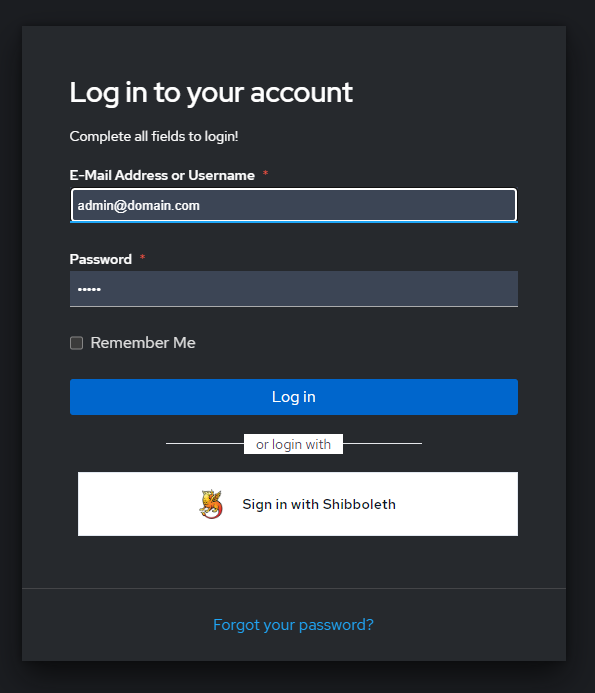
Section titled “Verify Configuration”After configuration, the rConfig login page will display a Login with Shibboleth button.
User Approval Process
Section titled “User Approval Process”When users attempt to sign in via SSO for the first time:
- User authenticates successfully with Shibboleth
- User account is created in rConfig with SSO access disabled
- User sees an error message indicating approval is required
Administrator must:
- Log in to rConfig as an administrator
- Navigate to Users section
- Locate the new SSO user
- Enable SSO access for the user
- Assign appropriate role and permissions
After approval, the user can successfully authenticate and access rConfig.
From V8.3.3, Settings › SAML2 / SSO Setup can auto-approve new users and assign their roles from a group attribute in the Shibboleth assertion (for example isMemberOf). With role mapping on, the IdP is authoritative on every login and users whose groups match no active role are refused. See SAML Auto-Approval and Role Mapping.
Common Gotchas
Section titled “Common Gotchas”Troubleshooting
Section titled “Troubleshooting”SSO button not appearing
Section titled “SSO button not appearing”- Verify all environment variables are correctly set
- Ensure cache has been cleared:
php artisan rconfig:clear-all - Check that the metadata file exists at
SAML2_METADATA_FILE
Metadata file not accessible
Section titled “Metadata file not accessible”- Check file permissions on metadata.xml (should be readable by web server)
- Verify
SAML2_METADATA_FILEpoints to the file path you uploaded - Metadata file must contain raw XML
- Metadata must NOT be: - HTML login page - redirected content - copied URL text
- Validate XML content and ensure the first non-whitespace character is
< - Example:
head /var/www/html/rconfig8/current/storage/saml2/idp-metadata.xml
  Expected output starts with:     <EntityDescriptor
Authentication fails
Section titled “Authentication fails”- Verify metadata.xml contains correct Shibboleth IdP configuration
- Check that Service Provider certificate and private key exist
- Confirm Shibboleth IdP has rConfig registered as a valid Service Provider
- Review Apache error logs for SAML-related errors
ACS URL mismatch
Section titled “ACS URL mismatch”- Confirm the IdP ACS URL is exactly
https://your-rconfig-domain.com/auth/callback/saml2 - Check scheme (
https), path, and trailing slash behavior - Any mismatch can break SAML assertion delivery or validation
Reverse proxy or load balancer issues
Section titled “Reverse proxy or load balancer issues”If rConfig is behind a load balancer or reverse proxy:
- Ensure
APP_URLis set correctly (https) - Ensure trusted proxies are configured
Incorrect scheme detection can break SAML validation.
Certificate or key file errors
Section titled “Certificate or key file errors”- Verify certificate and private key paths are correct in
.env - Check file permissions (readable by web server user)
- Ensure certificate and key files are valid and not expired
Attribute release issues
Section titled “Attribute release issues”- Verify Shibboleth IdP is configured to release required attributes (email, name)
- Check attribute mapping configuration in Shibboleth
- Review Shibboleth IdP logs for attribute release errors
Users cannot access after SSO login
Section titled “Users cannot access after SSO login”- Verify administrator has enabled SSO access in Users section
- Confirm user has been assigned an appropriate role
- Check user account status is active
Time synchronization issues
Section titled “Time synchronization issues”SAML assertions are time-sensitive.
Ensure your rConfig server and Identity Provider are time-synchronised (NTP).
Clock drift can cause valid logins to fail with authentication or validation errors.
Maintenance Notes
Section titled “Maintenance Notes”Always keep IdP metadata local and referenced through SAML2_METADATA_FILE.
Do not expose metadata files in a public web directory.
Related Documentation
Section titled “Related Documentation”- SSO Overview - Understanding SSO in rConfig V8
- Generic SAML Setup - Alternative SAML configuration
- SAML Auto-Approval and Role Mapping - Approve users and assign roles from IdP groups
- User Management - Managing user accounts and approvals
- Roles and Permissions - Configuring user roles and permissions