

Config Obfuscation - rConfig V8
Config Obfuscation: Mask Secrets Before They Leave the Server
Section titled “Config Obfuscation: Mask Secrets Before They Leave the Server”Config Obfuscation prevents sensitive values (passwords, secrets, communities, tokens) from being exposed in configuration text, search contexts, and diffs shown in the UI or returned via API.
It is designed to reduce accidental leakage during everyday workflows (config viewing, diffs, searches, exports) without changing the stored configuration files.
rConfig also has a separate, older environment flag named MASK_DEVICE_CREDENTIALS. That flag is narrower and protects device credential fields and a few credential-adjacent responses (UI and REST API). It is not the same feature as Config Obfuscation.
When to use this
Section titled “When to use this”- Security hardening: prevent secrets from being casually visible to read-only users.
- Screen sharing / demos: reduce risk during troubleshooting sessions.
- Audit & compliance: consistently mask known sensitive patterns (SNMP communities, enable secrets, local user passwords).
- Change workflows: ensure diffs and change previews don’t leak secrets.
Prerequisites
Section titled “Prerequisites”- rConfig 8.1.2 or later
CONFIG_OBFUSCATION_ENABLED=trueset in your.envfile- Access to Settings → Security and Access → Config Obfuscation (requires
setting.updatepermission) - At least one device with a configuration backup to test rules against after setup
How It Works
Section titled “How It Works”At render-time (and API response time), rConfig runs the configuration text through an obfuscation pass:
- Check if the feature is enabled.
- Check whether the current user is allowed to view unmasked output.
- Load the enabled rules (cached).
- Apply rules in order (
sort_order, thenid).
This means you can tune masking without changing how configs are collected or stored.
Enablement & Environment Variables
Section titled “Enablement & Environment Variables”These are configured via your .env:
| Variable | Default | Purpose |
|---|---|---|
MASK_DEVICE_CREDENTIALS | false | Legacy masking for device credential fields, selected debug output, and some integration secrets |
CONFIG_OBFUSCATION_ENABLED | false | Enables/disables obfuscation globally |
CONFIG_OBFUSCATION_CACHE_SECONDS | 300 | Cache TTL for enabled rules and “unmasked roles” setting |
CONFIG_OBFUSCATION_DEFAULT_REPLACEMENT | ******** | Default replacement when a rule has no replacement, i.e. <REDACTED> or [SECRET], |
Legacy Device Credential Masking (MASK_DEVICE_CREDENTIALS)
Section titled “Legacy Device Credential Masking (MASK_DEVICE_CREDENTIALS)”MASK_DEVICE_CREDENTIALS is an environment-level safeguard for device credentials themselves, not a rule-based config text masking system.
How to Enable It
Section titled “How to Enable It”Set this in your .env:
MASK_DEVICE_CREDENTIALS=trueThen reload your application config as you normally would for environment changes.
If it remains:
MASK_DEVICE_CREDENTIALS=falsethen this legacy masking layer stays off.
What It Does
Section titled “What It Does”When enabled, rConfig applies fixed masking behavior in a few specific places:
- Device API/UI payloads omit or mask
device_username,device_password, anddevice_enable_passwordinstead of returning raw values. - Device debug output replaces known device password values with
********. - Credential-set passwords loaded through the device credential relation are also masked in debug output.
- Some integration responses, such as the HashiCorp Vault config response, replace sensitive tokens with
********.
This behavior is fixed in code. It does not use database rules, per-role access settings, or custom replacement strings.
Why It Is Different From Config Obfuscation
Section titled “Why It Is Different From Config Obfuscation”MASK_DEVICE_CREDENTIALS and Config Obfuscation solve related but different problems:
| Area | MASK_DEVICE_CREDENTIALS | Config Obfuscation |
|---|---|---|
| Primary target | Stored device credential fields and a few secret-adjacent responses | Configuration text, searches, previews, exports, and diffs |
| Configuration model | Single .env flag | .env flag plus database-backed rules and Settings UI |
| Custom rules | No | Yes |
| Per-role unmask access | No | Yes |
| Replacement control | Fixed ******** | Per-rule replacement or global default |
| Best use | Hide application-managed credentials from routine API/UI exposure | Redact secrets found inside collected config text |
In short: MASK_DEVICE_CREDENTIALS protects credential fields rConfig already knows about. Config Obfuscation protects secret patterns found inside config content.
Important Interaction When MASK_DEVICE_CREDENTIALS=false
Section titled “Important Interaction When MASK_DEVICE_CREDENTIALS=false”Setting MASK_DEVICE_CREDENTIALS=false does not disable Config Obfuscation.
If you have:
MASK_DEVICE_CREDENTIALS=falseCONFIG_OBFUSCATION_ENABLED=truethen the legacy device-credential masking layer is off, but Config Obfuscation still runs for config content and diffs.
For device debug output specifically, rConfig still attempts to replace exact known device secret values with ******** before applying obfuscation rules when Config Obfuscation is enabled. This means debug output may still hide secrets even when MASK_DEVICE_CREDENTIALS is set to false.
Rules are stored in the database (config_obfuscation_rules) and applied to any config output that is wired into the obfuscator.
Rule Types
Section titled “Rule Types”| Type | Match Behavior | Replacement Behavior |
|---|---|---|
regex | PCRE regex over the full content | Uses preg_replace() |
prefix | Line starts with pattern | Replaces the entire line |
suffix | Line ends with pattern | Replaces the entire line |
contains | Line contains pattern | Replaces the entire line |
exact | Line exactly equals pattern | Replaces the entire line |
Replacement Precedence (Rule vs Global)
Section titled “Replacement Precedence (Rule vs Global)”- If a rule’s
replacementis set, it wins. - If a rule’s
replacementis blank, rConfig usesCONFIG_OBFUSCATION_DEFAULT_REPLACEMENT.
The {default} Token
Section titled “The {default} Token”For regex rules, it’s common to preserve a prefix with capture groups. {default} lets you inject the global default into a rule replacement.
Example:
pattern: ^(enable secret\s+\S+\s+)(.+)$replacement: $1{default}If your default is ********, output becomes:
enable secret 5 ********If your default is [REDACTED], output becomes:
enable secret 5 [REDACTED]Example Rules
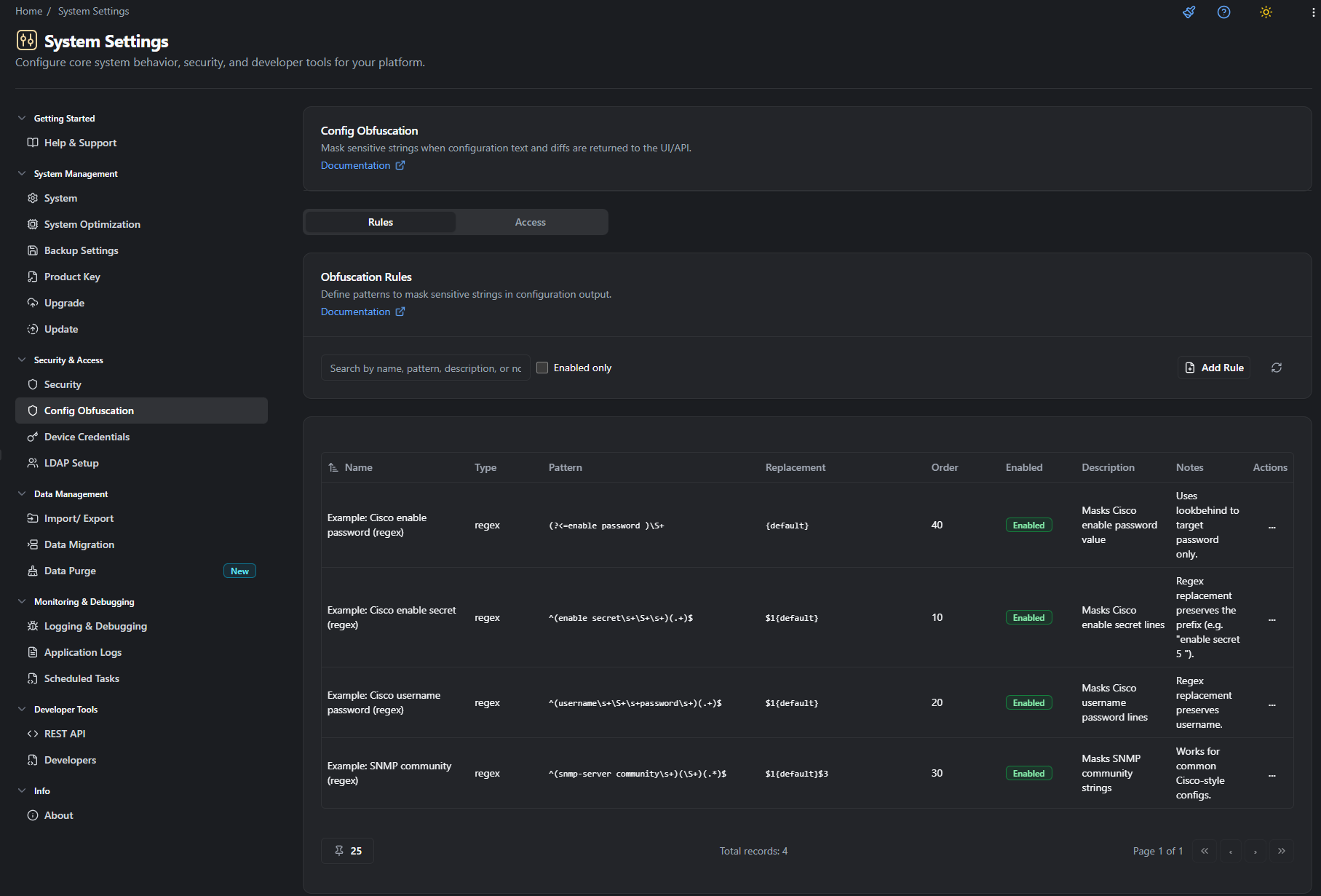
Section titled “Example Rules”rConfig ships with “Insert example rules” to help you get started. These examples are intentionally conservative and designed to be edited.
Suggested examples:
Cisco: Enable Secret
Section titled “Cisco: Enable Secret”pattern: ^(enable secret\s+\S+\s+)(.+)$replacement: $1{default}Cisco: Username Password
Section titled “Cisco: Username Password”pattern: ^(username\s+\S+\s+password\s+)(.+)$replacement: $1{default}SNMP Community
Section titled “SNMP Community”pattern: ^(snmp-server community\s+)(\S+)(.*)$replacement: $1{default}$3Cisco: Enable Password (value only)
Section titled “Cisco: Enable Password (value only)”pattern: (?<=enable password )\S+replacement: {default}Who Can View Unmasked Output
Section titled “Who Can View Unmasked Output”By default, when obfuscation is enabled, users see masked output.
To allow specific roles to view unmasked output, set Allowed unmasked roles in Settings. This is stored in:
settings.config_obfuscation_unmasked_roles(array of role IDs)
If the authenticated user has any role in that list, output is returned unmasked.
UI: Where to Configure It
Section titled “UI: Where to Configure It”Navigate to:
Settings → Security & Access → Config Obfuscation
Tabs:
- Rules: Create, edit, enable/disable, delete rules; insert example rules.
- Access: Pick which roles are allowed to view unmasked output.
Troubleshooting
Section titled “Troubleshooting”“My default replacement isn’t showing”
Section titled ““My default replacement isn’t showing””- Ensure the rule’s
replacementis blank, or uses{default}. - If a rule’s replacement is hard-coded (e.g.
********), it will override the global default.
“My rule masks too much (whole line disappears)”
Section titled ““My rule masks too much (whole line disappears)””- Non-regex rule types (
contains,prefix, etc.) replace the entire line. - Switch to a
regexrule and use capture groups to preserve what you want.
“Nothing is being masked”
Section titled ““Nothing is being masked””- Confirm
CONFIG_OBFUSCATION_ENABLED=true. - Confirm the rule is
enabled. - Confirm your user is not in an allowed unmasked role.
What’s next
Section titled “What’s next”- Configuration Backups - How and when rConfig captures device configurations
- Configuration Diffs - Viewing changes between configuration versions, which respect obfuscation rules
- Config Editor - Editing device configurations directly from the UI
- Snippets - Reusable configuration fragments for pushing to devices