

Optical TL1 collection
Optical TL1 collection
Section titled “Optical TL1 collection”rConfig collects optical transport nodes over TL1, on SSH or raw TCP. A gateway node is reached directly; the elements behind it have no management address of their own and are reached in-band through the gateway’s session. rConfig discovers those elements automatically and manages each one as its own device with its own configuration history.
Three platforms are supported. They agree on the envelope and disagree on nearly everything inside it, so each has its own page:
| Platform | Guide | Status |
|---|---|---|
| Ciena 6500 | Ciena 6500 | Verified against customer sessions |
| Infinera DTN-X | Infinera DTN-X | Verified against customer sessions |
| Cisco ONS 15454 | Cisco ONS 15454 | Built from vendor documentation, not yet run against hardware |
This page and the three that follow cover what is the same everywhere. Read your platform’s page too: a couple of the differences decide whether collection works at all.
Gateways and the elements behind them
Section titled “Gateways and the elements behind them”An optical network is a hub-and-spoke arrangement, and the two roles map cleanly onto how rConfig reaches each node.
The gateway is the node you point rConfig at. It has a real host, port, and credentials. You add it like any other device and collect it directly. Ciena and Cisco both call it a GNE (Gateway Network Element).
The elements behind it have no independent management access. You cannot SSH to one. rConfig reaches it by logging into its gateway and addressing the element by its TL1 TID over that session. The gateway routes the command across its control network and returns the element’s reply.
Each vendor has its own word for those elements, and they all mean the same thing:
| Vendor | Calls them |
|---|---|
| Ciena | RNEs (Remote NEs) |
| Cisco | ENEs (End NEs) |
| Infinera | remote nodes |
rConfig’s UI uses Ciena’s term throughout, because Ciena was the first platform supported. An ENE behind a Cisco gateway appears in the TL1 Gateway panel as an RNE.
The important consequence: an element is still a full rConfig device (its own record, its own config snapshots and history, its own collection schedule), but its connection is always routed through its gateway.
An element can be dual-homed: reachable through two or more gateways, which is how operators build the network so that losing one gateway does not lose the elements behind it. rConfig identifies an element by its TL1 TID, so one reported by a second gateway is recognised as the same device and gains a second path. It does not become a second device record. One path is the primary, and collection falls over to another if a session through the primary cannot be established.
How collection works
Section titled “How collection works”You only ever add and configure the gateway. Everything about the elements behind it is automatic.
- Discover. When the gateway is collected, rConfig runs that platform’s neighbour command on the same session to list the elements behind it.
- Reconcile. Newly seen elements become rConfig devices linked to the gateway. Elements that disappear are flagged, never deleted, so their history is preserved. See discovery and reconciliation.
- Collect. Each element is collected on its own, routed through its gateway and addressed by TID. The gateway itself is collected directly. See collecting elements.
You never hand-build element devices. Point rConfig at the gateway, collect it, and the elements appear behind it.
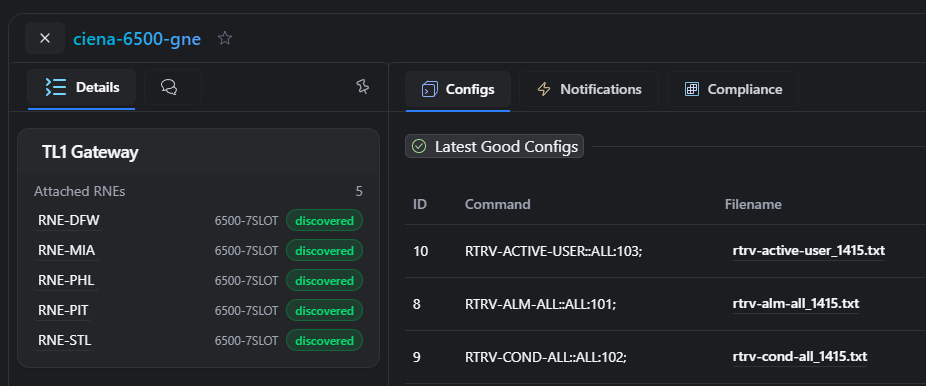 The TL1 Gateway panel on a gateway, listing the elements discovered behind it
When to use this
Section titled “When to use this”Best for: optical estates where elements are only reachable in-band through a gateway node, and you want each one tracked as its own device with full config history.
Not needed for: standalone optical nodes with direct management access. Those collect over TL1 as ordinary devices with no gateway involved, and discovery simply finds no neighbours.
Next step: Set up a gateway for TL1 collection.