

How to download the rConfig Skill for AI agents
How to download the rConfig Skill for AI agents
Section titled “How to download the rConfig Skill for AI agents”After reading this page, you can download a portable rConfig Skill package and set it up with an agent that supports Skill or plugin bundles.
When to use this
Section titled “When to use this”Use a downloadable Skill when your agent supports installable Skill/plugin packages rather than (or in addition to) a live connection, or when you want to hand a teammate a ready-to-install bundle instead of walking them through MCP server setup. A Skill is a portable artifact you install once; the MCP server is a live connection you authenticate to each time.
Prerequisites
Section titled “Prerequisites”- Access to the AI Center in rConfig
- An agent that supports Skill or plugin-style bundles (Claude, Cursor, Cline, GitHub Copilot, or another MCP-compatible agent)
- An MCP access token: generate one from MCP Server before or after downloading the Skill
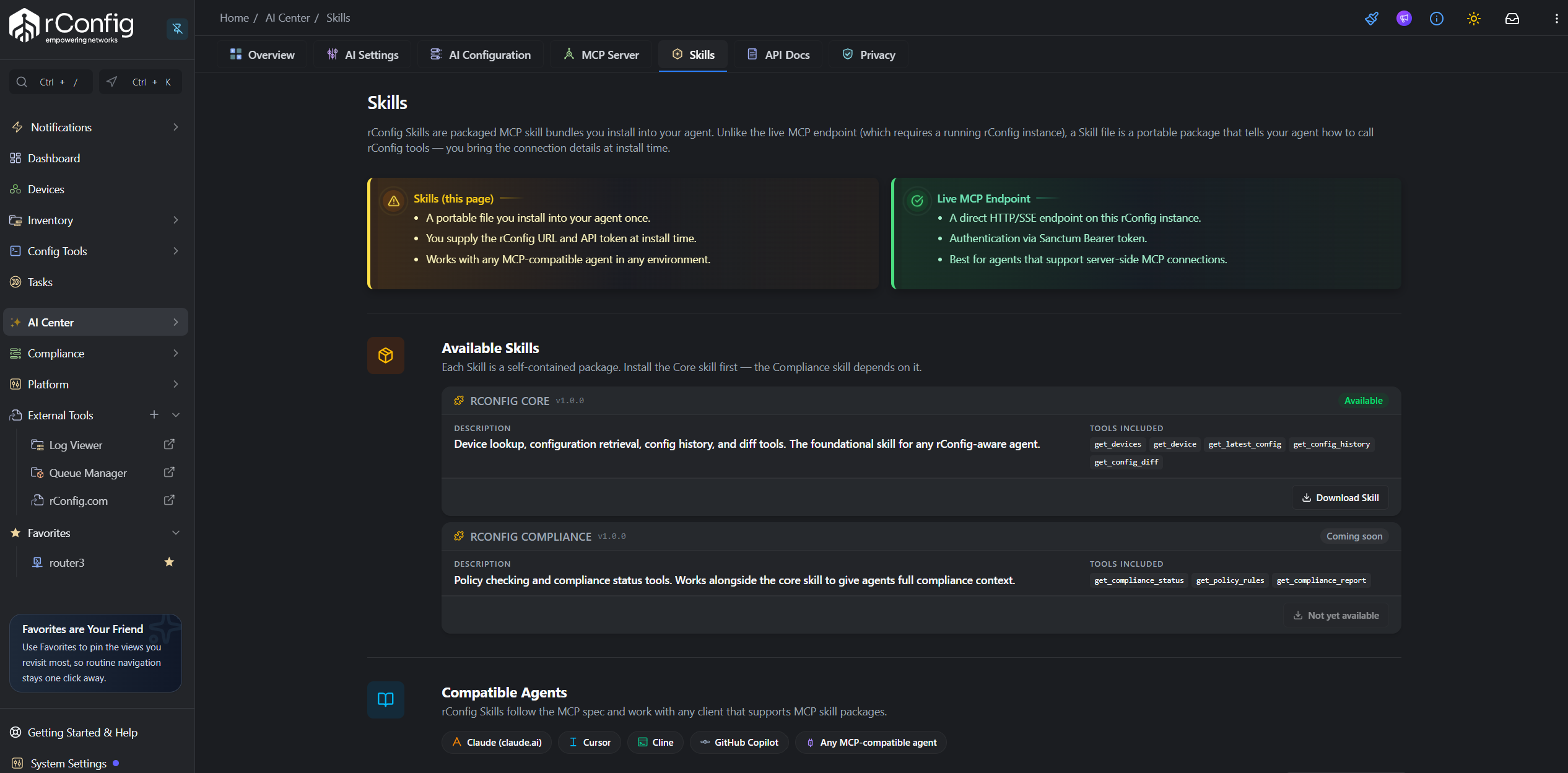
Available Skills
Section titled “Available Skills”| Skill | Status | Tools included |
|---|---|---|
| rConfig Core | Available | get_devices, get_device, get_latest_config, get_config_history, get_config_diff |
| rConfig Compliance | Coming soon | get_compliance_status, get_policy_rules, get_compliance_report |
Each Skill is self-contained, but rConfig Compliance depends on rConfig Core. Install Core first.
Step-by-step walkthrough
Section titled “Step-by-step walkthrough”1. Open the Skills tab
Section titled “1. Open the Skills tab”- Click AI Center in the left sidebar.
- Select the Skills tab.
2. Download the Skill
Section titled “2. Download the Skill”Click Download Skill on rConfig Core. The button reads Downloading… while the package is being prepared, then your browser saves a file named rconfig-core-skill-v1.0.0.zip.
3. Add your MCP token to the package
Section titled “3. Add your MCP token to the package”The downloaded package includes a generated mcp.json pointing at your instance’s live MCP endpoint, with a placeholder in place of a real token: <your-mcp-read-token>. Generate a real token from MCP Server if you haven’t already, then replace the placeholder with it before installing the Skill in your agent.
4. Install in your agent
Section titled “4. Install in your agent”Follow your agent’s own instructions for installing a local Skill/plugin package. Compatible agents include Claude (claude.ai), Cursor, Cline, GitHub Copilot, and any other MCP-compatible agent.