

Troubleshooting TL1 collection
Troubleshooting TL1 collection
Section titled “Troubleshooting TL1 collection”When a TL1 collection fails, the node usually tells you why in its response. Capture that response with rConfig’s standard debug tools, then read the TL1 error code to find the cause.
Capture the exchange first
Section titled “Capture the exchange first”TL1 collection uses the same diagnostic tooling as any other device backup. Start there:
- Live Debug Console streams the raw TL1 exchange in the UI. On TL1 devices, any
M <ctag> DENYrow is highlighted and the Analysis panel calls out the error codes it found, so you do not have to scan the stream by hand. - CLI debug runs the same collection with full output on the command line:
# Stream the raw TL1 exchange for a device (example device ID 6512)php artisan rconfig:download-device 6512 -dIf the session never reaches a TL1 response at all, the problem is connectivity or login rather than TL1. Work through basic connectivity and authentication first, then come back to the error codes below.
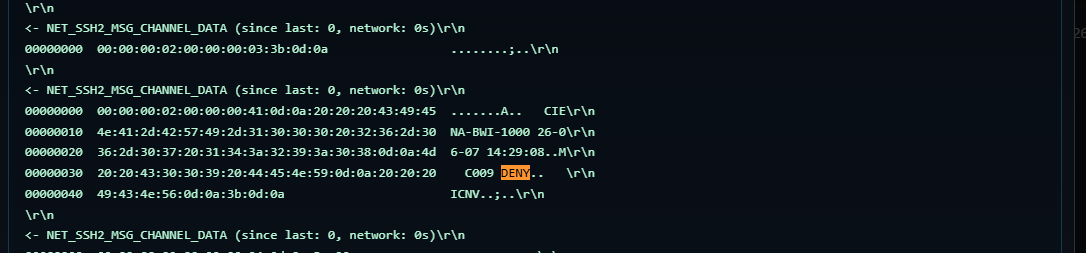 The live debug console highlighting a TL1 DENY row
Reading TL1 DENY codes
Section titled “Reading TL1 DENY codes”A rejected command comes back as M <ctag> DENY followed by a four-character error code. The most common ones:
| Code | Meaning | Usual cause |
|---|---|---|
IIAC | Invalid access identifier | The TID or AID is unknown or unreachable, for example an element that is not currently behind this gateway. |
ICNV | Invalid command / verb | The command verb is not recognised by the node. |
PLNA | Not logged in | The command was sent before a successful ACT-USER login. |
A single denied command fails that device’s collection and marks it config-failed, so the error code is the fastest route to the cause.
Common problems
Section titled “Common problems”No elements discovered
Section titled “No elements discovered”The gateway collects, but the TL1 Gateway panel shows nothing behind it.
- Confirm
tl1Gatewayisonin the template (setup). - Confirm
tl1Vendornames the right platform. This is the most common cause. The activity log carries a “could not parse the response as … format” warning when the reply did not match the platform rConfig was told to expect. Discovery reports the run as inconclusive and leaves the known elements alone rather than flagging them all missing. - Confirm the node actually fronts elements. Log into the gateway and run its neighbour command by hand (
RTRV-NE-LIST:::2;on Ciena,RTRV-TIDMAP:::2;on Infinera,RTRV-MAP-NETWORK:::2;on Cisco). If it returns an emptyCOMPLD, the node is standalone and there is nothing to discover.
The session hangs, or every command times out
Section titled “The session hangs, or every command times out”Usually the device’s Main Prompt is set to the wrong character. An Infinera DTN-X presents > where Ciena and Cisco present <.
- Clear the Main Prompt field on the device. rConfig then uses the prompt that belongs to
tl1Vendor.
Only ten elements are discovered on an Infinera gateway
Section titled “Only ten elements are discovered on an Infinera gateway”A DTN-X pages RTRV-TIDMAP ten records at a time. Finding exactly ten means only the first page was read, which also leaves the remaining pages on the wire where they are answered to the next command.
- rConfig 8.4.0 and later read the whole response. On an earlier release, upgrade.
Login fails before any command
Section titled “Login fails before any command”Every command fails, or the whole collection fails immediately.
- Check
sshAuthmatches the node. Apasswordnode with anonetemplate (or the reverse) fails at the SSH layer before TL1 starts. - Verify the gateway credentials by connecting directly. See basic connectivity and authentication.
An element returns IIAC
Section titled “An element returns IIAC”Collecting an element fails with DENY IIAC.
- The TID is no longer behind this gateway. Re-collect the gateway so discovery reconciles it. If it is genuinely gone, the element is flagged
missingand can be removed.
An element fails when its gateway is down
Section titled “An element fails when its gateway is down”- An element is only reachable through its gateway. A gateway outage marks every element behind it config-failed. Restore the gateway, then re-collect. A dual-homed element uses its other gateway instead.
Collections sit waiting on a busy gateway
Section titled “Collections sit waiting on a busy gateway”The device event log shows “gateway at connection capacity” and the collection does not start.
- This is the connection limit doing its job, not a fault. rConfig is holding the collection until a session frees up, and it retries for an hour before giving up.
- Open the gateway and check the TL1 Gateway panel. If connections sit at the limit for the whole run, it has more elements than it can work through in the time available.
- Raise
tl1MaxConnectionson the gateway’s template only as far as the node itself will accept. Setting it above what the node allows moves the problem: the node starts refusing connections instead, and those collections fail outright rather than waiting.
Related: Discovery and reconciliation · Collecting elements · Ciena · Infinera · Cisco