

What is the AI Center in rConfig V8?
What is the AI Center in rConfig V8?
Section titled “What is the AI Center in rConfig V8?”After reading this page, you can explain what the AI Center is, where to find it, which AI capabilities it powers, and why every one of them is read-only to your network.
What the AI Center is
Section titled “What the AI Center is”The AI Center is rConfig’s single home for every AI capability in the product: the provider you connect, the capabilities you turn on, the knowledge that grounds each response, and the surfaces that let external agents query rConfig. It sits as its own item in the left sidebar, labeled AI Center, above the Settings group.
The AI Center is organized into seven pages, reached through the tabs at the top of each screen:
| Tab | Purpose |
|---|---|
| Overview | Provider status, enabled capabilities, and links out to inbound and outbound surfaces |
| AI Settings | Add, test, and activate an AI provider (admin only) |
| AI Configuration | Turn individual capabilities on or off (admin only) |
| MCP Server | Connect external agents (Claude Code, Cursor, Gemini CLI) to rConfig over MCP |
| Skills | Download a portable Skill package for agents that support them |
| API Docs | Generate and download AI-agent-friendly Markdown exports of the REST API |
| Privacy | What data each capability sends to your provider, and what rConfig never stores |
AI Settings and AI Configuration are visible only to Admin-role users. The remaining five tabs are visible to any user with access to the AI Center.
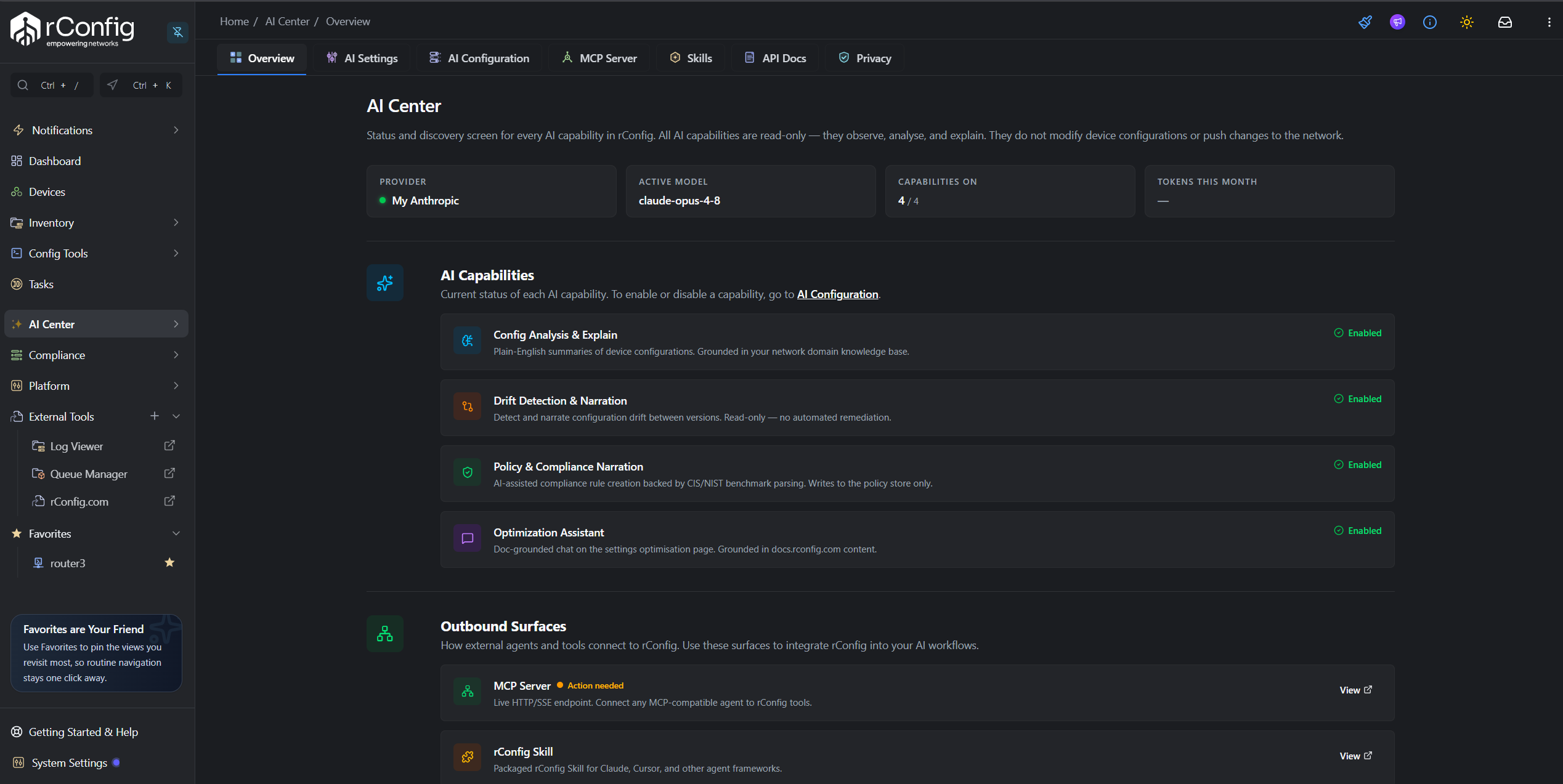
Everything is read-only, by design
Section titled “Everything is read-only, by design”Every AI capability in this release reads your data and explains it back to you in plain English. None of them push a change to a device or the network. The one deliberate exception is AI-assisted compliance rule creation, which writes only to rConfig’s own policy store, and only after you review the output and click Save, never directly to a device. See Policy & Compliance Narration for how that works.
Bring your own LLM
Section titled “Bring your own LLM”The AI Center supports six provider types: OpenAI, Anthropic, Google Gemini, Azure OpenAI, Ollama, and any OpenAI-compatible endpoint. The last two let you point rConfig at a local or self-hosted model instead of a cloud API, so config data never leaves your network. See Set up an AI provider to configure one.
The four in-app capabilities
Section titled “The four in-app capabilities”| Capability | What it does | Where you use it |
|---|---|---|
| Config Analysis & Explain | Plain-English summary, issue-finding, and Q&A on a device configuration | Config viewer |
| Drift Detection & Narration | Narrates what changed between two config versions and why it might matter | Config changes panel |
| Policy & Compliance Narration | Narrates a compliance result in plain English, and can draft new CIS/NIST-style policy rules | Compliance results, policy definition editor |
| Optimization Assistant | Doc-grounded chat for system tuning questions | System Optimization settings |
Each capability can be turned on or off independently from AI Configuration, and each is grounded in a different source of context so it doesn’t rely on the model’s general training data alone. Config Analysis, Drift Detection, and Compliance Narration draw on rConfig’s own networking domain knowledge (the context harness); the Optimization Assistant draws on indexed content from docs.rconfig.com (the knowledge layer). See AI Configuration for how grounding is assembled per capability.
The outbound surface
Section titled “The outbound surface”The AI Center is also how rConfig makes itself consumable by external AI agents and copilots:
- MCP Server: a live, read-only MCP endpoint that agents like Claude Code, Cursor, and Gemini CLI can connect to directly
- Skills: a downloadable, portable package for agents that support Skill/plugin bundles
- API Docs: Markdown exports of the REST API written for AI agents to ingest directly