

How to use Drift Detection & Narration in rConfig V8
How to use Drift Detection & Narration in rConfig V8
Section titled “How to use Drift Detection & Narration in rConfig V8”After reading this page, you can generate an AI narration of a configuration change directly from the config changes panel, and understand exactly what’s read to produce it.
When to use this
Section titled “When to use this”Use Drift Detection & Narration when a config diff shows a change and you want a plain-English explanation of what it does: useful during change review, incident triage, or when the person reviewing the diff isn’t the one who made the change.
Prerequisites
Section titled “Prerequisites”- An active AI provider (see Set up an AI provider)
- Drift Detection & Narration turned on in AI Configuration
- Permission to view the config change in question
Step-by-step walkthrough
Section titled “Step-by-step walkthrough”1. Open the config changes panel
Section titled “1. Open the config changes panel”Navigate to a device’s config change or diff view and open the config changes panel.
2. Click Analyze with AI
Section titled “2. Click Analyze with AI”Click Analyze with AI. The button label changes to Analyzing… while the request is in flight.
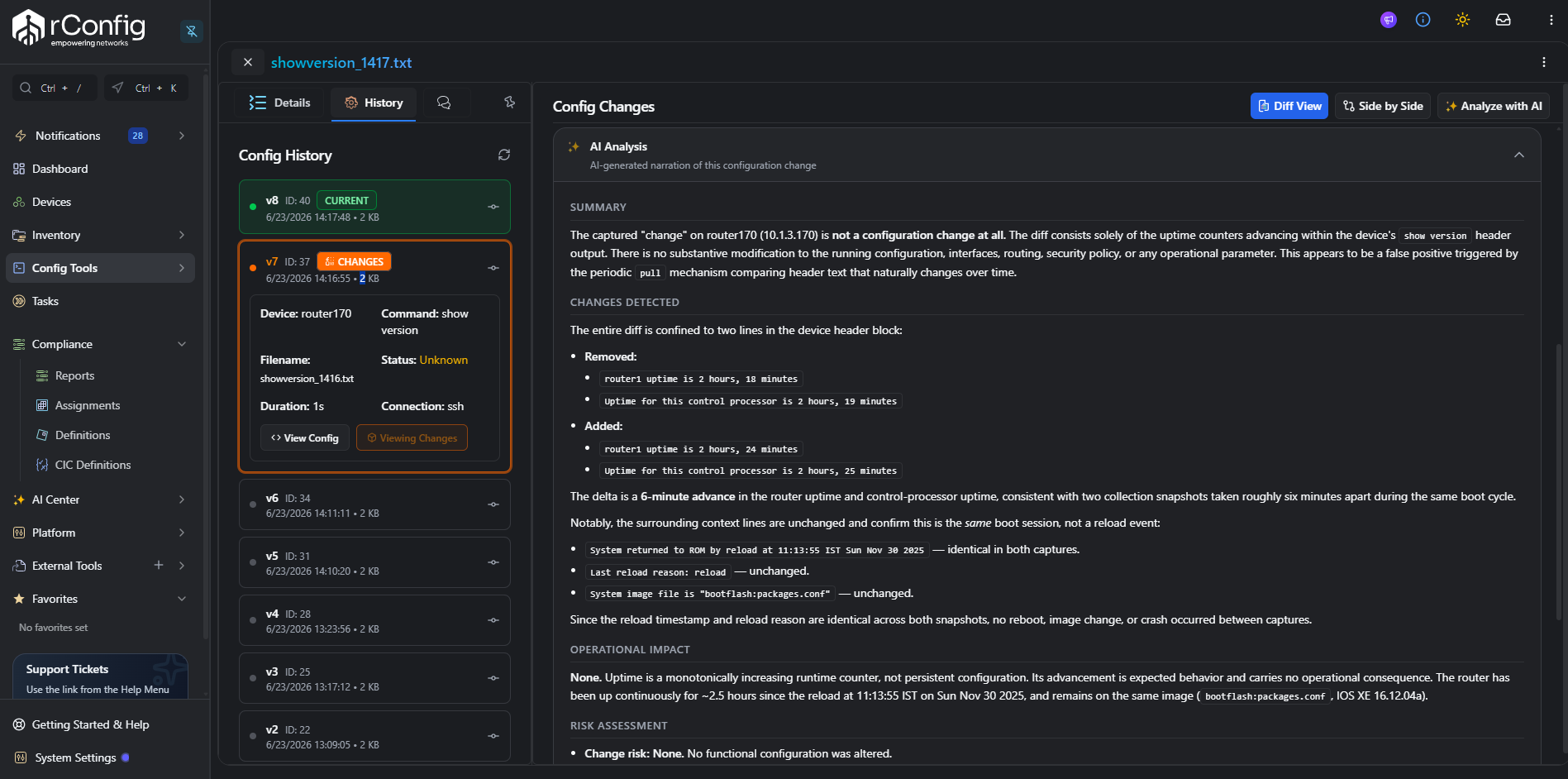
If Drift Detection & Narration is turned off in AI Configuration, the Analyze with AI button doesn’t appear on the panel at all.
3. Read the result
Section titled “3. Read the result”The narration appears in a collapsible AI Analysis panel below the button, with a summary, a breakdown of the specific changes detected, an operational impact assessment, and a risk assessment.
What the analysis reads
Section titled “What the analysis reads”rConfig sends the device name, the trigger for the change, its severity, and the computed diff between versions (as plain text, converted from the same diff shown on screen) to the active provider. If no diff has been computed yet for that change, it falls back to sending the full previous and current configuration files instead. See Governance, audit & privacy for the complete data-handling table across all capabilities.