

Set up a gateway for TL1 collection
Set up a gateway for TL1 collection
Section titled “Set up a gateway for TL1 collection”You configure the gateway node once. Its connection template carries the TL1 settings and turns on neighbour discovery, so once the gateway collects, the elements behind it are found and added automatically. See the overview for how the pieces fit together.
The steps are the same on all three platforms. Only tl1Vendor and the verb set differ, and your platform’s page (Ciena, Infinera, Cisco) gives both.
1. Connection template
Section titled “1. Connection template”The TL1 settings live in a connection template. The connect block selects the tl1 protocol and enables gateway discovery:
connect: timeout: 15 protocol: tl1 # use the TL1-over-SSH collector port: 22000 # the gateway's SSH port sshAuth: password # SSH transport auth: 'password' or 'none' tl1Vendor: ciena # 'ciena' (default), 'infinera' or 'cisco-ons' tl1Gateway: "on" # discover the elements behind this gateway tl1MaxConnections: 20 # max concurrent TL1 sessions to this gateway| Field | Values | Purpose |
|---|---|---|
protocol | tl1 | Routes the device to the TL1 collector. |
sshAuth | password / none | How the SSH transport authenticates before the in-band ACT-USER login. Must match how the node is configured. |
tl1Vendor | ciena / infinera / cisco-ons | The platform dialect: which neighbour command to run, how to read its records, and what prompt the node presents. Defaults to ciena. |
tl1Gateway | on / off | When on, a gateway collection also runs neighbour discovery. Leave off for standalone TL1 nodes. |
tl1NeighbourCmd | TL1 command | Optional override. Each tl1Vendor supplies its own command, so leave this out unless a node needs a different verb. Set it and rConfig sends exactly what you wrote, with one exception noted below. |
tl1MaxConnections | 1 to 500 | How many TL1 sessions rConfig opens to this gateway at once. Defaults to 20. See collecting elements. |
Ready-made templates are available in the rConfig templates repository, one per platform and transport:
- Ciena 6500 - SSH and telnet
- Infinera DTN-X - SSH and telnet
- Cisco ONS 15454 - SSH and telnet, shipped as an untested starter
Set tl1Transport: telnet to use the raw-TCP transport instead of SSH.
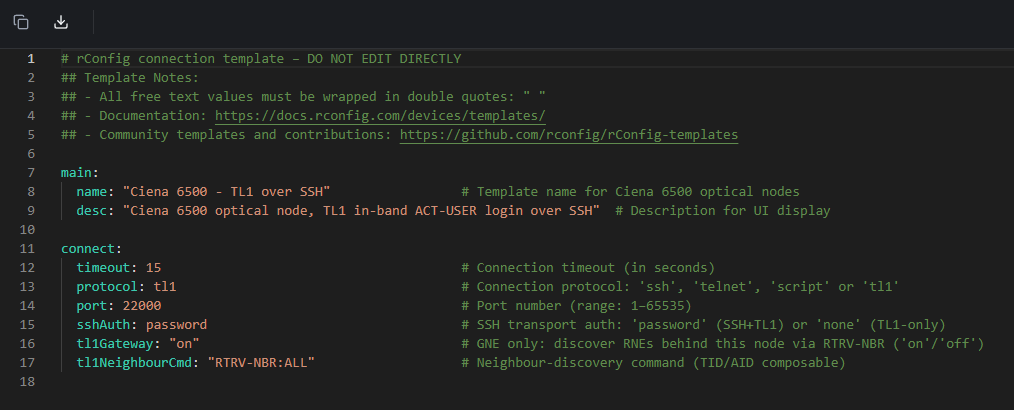 The TL1 connection template fields
2. Command group
Section titled “2. Command group”Create a command group, add the TL1 verbs you want to retrieve as commands, and attach the group to the gateway. This is a manual step: the group and its commands do not exist until you create them.
The same command group runs against the gateway and against every element behind it, so you define the verb set once. A typical set:
RTRV-EQPT::ALL:100; # shelf and equipment inventoryRTRV-ALM-ALL::ALL:101; # active alarmsRTRV-COND-ALL::ALL:102; # standing conditionsRTRV-SW-VER:::103; # software versionRTRV-SYS:::104; # system / shelf infoVerb support differs by platform; your platform’s page lists what it answers.
Do not add the neighbour command to the group. Discovery is issued by the collector itself when tl1Gateway is on, not as a per-element command.
3. Add the gateway device
Section titled “3. Add the gateway device”Add the gateway like any other device under Devices → Add Device, then assign the TL1 template and command group:
- IP / port: the gateway’s reachable management address and SSH port.
- Credentials: the username and password used for both the SSH transport (in
passwordmode) and the TL1ACT-USERlogin. - Connection template: the
tl1template from step 1. - Command group: the TL1 verb set from step 2.
- Main prompt: leave it blank. The prompt comes from
tl1Vendor, and the platforms differ. A<typed into an Infinera device’s prompt field will hang the session until it times out.
You do not create any element devices. They are discovered on the first collection.
Next step: Discover and reconcile the elements.