

Security Review
Security Review
Section titled “Security Review”From V8.5.0, rConfig checks its own security every day. About 100 read-only checks look at the application settings, the web server, TLS, PHP, the database, Redis, accounts, API tokens, stored credentials, the operating system and the security advisories that apply to your version. A check that newly fails sends an alert, and the results are on Settings > Security Review.
Running an old PHP build with a published vulnerability? An .env file reachable over HTTPS? An administrator still on admin@domain.com / admin? Security Review finds each of these and tells you the exact command to fix it.
What it checks
Section titled “What it checks”Each check has a stable ID such as redis.auth or web.env_exposed, a severity, and a result:
| Result | Meaning |
|---|---|
| Passed | The setting is safe. |
| Warning | Worth fixing, but not an open door on its own. |
| Failed | Fix this. Failures send an alert. |
| Skipped | The check does not apply here (for example a Vector check without Vector), or could not run. |
| Accepted | An administrator accepted the risk until a date, with a reason. |
The checks are grouped. The check reference explains every ID:
- Application, Web exposure, TLS, PHP, Database, Redis
- Accounts and sign-in, API and MCP tokens, Data at rest
- Runtime and privileges, Versions, Security advisories, Supply chain
- Operating system, Integrations, Devices
The checks never change anything, and never show a secret. They report whether a value is set and safe, not the value.
Run the checks
Section titled “Run the checks”Open Settings > Security Review (first under Security & Access) and click Run checks. The checks run in the background and take under a minute. You can leave the page; the results are stored.
cd /var/www/html/rconfig8
# Every check, as a table, with the fixes underneath
php artisan rconfig:security-check
# The full report as JSON, for a support ticket or a script
php artisan rconfig:security-check --json > security-report.json
# One group, or a single check
php artisan rconfig:security-check --only=webphp artisan rconfig:security-check --only=redis.auth
# List every check ID
php artisan rconfig:security-check --list
The exit code is 0 when everything passes, 1 for warnings and 2 for failures. Add --fail-on=warn to treat warnings as failures in CI or a deploy script. Runs with --only or --except are not stored.
The scheduler runs a full check every day at 04:15 (set SECURITY_CHECK_TIME in .env to change it). If the scheduler stops, runtime.security_check_stale warns after 48 hours.
Read the results
Section titled “Read the results”The tiles at the top count failed, warning, passed, skipped and accepted checks. Click a tile to filter the list. By default the list shows what needs attention: failures first, then warnings, sorted by severity.
Click a finding to see why it matters, the fix for your server, the evidence the check collected (never a secret), the standards it maps to (NIST SP 800-53, NIS2 Article 21, CIS Benchmarks, OWASP ASVS) and any advisory it guards against.
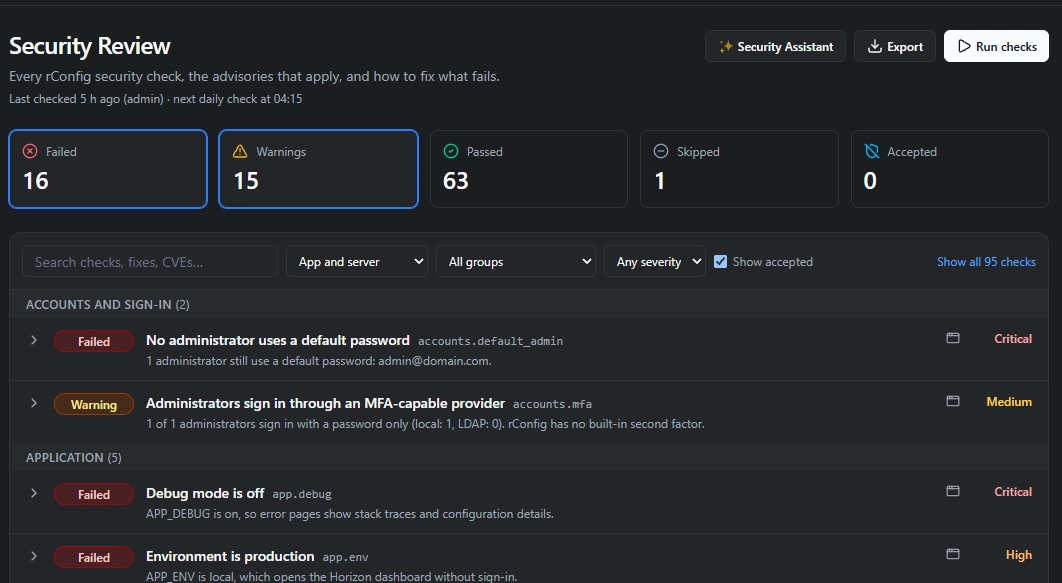 Security Review page with posture tiles, an active advisory and an expanded failing check showing its fix command.
The advisories card lists rConfig security advisories that apply to this server, and why: for example PHP 8.4.27 is in the affected range (>=8.4.0 <8.4.28). It links to the advisory and to all rConfig security advisories. See Security advisory feed for how this works offline.
Fix a finding
Section titled “Fix a finding”Some findings can be fixed from the page, as the web user, without root:
| Check | Fix |
|---|---|
data.config_file_modes |
Sets saved configs to 0440 and their folders to 0750 (rconfig:set-config-permissions). |
app.env_file_perms |
Removes other-user access from .env, when the web user owns it. |
app.env_backups |
Makes .env backups 0640. |
web.public_dir_clean |
Moves backups, dumps and keys out of public/ into storage/app/quarantine. Nothing is deleted. |
tokens.expired_present |
Deletes expired API tokens. |
tokens.unused |
Revokes the long-unused tokens you tick. |
Click the fix on the finding. rConfig shows exactly what will change, runs the fix in the background, records it in the activity log and runs the checks again. Fixing needs the security.update permission.
The same fixes are available on the command line:
php artisan rconfig:security-fix --listphp artisan rconfig:security-fix data.config_file_modes --dry-runphp artisan rconfig:security-fix data.config_file_modesEverything else shows the command to run. Fixes that need root point to the server check script.
Accept a risk
Section titled “Accept a risk”Sometimes a finding is expected. A local break-glass administrator, for example, will always show in accounts.mfa. Click Accept risk, give a reason (at least 10 characters) and a review date at most a year away.
An accepted finding stays in the report and in exports, marked Accepted. It no longer counts as a failure or warning, no longer changes the command’s exit code and no longer alerts. When the date passes it counts again. Click Stop accepting to end it early. Both actions are recorded in the activity log.
Alerts
Section titled “Alerts”A check that newly fails sends a Security Check Failed notification, and a recovery sends Security Check Recovered. Both use your notification channels: in-app, email, Slack, Teams and webhooks. Set who gets them in Settings > Notifications. A failure alerts once, not every day.
To alert on new warnings too, set SECURITY_CHECK_NOTIFY_ON_WARN=true in .env. The check integrations.alert_channels warns if alerts would only reach the in-app bell.
Export and API
Section titled “Export and API”- Export > JSON gives the same report as
rconfig:security-check --json(schema version 1). - Export > CSV gives one row per check, for a spreadsheet or an audit pack.
GET /api/v2/security/reviewreturns the latest report to a REST API token with the View the Security Review report (security.read) ability, for SIEM and compliance tools.- The
get_security_postureMCP tool gives AI assistants the same report. See MCP server.
Ask the Security Assistant to explain a finding, plan the fixes or write an audit summary.